Breaking News

Fanatec and Trak Racer showcase the future of simulation at SimRacing Expo Frankfurt 2026 Razer Unveils the Barracuda V2 Pro ASUS Republic of Gamers Announces Bulwark Dock DG310 Akasa Announces Fermi CM5 Fanless Case for Raspberry Pi Compute Module 5 LG Electronics Advances the LG Sound Suite Experience With New DTS

logo

  • Share Us
    • Facebook
    • Twitter
  • Home
  • Home
  • News
  • Reviews
  • Essays
  • About
    • Submit News

    • Contact Us
    • Privacy

    • Promotion
    • Advertise

    • RSS Feed

Search form

GEAR PRO v6.05 CD DVD Mastering edition

Dec 3,2003 0

4. Audio CD


Review Pages

1. Intoduction
2. DVD-Video
3. Erase RW
4. Audio CD
5. Video CD
6. Other


GEAR PRO CD/DVD Mastering software - Page 04

AudioCD

If we want to playback our favorite MP3 songs into our hi-fi system, which is not compatible with MP3 format, Gear can convert this format into another ( WAV) which is supported from most of the CD players. The basic difference between the converted song and the MP3 one is that the WAV is several times bigger than the MP3. So we can write approximately 12~18 ( depending of course on the songs size) Wav songs into a usual 700MB media.

First we have to choose the CD-Audio option from the drop-down menu in the main bar of GEAR, as in the screen shot below.

As soon as we press the "Create..." button we will see the following photo, where we must select again the CD-Audio option. Here we can also give a name to our CD project and define the disc size.
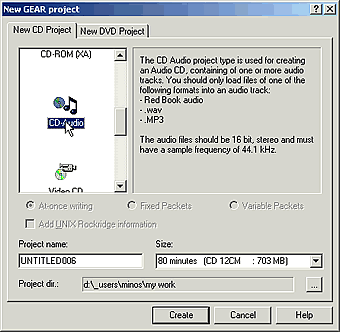
After we have adjusted those settings we press "Create". The next picture will be appear. Right after we should open the folder that contains the MP3 files we want to write. That is very easy, just use the explorer in the left
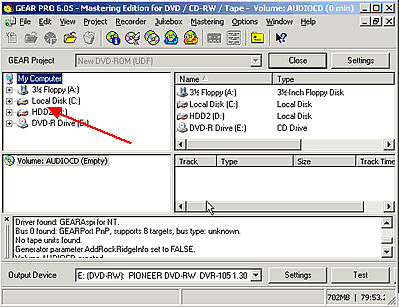
As soon as we find the MP3 files that we were looking for, with the drag'n'drop method we put them in the space as the arrow in the following picture.
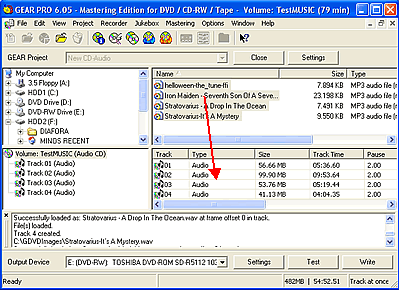
Gear automatically converts the .wav files to MP3. During this procedure we see the screen shot below.

The last thing we should do is to press the "Write" button for burning our disc. Otherwise we can make a virtual write by pressing the "Test" button. The next steps are the same as in Page 02.


 

Review Pages

1. Intoduction
2. DVD-Video
3. Erase RW
4. Audio CD
5. Video CD
6. Other


Pages

  • « first
  • ‹ previous
  • 1
  • 2
  • 3
  • 4
  • 5
  • 6
  • next ›
  • last »

Tags:
Previous Post
Cyberdrive DX082D DVD+RW
Next Post
Pioneer DVR-SK12D

Related Posts

Latest Reviews

Fanxiang MP83 M.2 NVMe SSD Enclosure
Enterprise & IT

Fanxiang MP83 M.2 NVMe SSD Enclosure

Ugreen CM642 USB4.0 Enclosure
PC components

Ugreen CM642 USB4.0 Enclosure

be quiet! Dark Power 14 IO
PC components

be quiet! Dark Power 14 IO

SanDisk High Endurance 512GB microSDXC
Cameras

SanDisk High Endurance 512GB microSDXC

Samsung PRO Ultimate 512GB microSDXC
Cameras

Samsung PRO Ultimate 512GB microSDXC

Popular News

MSI’s Latest AMD X870E MAX & EVO Series Motherboards

MSI’s Latest AMD X870E MAX & EVO Series Motherboards

COLORFUL Launches iGame B850M ULTRA Series Micro-ATX Motherboards

COLORFUL Launches iGame B850M ULTRA Series Micro-ATX Motherboards

COLORFUL Presents Limited Edition Chitu MAG-60 Magnetic Keyboard Inspired by the Year of the Horse

COLORFUL Presents Limited Edition Chitu MAG-60 Magnetic Keyboard Inspired by the Year of the Horse

COLORFUL Launches iGame B850I MINI OC V14 Motherboard

COLORFUL Launches iGame B850I MINI OC V14 Motherboard

COLORFUL Launches the iGame X870E VULCAN W OC Motherboard

COLORFUL Launches the iGame X870E VULCAN W OC Motherboard

COLORFUL Presents iGame Z890 ULTRA-S W and iGame Z890M ULTRA Z Motherboards

COLORFUL Presents iGame Z890 ULTRA-S W and iGame Z890M ULTRA Z Motherboards

COLORFUL Expands B850 Motherboard Lineup with New CVN, Battle-Ax, and MEOW Models

COLORFUL Expands B850 Motherboard Lineup with New CVN, Battle-Ax, and MEOW Models

ASRock Adds Support for One Sub-Channel DRAM Module on Intel DDR5 Motherboards

ASRock Adds Support for One Sub-Channel DRAM Module on Intel DDR5 Motherboards

Main menu

  • Home
  • News
  • Reviews
  • Essays
  • About
    • Submit News

    • Contact Us
    • Privacy

    • Promotion
    • Advertise

    • RSS Feed
  • About
  • Privacy
  • Contact Us
  • Promotional Opportunities @ CdrInfo.com
  • Advertise on out site
  • Submit your News to our site
  • RSS Feed