
Windows Live Messenger For iPhone Released
Microsoft launched Windows Live Messenger for iPhone in the US, Canada, UK, and France.
You can download Messenger for iPhone for free from the iPhone App Store.
Messenger for iPhone is a slimmed down and yet full-featured companion to the soon-to-be-released Messenger beta for the PC.
When you first open new Messenger iPhone app for iPhone, you'll be able to both update your status message and see your friends' updates at a glance. Soon you will also be able to access other services such as Facebook, MySpace, Linkedin (available soon), Microsoft said.
The Social tab brings together all of your friends' activities on Windows Live and on other services that you?ve connected to Windows Live, and displays them along with photos, links, and other content they've posted. You can view people's comments or add your own. To help you cut through the clutter, you can use several filters, such as "photos" and "status messages," to quickly focus in on a particular type of update.. Click the Friends tab and visit the profile of any of your friends to see everything that they've shared with you.
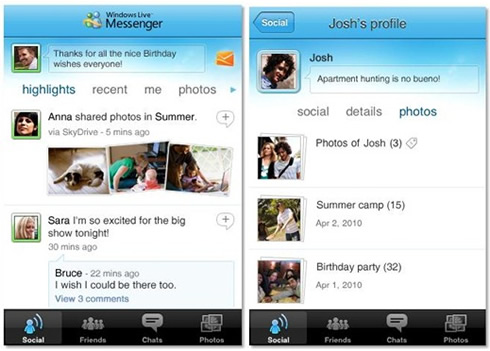
One of the new features in this Windows Live release is the ability to include photos, links, and other rich content in your status messages. Creating a photo status message from your iPhone takes just a few taps. You can take a new picture, select one from a local iPhone album, or use any photo you?ve uploaded to your SkyDrive. Want to make your photo a bit more fun? You can "style" it using one of the built-in photo effects.

Once you share this, your Messenger friends will be able to see your new photo status message in Messenger anywhere, whether they connect from their PC, from the web at www.live.com, or from their own iPhone Messenger app. Moreover, if you've connected Messenger to another service such as Facebook, Messenger takes care of publishing your status message to that service as well - if it supports this type of status message.
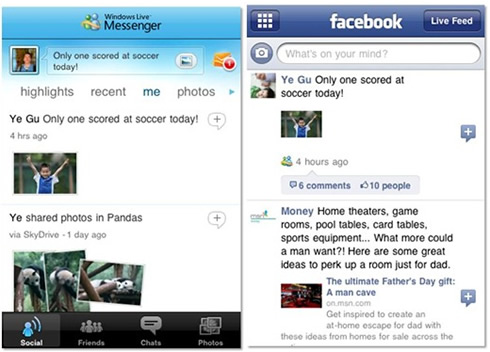
If you want to connect Facebook or any other service to Windows Live, just browse to your profile page and click Connect on your PC, and then select the service you want to connect to. This connects Windows Live to that service whether you?re on the PC, the web, or the iPhone.
Of course, all the primary instant messaging functions that you've come to expect are at your disposal. Starting an IM with friends is easy. You just tap a person's name on the Friends tab, or tap their picture from anywhere in the app. So if you're scanning through the highlights on the Social tab and you see some new pictures that a friend just uploaded, you can instantly send her compliments on her new photos.
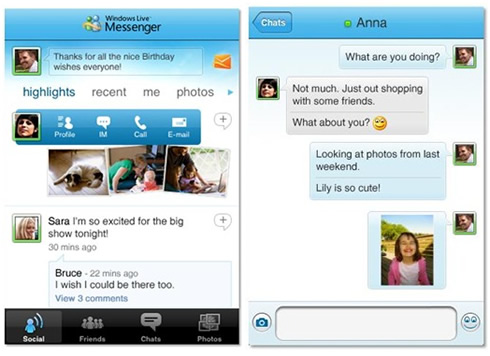
You can send text, emoticons, nudges, URLs and photos with your IM messages. Messenger for iPhone also makes it easy for you to carry on multiple IM conversations at the same time. While you?re chatting with one friend, incoming IM messages from others are displayed in a notification area within the current chat screen, so that you don't miss a beat. And push notifications keep you on IM even when the app is closed.
Later this year, Microsoft also plans to support Facebook Chat as part of our deeper integration with that service.
And of course, you can also view your Hotmail without leaving the Messenger iPhone app.
For all those who are not having an iPhone, Windows Live has a broad set of options for other mobile phones, too. You can access Windows Live using your phone?s web browser by visiting m.live.com.
Even if you have a more basic phone, you can still update your Messenger status message, get alerts for social updates, and more, all via SMS.
Messenger for iPhone is a slimmed down and yet full-featured companion to the soon-to-be-released Messenger beta for the PC.
When you first open new Messenger iPhone app for iPhone, you'll be able to both update your status message and see your friends' updates at a glance. Soon you will also be able to access other services such as Facebook, MySpace, Linkedin (available soon), Microsoft said.
The Social tab brings together all of your friends' activities on Windows Live and on other services that you?ve connected to Windows Live, and displays them along with photos, links, and other content they've posted. You can view people's comments or add your own. To help you cut through the clutter, you can use several filters, such as "photos" and "status messages," to quickly focus in on a particular type of update.. Click the Friends tab and visit the profile of any of your friends to see everything that they've shared with you.
One of the new features in this Windows Live release is the ability to include photos, links, and other rich content in your status messages. Creating a photo status message from your iPhone takes just a few taps. You can take a new picture, select one from a local iPhone album, or use any photo you?ve uploaded to your SkyDrive. Want to make your photo a bit more fun? You can "style" it using one of the built-in photo effects.
Once you share this, your Messenger friends will be able to see your new photo status message in Messenger anywhere, whether they connect from their PC, from the web at www.live.com, or from their own iPhone Messenger app. Moreover, if you've connected Messenger to another service such as Facebook, Messenger takes care of publishing your status message to that service as well - if it supports this type of status message.
If you want to connect Facebook or any other service to Windows Live, just browse to your profile page and click Connect on your PC, and then select the service you want to connect to. This connects Windows Live to that service whether you?re on the PC, the web, or the iPhone.
Of course, all the primary instant messaging functions that you've come to expect are at your disposal. Starting an IM with friends is easy. You just tap a person's name on the Friends tab, or tap their picture from anywhere in the app. So if you're scanning through the highlights on the Social tab and you see some new pictures that a friend just uploaded, you can instantly send her compliments on her new photos.
You can send text, emoticons, nudges, URLs and photos with your IM messages. Messenger for iPhone also makes it easy for you to carry on multiple IM conversations at the same time. While you?re chatting with one friend, incoming IM messages from others are displayed in a notification area within the current chat screen, so that you don't miss a beat. And push notifications keep you on IM even when the app is closed.
Later this year, Microsoft also plans to support Facebook Chat as part of our deeper integration with that service.
And of course, you can also view your Hotmail without leaving the Messenger iPhone app.
For all those who are not having an iPhone, Windows Live has a broad set of options for other mobile phones, too. You can access Windows Live using your phone?s web browser by visiting m.live.com.
Even if you have a more basic phone, you can still update your Messenger status message, get alerts for social updates, and more, all via SMS.