Breaking News

LG Electronics Advances the LG Sound Suite Experience With New DTS DJI Delivers First Drone Dock with Automated, 25-Second Battery Swaps ASUS Announces ExpertBook A7 (AMD) Kioxia Introduces Direct Liquid Cooling Support for Enterprise SSDs Apple announces new product for 2026

logo

  • Share Us
    • Facebook
    • Twitter
  • Home
  • Home
  • News
  • Reviews
  • Essays
  • About
    • Submit News

    • Contact Us
    • Privacy

    • Promotion
    • Advertise

    • RSS Feed

Search form

Apacer Share Steno CD311

May 27,2005 0

4. Using the CD311 - Page 2


Review Pages

1. Introduction
2. The Package
3. Using the CD311 - Page 1
4. Using the CD311 - Page 2
5. Using the CD311 - Page 3
6. Updating the CD311
7. PC Mode/Performance
8. Conclusion


The third option from the main menu, "Settings", allows access to the CD311's properties where we can set or view various options including checking the firmware version,

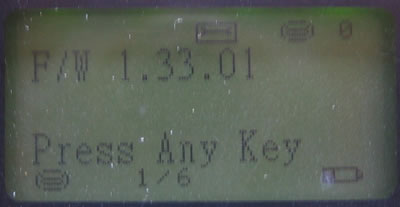
select the display language (English or Chinese),
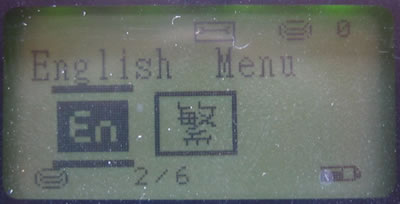
control the LCD brightness,
set the PowerOff time,
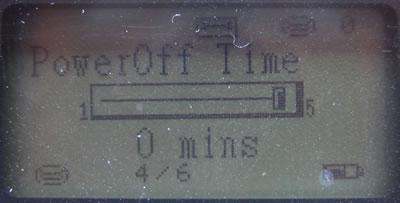
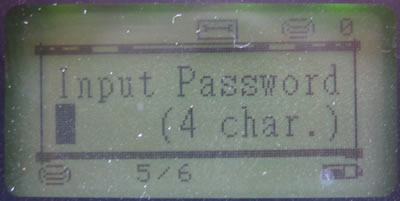
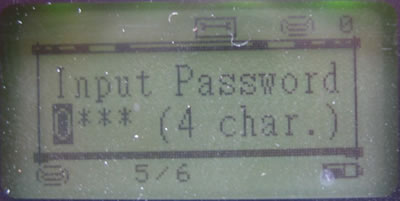
enable password protection on files, (extremely important)...

When password protection is enable, the CD311 will prompt you to enter a 4 character password using the up/down buttons to scroll through the letters and the left/right buttons to change character position. After setting a password, you must enter this password the next time you start the Share Steno. The same password must also be entered when connecting the device to a computer before gaining access to the Share Steno’s contents. If you forget your password, you will need to contact an Apacer service centre. Password security is only functional while the HDD is in the Share Steno. If the hard disk is removed from the device and installed in a PC for example, password security does not function. This is a limitation of the FAT file system used to format the HDD, which does not provide any form of security on files or folders.
When "HideFile" is enabled, any files that are hidden under the Windows OS will remain hidden on
the Share Steno as well.


Review Pages

1. Introduction
2. The Package
3. Using the CD311 - Page 1
4. Using the CD311 - Page 2
5. Using the CD311 - Page 3
6. Updating the CD311
7. PC Mode/Performance
8. Conclusion


Pages

  • « first
  • ‹ previous
  • 1
  • 2
  • 3
  • 4
  • 5
  • 6
  • 7
  • 8
  • next ›
  • last »

apacer

Tags: apacer
Previous Post
Rewritable Media Tests
Next Post
Inno3D 6200A

Related Posts

  • Apacer Powers the Future of AI and Green Computing with Next-Gen Storage Solutions at COMPUTEX 2025

  • Apacer’s Fully Lead-Free Memory Modules are a Game Changer

  • Apacer Offers FIPS 140-2 Validated SSDs and High Capacities SSDs up to 16TB On Display at WEST 2024

  • Apacer introduces AS2280F4 M.2 PCIe Gen5 x4 NVME SSD

  • Apacer Launches CFexpress Type B 8.3K 60P RAW Video Recording Memory Card

  • Apacer Unveils High-tech Products at Embedded World 2022 in Nuremberg

  • Apacer Unveils COMPUTEX 2022 Event Series

  • Apacer Launches AS2280Q4U M.2 Gen4 x4 SSD for PS5

Latest Reviews

Fanxiang MP83 M.2 NVMe SSD Enclosure
Enterprise & IT

Fanxiang MP83 M.2 NVMe SSD Enclosure

Ugreen CM642 USB4.0 Enclosure
PC components

Ugreen CM642 USB4.0 Enclosure

be quiet! Dark Power 14 IO
PC components

be quiet! Dark Power 14 IO

SanDisk High Endurance 512GB microSDXC
Cameras

SanDisk High Endurance 512GB microSDXC

Samsung PRO Ultimate 512GB microSDXC
Cameras

Samsung PRO Ultimate 512GB microSDXC

Popular News

MSI’s Latest AMD X870E MAX & EVO Series Motherboards

MSI’s Latest AMD X870E MAX & EVO Series Motherboards

COLORFUL Launches iGame B850M ULTRA Series Micro-ATX Motherboards

COLORFUL Launches iGame B850M ULTRA Series Micro-ATX Motherboards

COLORFUL Presents Limited Edition Chitu MAG-60 Magnetic Keyboard Inspired by the Year of the Horse

COLORFUL Presents Limited Edition Chitu MAG-60 Magnetic Keyboard Inspired by the Year of the Horse

COLORFUL Launches iGame B850I MINI OC V14 Motherboard

COLORFUL Launches iGame B850I MINI OC V14 Motherboard

COLORFUL Presents iGame Z890 ULTRA-S W and iGame Z890M ULTRA Z Motherboards

COLORFUL Presents iGame Z890 ULTRA-S W and iGame Z890M ULTRA Z Motherboards

COLORFUL Launches the iGame X870E VULCAN W OC Motherboard

COLORFUL Launches the iGame X870E VULCAN W OC Motherboard

COLORFUL Expands B850 Motherboard Lineup with New CVN, Battle-Ax, and MEOW Models

COLORFUL Expands B850 Motherboard Lineup with New CVN, Battle-Ax, and MEOW Models

ASRock Adds Support for One Sub-Channel DRAM Module on Intel DDR5 Motherboards

ASRock Adds Support for One Sub-Channel DRAM Module on Intel DDR5 Motherboards

Main menu

  • Home
  • News
  • Reviews
  • Essays
  • About
    • Submit News

    • Contact Us
    • Privacy

    • Promotion
    • Advertise

    • RSS Feed
  • About
  • Privacy
  • Contact Us
  • Promotional Opportunities @ CdrInfo.com
  • Advertise on out site
  • Submit your News to our site
  • RSS Feed