Breaking News

Akasa Announces Fermi CM5 Fanless Case for Raspberry Pi Compute Module 5 LG Electronics Advances the LG Sound Suite Experience With New DTS DJI Delivers First Drone Dock with Automated, 25-Second Battery Swaps ASUS Announces ExpertBook A7 (AMD) Kioxia Introduces Direct Liquid Cooling Support for Enterprise SSDs

logo

  • Share Us
    • Facebook
    • Twitter
  • Home
  • Home
  • News
  • Reviews
  • Essays
  • About
    • Submit News

    • Contact Us
    • Privacy

    • Promotion
    • Advertise

    • RSS Feed

Search form

Noctua NF-F12 review

Sep 16,2012 0

2. A closer look


Review Pages

1. Features, specs
2. A closer look
3. The NF-F12 in action


The Noctua NF-F12 retails in an attractive package with all the product features printed on the front and back sides of it. The product costs around $19.50 (6-years warranty), which is not much for such a promising 120mm fan. For our tests we used two NF-F12 fans.

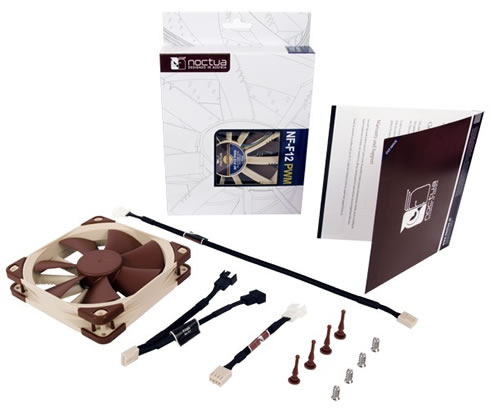
Inside the box is a plastic shell that holds the NF-F12 PWM fan and the accessory bundle. All the features of the fan are presented and well-explained in the inner part of the box:

Opening the box unveils the contents

  • 1x Noctua NH-L12 product
  • 1x Low-Noise Adapter (L.N.A.)
  • 1x 4-Pin Y-Cable
  • 1x 30cm Extension Cable
  • 4x Vibration-Compensators
  • 4x Fan Screws

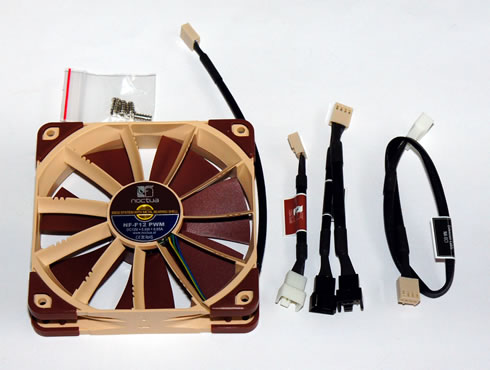
The Noctua NF-F12 has the typical dimensions (120x120x25) of 120mm fans so it will fit in all cases/cpu coolers. Noctua;s products are easily recognizable by their ‘Marmite’ colors and the standard seven blade fan design. The 4-pin cable is shielded and durable. What's different from from the previous fan designs that there are larger rubberized vibration pads placed at each corner of the fan. These vibration pads can be easily removed.

You can also see the unusual fan design developed by Noctua. Air notches are no longer on the blades as in the P12 range but are now placed upon the fan chassis itself. According to Noctua, these are the guide vanes that help to generate sound ‘pulses’ along the framework when one of the fan blades crosses over this section:
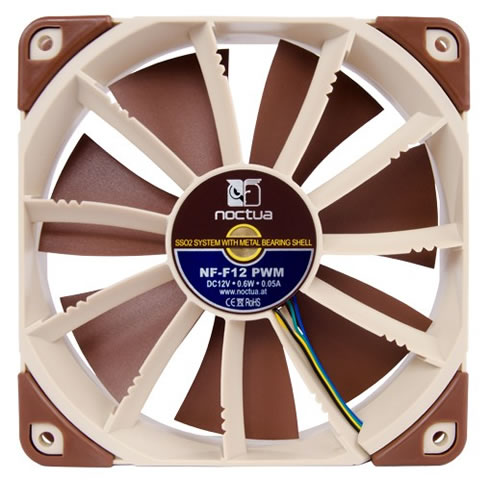
The Noctua NF-F12 also comes with a SSO2 bearing with a metal shell. The second generation SSO2 full metal bearing is machined from solid brass for a longer lifespan and improved fan blade stabilization. When the 4-pin fan header is plugged on board, it uses the NE-FD1 PWM sensor to determine the fan speed.

e


Review Pages

1. Features, specs
2. A closer look
3. The NF-F12 in action


Pages

  • « first
  • ‹ previous
  • 1
  • 2
  • 3
  • next ›
  • last »

Noctua

Tags: Noctua
Previous Post
Noctua NH-L12 review
Next Post
Shuttle XS35GTA v3 review

Related Posts

  • Thermal Grizzly and Noctua introduce WireView Pro II Noctua Edition GPU monitoring device

  • Forced Physics DCT and Noctua announce research partnership on micro-channel array cooling

  • Noctua and Prusa Research release PETG filaments in signature Noctua colours

  • Noctua NL-LC1-36

  • Noctua introduces NL-LC1 all-in-one liquid coolers

  • Noctua at Computex 2026

  • Carbice and Noctua announce strategic partnership for DIY PC cooling applications

  • Noctua presents NF-A12x25 G2 chromax.black 120mm fans

Latest Reviews

Fanxiang MP83 M.2 NVMe SSD Enclosure
Enterprise & IT

Fanxiang MP83 M.2 NVMe SSD Enclosure

Ugreen CM642 USB4.0 Enclosure
PC components

Ugreen CM642 USB4.0 Enclosure

be quiet! Dark Power 14 IO
PC components

be quiet! Dark Power 14 IO

SanDisk High Endurance 512GB microSDXC
Cameras

SanDisk High Endurance 512GB microSDXC

Samsung PRO Ultimate 512GB microSDXC
Cameras

Samsung PRO Ultimate 512GB microSDXC

Popular News

MSI’s Latest AMD X870E MAX & EVO Series Motherboards

MSI’s Latest AMD X870E MAX & EVO Series Motherboards

COLORFUL Launches iGame B850M ULTRA Series Micro-ATX Motherboards

COLORFUL Launches iGame B850M ULTRA Series Micro-ATX Motherboards

COLORFUL Presents Limited Edition Chitu MAG-60 Magnetic Keyboard Inspired by the Year of the Horse

COLORFUL Presents Limited Edition Chitu MAG-60 Magnetic Keyboard Inspired by the Year of the Horse

COLORFUL Launches iGame B850I MINI OC V14 Motherboard

COLORFUL Launches iGame B850I MINI OC V14 Motherboard

COLORFUL Presents iGame Z890 ULTRA-S W and iGame Z890M ULTRA Z Motherboards

COLORFUL Presents iGame Z890 ULTRA-S W and iGame Z890M ULTRA Z Motherboards

COLORFUL Launches the iGame X870E VULCAN W OC Motherboard

COLORFUL Launches the iGame X870E VULCAN W OC Motherboard

COLORFUL Expands B850 Motherboard Lineup with New CVN, Battle-Ax, and MEOW Models

COLORFUL Expands B850 Motherboard Lineup with New CVN, Battle-Ax, and MEOW Models

ASRock Adds Support for One Sub-Channel DRAM Module on Intel DDR5 Motherboards

ASRock Adds Support for One Sub-Channel DRAM Module on Intel DDR5 Motherboards

Main menu

  • Home
  • News
  • Reviews
  • Essays
  • About
    • Submit News

    • Contact Us
    • Privacy

    • Promotion
    • Advertise

    • RSS Feed
  • About
  • Privacy
  • Contact Us
  • Promotional Opportunities @ CdrInfo.com
  • Advertise on out site
  • Submit your News to our site
  • RSS Feed