Xbox One System Update Released
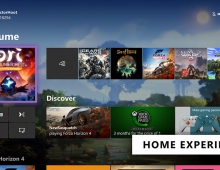
Microsoft has released a required Xbox One system update.
This update addresses the following:
- SmartGlass issues for some users when coming in and out of connected standby
- Addresses multiplayer issues for some users when re-joining games
- Addresses issues with inconsistent notifications for some users
- Addresses dashboard performance for some users
- Offers improvements for Xbox One's TV, system update, and content update services for scaling over time
- Updated wireless networking driver to improve connectivity issues for some users
If you are using the Xbox One "Instant On" (the low power state that allows you to instantly power up your console by saying "Xbox On"), your console automatically checks for updates when you turn it off. Your console will automatically download the update after you turn it off. Once the update has been downloaded in the background, your console will power completely down. Note that you will need to manually power your console back on after the update has been downloaded. Because the update will power your console completely down, the "Xbox On" voice command won?t be available until after the update is fully installed.
When you turn the console on you?ll see the update being applied. After that, your Xbox One will reboot. You?ll know the update is installing when you see the Xbox logo on the green background. This can take anywhere from 2-5 minutes. Once the update has finished installing, you?ll boot to the Home screen and you?re all set.
If you are not using the Xbox One "Instant On" feature, you will be required to download and apply this update.
- SmartGlass issues for some users when coming in and out of connected standby
- Addresses multiplayer issues for some users when re-joining games
- Addresses issues with inconsistent notifications for some users
- Addresses dashboard performance for some users
- Offers improvements for Xbox One's TV, system update, and content update services for scaling over time
- Updated wireless networking driver to improve connectivity issues for some users
If you are using the Xbox One "Instant On" (the low power state that allows you to instantly power up your console by saying "Xbox On"), your console automatically checks for updates when you turn it off. Your console will automatically download the update after you turn it off. Once the update has been downloaded in the background, your console will power completely down. Note that you will need to manually power your console back on after the update has been downloaded. Because the update will power your console completely down, the "Xbox On" voice command won?t be available until after the update is fully installed.
When you turn the console on you?ll see the update being applied. After that, your Xbox One will reboot. You?ll know the update is installing when you see the Xbox logo on the green background. This can take anywhere from 2-5 minutes. Once the update has finished installing, you?ll boot to the Home screen and you?re all set.
If you are not using the Xbox One "Instant On" feature, you will be required to download and apply this update.