Breaking News

SCUF Gaming Unveils Omega, Latest Officially Licensed Pro Controller for PS5 LiberNovo Launches Revolutionary New Ergonomic Chair Lineup Noctua presents NF-A12x25 G2 chromax.black 120mm fans INNO3D AT COMPUTEX 2026 Micron Redefines AI Performance With Sampling of 256GB DDR5 Server Module

logo

  • Share Us
    • Facebook
    • Twitter
  • Home
  • Home
  • News
  • Reviews
  • Essays
  • Forum
  • Legacy
  • About
    • Submit News

    • Contact Us
    • Privacy

    • Promotion
    • Advertise

    • RSS Feed
    • Site Map

Search form

Chrome OS Now Supports  Virtual Desks, Simpler Printing

Chrome OS Now Supports Virtual Desks, Simpler Printing

Enterprise & IT Nov 5,2019 0

The latest version of Chrome OS includes tools to help you organize your workspace, make phone calls more easily, and print and share feedback more quickly.

With Virtual Desks on Chromebook, you can now organize your workspace and multitask more easily. Think of Virtual Desks as separate workspaces within your Chromebook. If you’re working on multiple projects, you can dedicate a desk to each one. Or if you like to take a break during the workday, you could create a desk for web browsing or gaming.

Once the latest Chrome OS update arrives on your device, open Overview and tap New Desk in the top right-hand corner of your screen to try out Virtual Desks. Try dragging windows between desks.
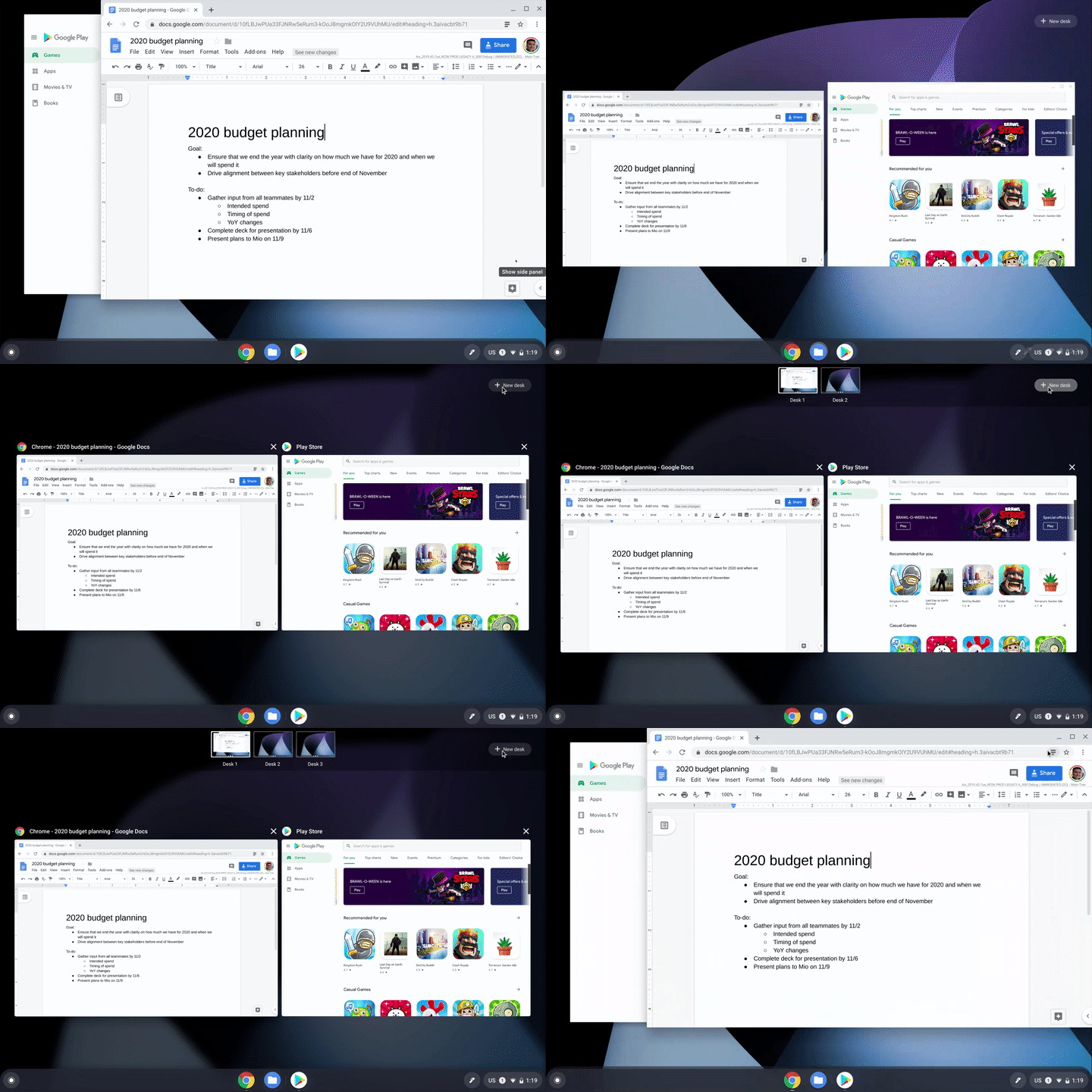
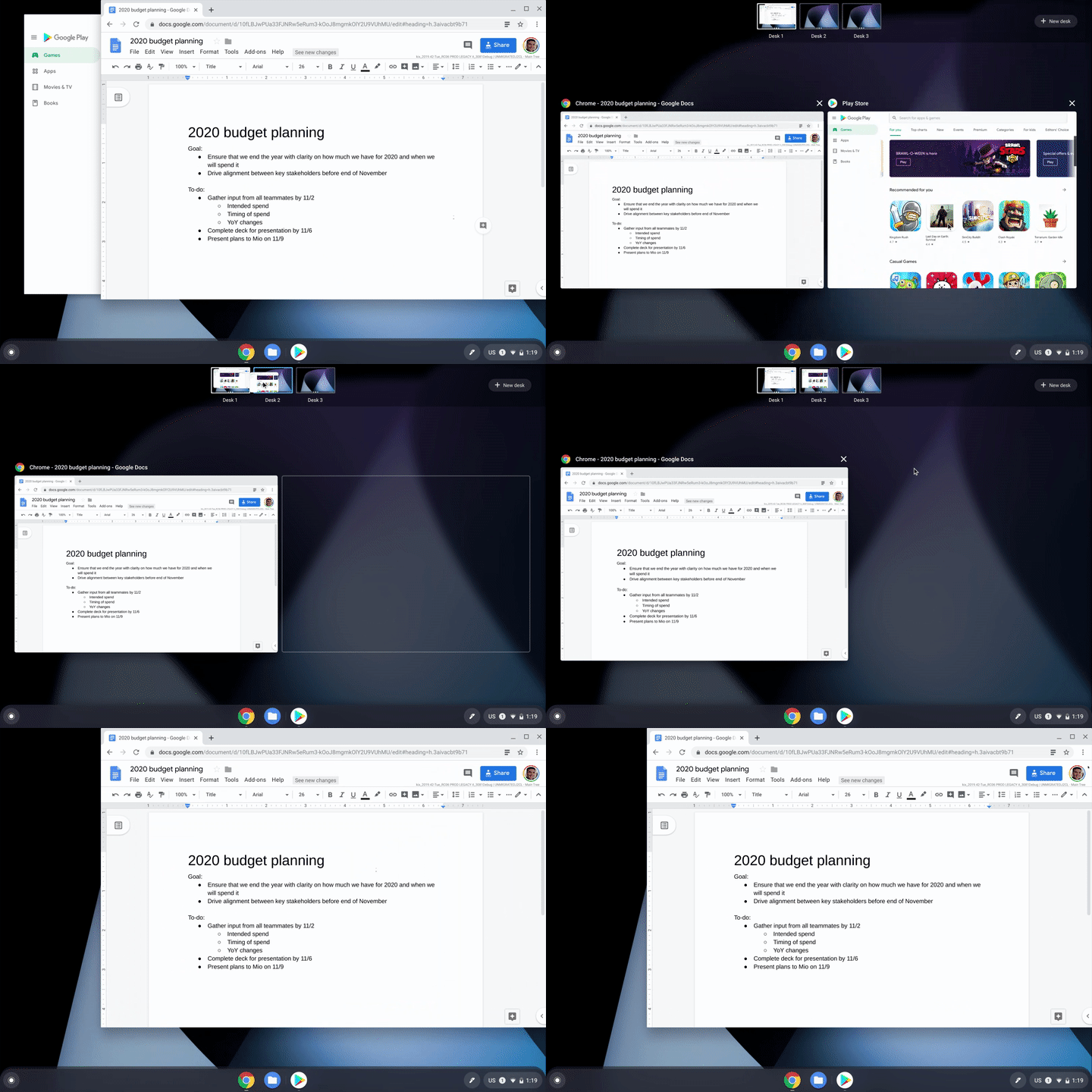
You can also try out the following keyboard shortcuts to take full advantage of Virtual Desks:

Create a new Desk with “Shift” + “Search ” + “=”

Switch between Desks with “Search ” + “]”

Move windows between Desks with “Shift” + “Search ” + “]”

Click-to-call

Chromebooks just got even better for people who use an Android phone. Now, you can right-click a phone number when browsing the web on your Chromebook and send the number to your mobile phone.

To set-up this feature, sign into your Google account on your Chromebook and phone and ensure that you’ve turned on syncing for Chrome browser.

Print without hassle

Now, compatible printers will automatically show up in your printer list—no setup needed. Press Ctrl + P on your keyboard, choose your printer, and you’re done.

Google has also reduced the number of steps needed to save printers to your profile. If there’s a specific printer you use frequently, you can now save it as default. Just visit your Settings and head to the Printers section.

Share feedback more easily

Google has also made it easier for you to share feedback about the OS. Just press and hold your power button for a second, and alongside the “Lock” and “Power off” buttons, you will now see a dedicated button for feedback.

Tags: chrome OS
Previous Post
U.S. Postal Service to Improve Delivery Service Using Nvidia's AI Technology
Next Post
Tesla Settles with Walmart Over Solar Panel Fires

Related Posts

  • Celebrating update 100 with new Chromebook features

  • New Chrome OS Brings Easy Navigation in Chromebook Tablet Mode

  • Google to Resume Chrome and Chrome OS Release Updates

  • Google is Phasing Out Support for Chrome Apps

  • Chrome OS Now Offers More Control For Music and Podcasts

  • Acer Chromebook Tab 10 Tablet Runs on Chrome OS

  • Google Says Chrome OS is Here to Stay

  • Google To Merge Chrome OS With Android

Latest News

SCUF Gaming Unveils Omega, Latest Officially Licensed Pro Controller for PS5
Gaming

SCUF Gaming Unveils Omega, Latest Officially Licensed Pro Controller for PS5

LiberNovo Launches Revolutionary New Ergonomic Chair Lineup
Consumer Electronics

LiberNovo Launches Revolutionary New Ergonomic Chair Lineup

Noctua presents NF-A12x25 G2 chromax.black 120mm fans
Cooling Systems

Noctua presents NF-A12x25 G2 chromax.black 120mm fans

INNO3D AT COMPUTEX 2026
GPUs

INNO3D AT COMPUTEX 2026

Micron Redefines AI Performance With Sampling of 256GB DDR5 Server Module
Enterprise & IT

Micron Redefines AI Performance With Sampling of 256GB DDR5 Server Module

Popular Reviews

Akaso 360 Action camera

Akaso 360 Action camera

Dragon Touch Digital Calendar

Dragon Touch Digital Calendar

be quiet! Pure Loop 3 280mm

be quiet! Pure Loop 3 280mm

Noctua NF-A12x25 G2 fans

Noctua NF-A12x25 G2 fans

Soft2bet and the unseen hardware that makes instant play possible

Soft2bet and the unseen hardware that makes instant play possible

Crucial T710 2TB NVME SSD

Crucial T710 2TB NVME SSD

JSAUX 65Wh Rog Ally Battery

JSAUX 65Wh Rog Ally Battery

Introducing PriceHub

Introducing PriceHub

Main menu

  • Home
  • News
  • Reviews
  • Essays
  • Forum
  • Legacy
  • About
    • Submit News

    • Contact Us
    • Privacy

    • Promotion
    • Advertise

    • RSS Feed
    • Site Map
  • About
  • Privacy
  • Contact Us
  • Promotional Opportunities @ CdrInfo.com
  • Advertise on out site
  • Submit your News to our site
  • RSS Feed