Breaking News

SWIT Packs 210Wh and 200W Output into Compact MINO-A Gold Mount Battery Series Fanatec and Trak Racer showcase the future of simulation at SimRacing Expo Frankfurt 2026 Razer Unveils the Barracuda V2 Pro ASUS Republic of Gamers Announces Bulwark Dock DG310 Akasa Announces Fermi CM5 Fanless Case for Raspberry Pi Compute Module 5

logo

  • Share Us
    • Facebook
    • Twitter
  • Home
  • Home
  • News
  • Reviews
  • Essays
  • About
    • Submit News

    • Contact Us
    • Privacy

    • Promotion
    • Advertise

    • RSS Feed

Search form

Octave Multipod

May 13,2005 0

4. Using the device - Page 2


Review Pages

1. Introduction
2. Retail package
3. Using the device - Page 1
4. Using the device - Page 2
5. Using the device - Page 3
6. Conclusion
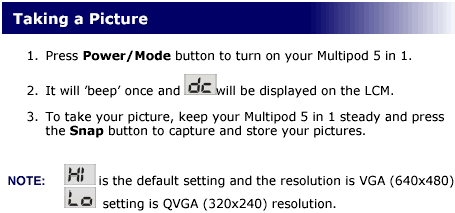
 

Setting it to Hi quality, we took several pictures, mostly with good daylight and again the image quality was average to acceptable. You can view several samples (1, 2, 3, 4, 5, 6, 7). The device produces very bad pictures during night time or with limited light, so this is something you have to consider.
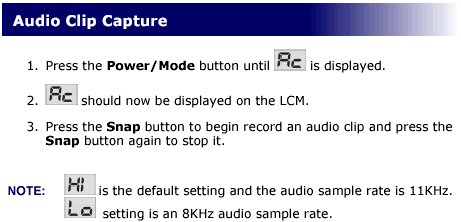
The Audio recording mode produces .WAV files (sample), with good quality, considering the low sampling rate.
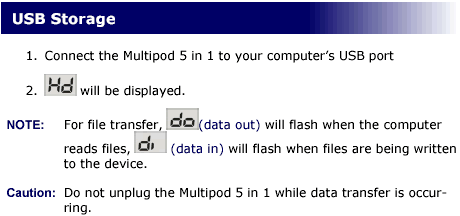
When you connect the Multipod 5 in 1 to the computer USB port, it is automatically recognized by the system (for Win98 you will have to install the included drivers).
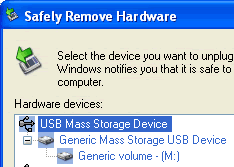
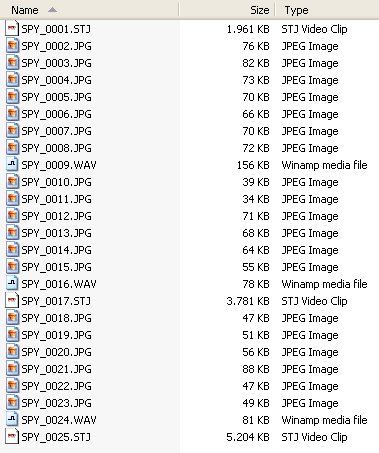
Once connected, we can browse the contents of the Multipod, view stored pictures, videos and audio clips, and of course with drag & drop, add files or store them onto the device to transferor to another PC.
 

Review Pages

1. Introduction
2. Retail package
3. Using the device - Page 1
4. Using the device - Page 2
5. Using the device - Page 3
6. Conclusion
 

Pages

  • « first
  • ‹ previous
  • 1
  • 2
  • 3
  • 4
  • 5
  • 6
  • next ›
  • last »

Octave

Tags: Octave
Previous Post
ArcticCooling - ATI Silencer5
Next Post
Interview with Mr Lawrence Chang of Kingmax

Related Posts

  • Possible Oculus Quest 2 Details Leak

  • Optical Quantum InkJet Printable Media

  • DVD Duplicators by Octave Systems, Incorporated.

  • More about the AVO-Card-Rs

Latest Reviews

Fanxiang MP83 M.2 NVMe SSD Enclosure
Enterprise & IT

Fanxiang MP83 M.2 NVMe SSD Enclosure

Ugreen CM642 USB4.0 Enclosure
PC components

Ugreen CM642 USB4.0 Enclosure

be quiet! Dark Power 14 IO
PC components

be quiet! Dark Power 14 IO

SanDisk High Endurance 512GB microSDXC
Cameras

SanDisk High Endurance 512GB microSDXC

Samsung PRO Ultimate 512GB microSDXC
Cameras

Samsung PRO Ultimate 512GB microSDXC

Popular News

MSI’s Latest AMD X870E MAX & EVO Series Motherboards

MSI’s Latest AMD X870E MAX & EVO Series Motherboards

COLORFUL Launches iGame B850M ULTRA Series Micro-ATX Motherboards

COLORFUL Launches iGame B850M ULTRA Series Micro-ATX Motherboards

COLORFUL Presents Limited Edition Chitu MAG-60 Magnetic Keyboard Inspired by the Year of the Horse

COLORFUL Presents Limited Edition Chitu MAG-60 Magnetic Keyboard Inspired by the Year of the Horse

COLORFUL Launches iGame B850I MINI OC V14 Motherboard

COLORFUL Launches iGame B850I MINI OC V14 Motherboard

COLORFUL Launches the iGame X870E VULCAN W OC Motherboard

COLORFUL Launches the iGame X870E VULCAN W OC Motherboard

COLORFUL Presents iGame Z890 ULTRA-S W and iGame Z890M ULTRA Z Motherboards

COLORFUL Presents iGame Z890 ULTRA-S W and iGame Z890M ULTRA Z Motherboards

COLORFUL Expands B850 Motherboard Lineup with New CVN, Battle-Ax, and MEOW Models

COLORFUL Expands B850 Motherboard Lineup with New CVN, Battle-Ax, and MEOW Models

ASRock Adds Support for One Sub-Channel DRAM Module on Intel DDR5 Motherboards

ASRock Adds Support for One Sub-Channel DRAM Module on Intel DDR5 Motherboards

Main menu

  • Home
  • News
  • Reviews
  • Essays
  • About
    • Submit News

    • Contact Us
    • Privacy

    • Promotion
    • Advertise

    • RSS Feed
  • About
  • Privacy
  • Contact Us
  • Promotional Opportunities @ CdrInfo.com
  • Advertise on out site
  • Submit your News to our site
  • RSS Feed