Breaking News

Greenliant heads to electronica 2026 with its full industrial SSD lineup CORSAIR Brings Comfort in Full Bloom with Dark Cherry Blossom TC500 and TC100 RELAXED Gaming Chairs ASUS Republic of Gamers Announces Availability of ROG Swift OLED PG259QWS Ace and Strix OLED XG259QWPG Ace ASUS Announces TUF Gaming Radeon RX 9070 XT Onimusha Special Edition ASUS Republic of Gamers Announces ROG XG Station 3

logo

  • Share Us
    • Facebook
    • Twitter
  • Home
  • Home
  • News
  • Reviews
  • Essays
  • About
    • Submit News

    • Contact Us
    • Privacy

    • Promotion
    • Advertise

    • RSS Feed

Search form

Octave Multipod

May 13,2005 0

3. Using the device - Page 1


Review Pages

1. Introduction
2. Retail package
3. Using the device - Page 1
4. Using the device - Page 2
5. Using the device - Page 3
6. Conclusion


The user has to to install the web camera drivers and application, if they wish to use the Multipod Video recording functions (either as Web Camera or convert the captured videos to ASF format).

The internal Lithium-Polymer battery charges when the user attaches the device to a computer USB port. Octave suggests to charge for a minimum of 2.5 hours before using for the first time.

Lets now see how to operate each mode:
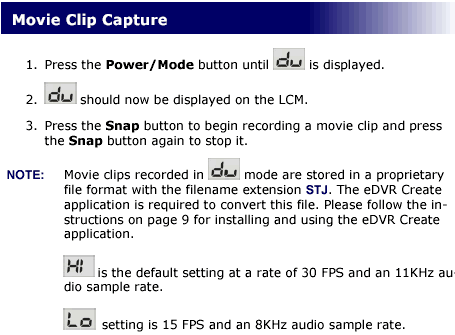
The above screenshot shows more or less how the Movie Clip capture mode works. You can view a sample recorded video here (4.2MB). The recording quality is acceptable, if you consider the device's size and the limited focal length/aperture.

The recorded videos are in STJ format, you have to install the eDVR Create software in order to convert them to a playable (ASF) format.
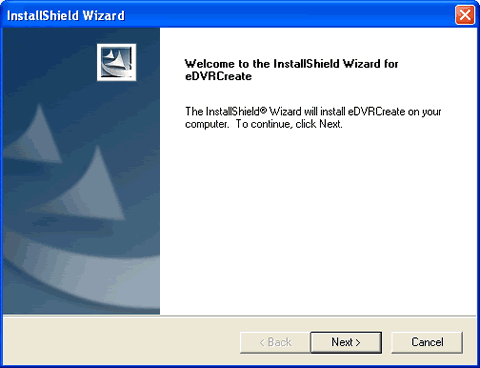
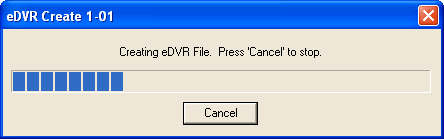
After installing the software, it auto registers the .STJ extension so you only have to double click on the file and the covert wizard loads and prompts you where to store the produced ASF file.

 

Review Pages

1. Introduction
2. Retail package
3. Using the device - Page 1
4. Using the device - Page 2
5. Using the device - Page 3
6. Conclusion
 

Pages

  • « first
  • ‹ previous
  • 1
  • 2
  • 3
  • 4
  • 5
  • 6
  • next ›
  • last »

Octave

Tags: Octave
Previous Post
ArcticCooling - ATI Silencer5
Next Post
Interview with Mr Lawrence Chang of Kingmax

Related Posts

  • Possible Oculus Quest 2 Details Leak

  • Optical Quantum InkJet Printable Media

  • DVD Duplicators by Octave Systems, Incorporated.

  • More about the AVO-Card-Rs

Latest Reviews

The Best Online Casino Games to Play on a Browser
Enterprise & IT

The Best Online Casino Games to Play on a Browser

be quiet! Light Wings Pro IO fan
Cooling Systems

be quiet! Light Wings Pro IO fan

Why Intelligent Firmware Matters More Than Peak Throughput in NAS Systems
Enterprise & IT

Why Intelligent Firmware Matters More Than Peak Throughput in NAS Systems

Fanxiang MP83 M.2 NVMe SSD Enclosure
Enterprise & IT

Fanxiang MP83 M.2 NVMe SSD Enclosure

Ugreen CM642 USB4.0 Enclosure
PC components

Ugreen CM642 USB4.0 Enclosure

Popular News

MSI’s Latest AMD X870E MAX & EVO Series Motherboards

MSI’s Latest AMD X870E MAX & EVO Series Motherboards

COLORFUL Launches iGame B850M ULTRA Series Micro-ATX Motherboards

COLORFUL Launches iGame B850M ULTRA Series Micro-ATX Motherboards

COLORFUL Launches iGame B850I MINI OC V14 Motherboard

COLORFUL Launches iGame B850I MINI OC V14 Motherboard

COLORFUL Presents Limited Edition Chitu MAG-60 Magnetic Keyboard Inspired by the Year of the Horse

COLORFUL Presents Limited Edition Chitu MAG-60 Magnetic Keyboard Inspired by the Year of the Horse

COLORFUL Launches the iGame X870E VULCAN W OC Motherboard

COLORFUL Launches the iGame X870E VULCAN W OC Motherboard

COLORFUL Presents iGame Z890 ULTRA-S W and iGame Z890M ULTRA Z Motherboards

COLORFUL Presents iGame Z890 ULTRA-S W and iGame Z890M ULTRA Z Motherboards

COLORFUL Expands B850 Motherboard Lineup with New CVN, Battle-Ax, and MEOW Models

COLORFUL Expands B850 Motherboard Lineup with New CVN, Battle-Ax, and MEOW Models

ASRock Adds Support for One Sub-Channel DRAM Module on Intel DDR5 Motherboards

ASRock Adds Support for One Sub-Channel DRAM Module on Intel DDR5 Motherboards

Main menu

  • Home
  • News
  • Reviews
  • Essays
  • About
    • Submit News

    • Contact Us
    • Privacy

    • Promotion
    • Advertise

    • RSS Feed
  • About
  • Privacy
  • Contact Us
  • Promotional Opportunities @ CdrInfo.com
  • Advertise on out site
  • Submit your News to our site
  • RSS Feed