Breaking News

CORSAIR Launches the RM1200e Power Supply with Built-in PinProtect GPU Overcurrent Protection and Platinum-certified Efficiency CORSAIR Changes the Game with PureVector, a Science-Based Personalized Aiming Technology, Launching Exclusively in the SABRE v3 PRO PureVector Mouse Series AMD FSR Upscaling 4.1 Boosts Frames and Image Quality on More Devices TerraMaster TerraSync Update COLORFUL Launches iGame X870E ULTRA-S V14 Motherboard

logo

  • Share Us
    • Facebook
    • Twitter
  • Home
  • Home
  • News
  • Reviews
  • Essays
  • About
    • Submit News

    • Contact Us
    • Privacy

    • Promotion
    • Advertise

    • RSS Feed

Search form

Thermaltake Tide Water

May 22,2006 0

4. Performance


Review Pages

1. Introduction
2. A Closer Look
3. Installation
4. Performance
5. Conclusion


As we previously mentioned, the graphics card from ASUS we used, already has an effective cooling system. So it would be rather interesting to compare its performance against that of the Tide Water cooler.

For our tests, we used 3DMark05, which we set to 1280X1024 resolution, 4X Anti-Aliasing and 8X Anisotropic filtering enabled for higher GPU processing power. We set the benchmark to run three times continuously, meaning three times for each of the three tests.

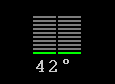
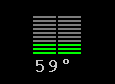
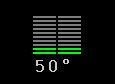
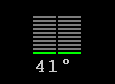
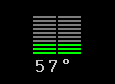
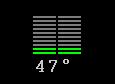
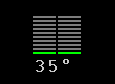
Our first measurements were taken with the stock cooler. Afterwards, we installed the Tide Water cooler and set it running at Low speed. We then repeated the same task with the fan rotation speed set at High. The numbers in the following table, concern the temperatures in idle state, at the finish of the benchmark, and one more measurement two minutes after the test is over, just to check out how quickly the temperature drops (Revert).

  Idle Finish

Revert

Stock
Min
Max

If you've already got a good cooling solution, such as the Freezer from Arctic Cooling, you won't notice any great difference with the Tide Water at Low speed, although it is slightly better. Almost the same temperature in idle mode and two degrees lower for the Tide Water cooler under high load. The Tide Water cooler also helps the GPU return to lower temperatures faster.

The big difference comes when the Tide Water cooler is set to High Speed. Now, there is huge difference in temperatures. 7°C degrees lower in idle mode and 15°C under full load. Also look at how low the temperature drops, once the test is over.

At Low Speed, the noise levels are not noticeable. But at High Speed, there is a loud noise coming from the box. It is then really up to each individual to decide whether the noise is justified. Maybe while playing a game with the volume turned up, the noise will not be discernable or annoying.


Review Pages

1. Introduction
2. A Closer Look
3. Installation
4. Performance
5. Conclusion


Pages

  • « first
  • ‹ previous
  • 1
  • 2
  • 3
  • 4
  • 5
  • next ›
  • last »

Thermaltake

Tags: Thermaltake
Previous Post
Mushkin XP2-6400
Next Post
ASUS P5WD2-E Premium

Related Posts

  • Thermaltake Launches AW360/420 AIO Liquid Cooler and WAir CPU Cooler for Workstations

  • Begin the Racing Journey with the Thermaltake GR300 Racing Simulator Cockpit

  • Thermaltake Unveils the Massive EXTREME with Cross-flow Fan

  • Thermaltake Releases the Toughpower TF3 1300W with Support for RTX50 Series GPUs

  • Thermaltake Unveils G6 Direct Drive Racing Wheel Bundle and GM5 3DOF Motion System

  • Thermaltake Launches the TT150 LED Bag in Different Sizes and New Colors

  • Thermaltake New TH V2 Ultra EX ARGB Sync AIO – Snow Edition is Now Available Worldwide

  • Thermaltake Coolers Support New-Gen Intel and AMD CPUs

Latest Reviews

Why Intelligent Firmware Matters More Than Peak Throughput in NAS Systems
Enterprise & IT

Why Intelligent Firmware Matters More Than Peak Throughput in NAS Systems

Fanxiang MP83 M.2 NVMe SSD Enclosure
Enterprise & IT

Fanxiang MP83 M.2 NVMe SSD Enclosure

Ugreen CM642 USB4.0 Enclosure
PC components

Ugreen CM642 USB4.0 Enclosure

be quiet! Dark Power 14 IO
PC components

be quiet! Dark Power 14 IO

SanDisk High Endurance 512GB microSDXC
Cameras

SanDisk High Endurance 512GB microSDXC

Popular News

MSI’s Latest AMD X870E MAX & EVO Series Motherboards

MSI’s Latest AMD X870E MAX & EVO Series Motherboards

COLORFUL Launches iGame B850M ULTRA Series Micro-ATX Motherboards

COLORFUL Launches iGame B850M ULTRA Series Micro-ATX Motherboards

COLORFUL Presents Limited Edition Chitu MAG-60 Magnetic Keyboard Inspired by the Year of the Horse

COLORFUL Presents Limited Edition Chitu MAG-60 Magnetic Keyboard Inspired by the Year of the Horse

COLORFUL Launches iGame B850I MINI OC V14 Motherboard

COLORFUL Launches iGame B850I MINI OC V14 Motherboard

COLORFUL Launches the iGame X870E VULCAN W OC Motherboard

COLORFUL Launches the iGame X870E VULCAN W OC Motherboard

COLORFUL Presents iGame Z890 ULTRA-S W and iGame Z890M ULTRA Z Motherboards

COLORFUL Presents iGame Z890 ULTRA-S W and iGame Z890M ULTRA Z Motherboards

COLORFUL Expands B850 Motherboard Lineup with New CVN, Battle-Ax, and MEOW Models

COLORFUL Expands B850 Motherboard Lineup with New CVN, Battle-Ax, and MEOW Models

ASRock Adds Support for One Sub-Channel DRAM Module on Intel DDR5 Motherboards

ASRock Adds Support for One Sub-Channel DRAM Module on Intel DDR5 Motherboards

Main menu

  • Home
  • News
  • Reviews
  • Essays
  • About
    • Submit News

    • Contact Us
    • Privacy

    • Promotion
    • Advertise

    • RSS Feed
  • About
  • Privacy
  • Contact Us
  • Promotional Opportunities @ CdrInfo.com
  • Advertise on out site
  • Submit your News to our site
  • RSS Feed