Breaking News

SAMA Introduces the S32 WOOD, a Compact M-ATX Case Bundled with an 80 PLUS Gold PSU Thypoch Completes Simera-C Cine Prime Lineup with New 100mm T1.9 Lens CORSAIR Launches the RM1200e Power Supply with Built-in PinProtect GPU Overcurrent Protection and Platinum-certified Efficiency CORSAIR Changes the Game with PureVector, a Science-Based Personalized Aiming Technology, Launching Exclusively in the SABRE v3 PRO PureVector Mouse Series AMD FSR Upscaling 4.1 Boosts Frames and Image Quality on More Devices

logo

  • Share Us
    • Facebook
    • Twitter
  • Home
  • Home
  • News
  • Reviews
  • Essays
  • About
    • Submit News

    • Contact Us
    • Privacy

    • Promotion
    • Advertise

    • RSS Feed

Search form

Vantec Mach1

Jul 22,2005 0

3. Performance


Review Pages

1. Introduction
2. Installation
3. Performance
4. Conclusion


To measure the CPU's temperature, we used SpeedFan v4.24 which provided us with real time monitoring and created a graph of the temperature over time. After letting the processor cool down in idle mode, we fired up Prime95 and ran the in-place large FFT test to heat it up to its maximum level. This is the graph of the temperature with the stock Intel fansink:
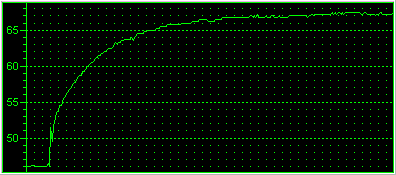
The temperature starts off at 46°C...
and here is the reported fan rotation speed...

The reported temperature for the Intel Prescott CPU and stock CPU cooler, was 45°C at idle mode and rose up to 67°C as the Prime FFT torture test was put to work.

We installed the Vantec mach1 and let the processor idle for a few minutes so that the temperature could settle. We then went on with the Prime FFT torture test once again, pushing the CPU to full load. Here we will be testing the Vantec cooler at High and Low Fan speeds. Let us start of with the Low mode first...

It is very likely that the first time you may not notice any great difference in temperatures. You need to give the thermal compound a little time, approximately a day, to reach optimal performance.

Low Fan Speed
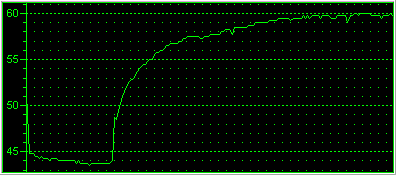
starting from 44°C in idle mode...
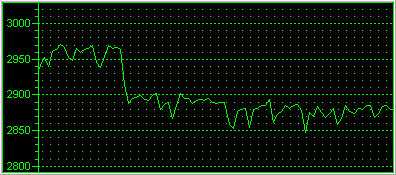
the RPM graph settling to just under 2900 RPM

At the low fan speed, the mach1 started at 44°C and after torturing the CPU with the in place FFT prime test, the temperature climbed up to 60°C. What we got was an amazing 7°C drop while the rotation speed ranging between 2850 to 2950 RPM. We then proceeded and set the fan speed switch to "high" to see what more the Vantec cooler could give.

High Fan Speed

starting form 42C idle mode climbing up to 56C
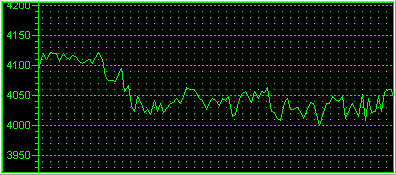
a little higher than the manufacturer states...

At high speed, the mach1 managed to drop the temperature by a further 2°C in idle mode and 4°C at full load. This is great performance from the Vantec cooler as it managed to reduce the CPU temperature by 11°C at full load compared to the original Intel cooler.

The temperatures reported were reduced dramatically by the Vantec mach1 CPU cooler, but at the cost of noise, which is a slight drawback. Nevertheless, great performance by the mach1 fansink.


Review Pages

1. Introduction
2. Installation
3. Performance
4. Conclusion


Pages

  • « first
  • ‹ previous
  • 1
  • 2
  • 3
  • 4
  • next ›
  • last »

Vantec

Tags: Vantec
Previous Post
Thermaltake PurePower 500W
Next Post
Apacer VS Transcend (DDR2 533MHz)

Related Posts

  • Vantec iCEBERQ6

  • Vantec NST-530U2 External Enclosure

  • Vantec PSU

  • New NexStar DX for DVD Burners

  • Vantec NexStar 3 eSATA

  • Vantec AVOX Jukebox Review

  • Vantec AVOX Jukebox

  • Vantec NexStar 3

Latest Reviews

Why Intelligent Firmware Matters More Than Peak Throughput in NAS Systems
Enterprise & IT

Why Intelligent Firmware Matters More Than Peak Throughput in NAS Systems

Fanxiang MP83 M.2 NVMe SSD Enclosure
Enterprise & IT

Fanxiang MP83 M.2 NVMe SSD Enclosure

Ugreen CM642 USB4.0 Enclosure
PC components

Ugreen CM642 USB4.0 Enclosure

be quiet! Dark Power 14 IO
PC components

be quiet! Dark Power 14 IO

SanDisk High Endurance 512GB microSDXC
Cameras

SanDisk High Endurance 512GB microSDXC

Popular News

MSI’s Latest AMD X870E MAX & EVO Series Motherboards

MSI’s Latest AMD X870E MAX & EVO Series Motherboards

COLORFUL Launches iGame B850M ULTRA Series Micro-ATX Motherboards

COLORFUL Launches iGame B850M ULTRA Series Micro-ATX Motherboards

COLORFUL Presents Limited Edition Chitu MAG-60 Magnetic Keyboard Inspired by the Year of the Horse

COLORFUL Presents Limited Edition Chitu MAG-60 Magnetic Keyboard Inspired by the Year of the Horse

COLORFUL Launches iGame B850I MINI OC V14 Motherboard

COLORFUL Launches iGame B850I MINI OC V14 Motherboard

COLORFUL Launches the iGame X870E VULCAN W OC Motherboard

COLORFUL Launches the iGame X870E VULCAN W OC Motherboard

COLORFUL Presents iGame Z890 ULTRA-S W and iGame Z890M ULTRA Z Motherboards

COLORFUL Presents iGame Z890 ULTRA-S W and iGame Z890M ULTRA Z Motherboards

COLORFUL Expands B850 Motherboard Lineup with New CVN, Battle-Ax, and MEOW Models

COLORFUL Expands B850 Motherboard Lineup with New CVN, Battle-Ax, and MEOW Models

ASRock Adds Support for One Sub-Channel DRAM Module on Intel DDR5 Motherboards

ASRock Adds Support for One Sub-Channel DRAM Module on Intel DDR5 Motherboards

Main menu

  • Home
  • News
  • Reviews
  • Essays
  • About
    • Submit News

    • Contact Us
    • Privacy

    • Promotion
    • Advertise

    • RSS Feed
  • About
  • Privacy
  • Contact Us
  • Promotional Opportunities @ CdrInfo.com
  • Advertise on out site
  • Submit your News to our site
  • RSS Feed