Breaking News

Greenliant heads to electronica 2026 with its full industrial SSD lineup CORSAIR Brings Comfort in Full Bloom with Dark Cherry Blossom TC500 and TC100 RELAXED Gaming Chairs ASUS Republic of Gamers Announces Availability of ROG Swift OLED PG259QWS Ace and Strix OLED XG259QWPG Ace ASUS Announces TUF Gaming Radeon RX 9070 XT Onimusha Special Edition ASUS Republic of Gamers Announces ROG XG Station 3

logo

  • Share Us
    • Facebook
    • Twitter
  • Home
  • Home
  • News
  • Reviews
  • Essays
  • About
    • Submit News

    • Contact Us
    • Privacy

    • Promotion
    • Advertise

    • RSS Feed

Search form

ASUS EAX1600XT Silent

May 8,2006 0

13. Overclocking


Review Pages

1. Introduction
2. A Closer Look
3. Test System - Configuration
4. 3DMark2005
5. 3DMark2003
6. Codecreatures
7. Aquamark - 3DMark01
8. Half Life 2
9. Ground Control II
10. Quake 4
11. Need For Speed - Most Wanted
12. F.E.A.R.
13. Overclocking
14. Conclusion


No matter your graphics card, there comes a time in your computer's life when it can no longer cope with the latest technological demands the ever so popular games impose. This is one of the main reasons for overclocking your graphics card. Gamers are always looking forward to a little extra boost in terms of framerate. Even though most of the time the boost is far from noticeable, overclocking remains the last resort when you can't afford to buy a brand new VGA card.

The stock clock speeds for the ASUS EAX1600XT card that we received, were 588MHz for the core and 693MHz for the memory.
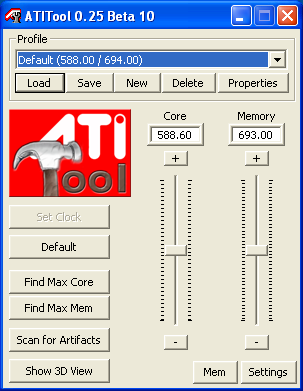
After a bit of tweaking and messing around with the core and memory clocks, we settled at a core speed of 650 and 738 for the memory. The overclocking speeds are very high for this type of card, especially if we consider that this card uses a passive cooling system. However, we believe that if the card was equipped with a fan cooling system, then we could have pushed it even further, especially since ATI chipsets are known for their high overclocking potential.
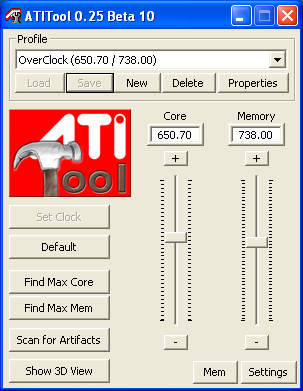
Overclocking is all well and good, but does it provide any gain. Let's see if we achieved any difference in performance.

Significant increase in 3D Marks was archived after overclocking.

The performance increase in NFS MW after overclocking, was at times more than 2 fps up.

But unfortunately, in F.E.A.R, the card disappointed us and reported lower framerates than when at the default clock speeds. This could have been due to the fact that card was overheating during the benchmark.


Review Pages

1. Introduction
2. A Closer Look
3. Test System - Configuration
4. 3DMark2005
5. 3DMark2003
6. Codecreatures
7. Aquamark - 3DMark01
8. Half Life 2
9. Ground Control II
10. Quake 4
11. Need For Speed - Most Wanted
12. F.E.A.R.
13. Overclocking
14. Conclusion


Pages

  • « first
  • ‹ previous
  • …
  • 6
  • 7
  • 8
  • 9
  • 10
  • 11
  • 12
  • 13
  • 14
  • next ›
  • last »

ASUS

Tags: ASUS
Previous Post
OCZ PC2-5400 Platinum XTC 2x512MB
Next Post
Krusell x50V

Related Posts

  • ASUS Announces TUF Gaming Radeon RX 9070 XT Onimusha Special Edition

  • ASUS Hardware Showcase: AI Accelerators, Collector GPUs, and Esport Monitors

  • ASUS Announces ExpertBook A7 (AMD)

  • ASUS ProArt RTX Spark Windows PCs Available for Immediate Pre-Order

  • ASUS Announces New 64GB Configuration of ASUS Ascent GX10

  • Announcing the New ASUS Googlebook 14

  • ASUS Announces Ascent QN10 Mini PC

  • ASUS Announces WiFi 8 Router

Latest Reviews

The Best Online Casino Games to Play on a Browser
Enterprise & IT

The Best Online Casino Games to Play on a Browser

be quiet! Light Wings Pro IO fan
Cooling Systems

be quiet! Light Wings Pro IO fan

Why Intelligent Firmware Matters More Than Peak Throughput in NAS Systems
Enterprise & IT

Why Intelligent Firmware Matters More Than Peak Throughput in NAS Systems

Fanxiang MP83 M.2 NVMe SSD Enclosure
Enterprise & IT

Fanxiang MP83 M.2 NVMe SSD Enclosure

Ugreen CM642 USB4.0 Enclosure
PC components

Ugreen CM642 USB4.0 Enclosure

Popular News

MSI’s Latest AMD X870E MAX & EVO Series Motherboards

MSI’s Latest AMD X870E MAX & EVO Series Motherboards

COLORFUL Launches iGame B850M ULTRA Series Micro-ATX Motherboards

COLORFUL Launches iGame B850M ULTRA Series Micro-ATX Motherboards

COLORFUL Launches iGame B850I MINI OC V14 Motherboard

COLORFUL Launches iGame B850I MINI OC V14 Motherboard

COLORFUL Presents Limited Edition Chitu MAG-60 Magnetic Keyboard Inspired by the Year of the Horse

COLORFUL Presents Limited Edition Chitu MAG-60 Magnetic Keyboard Inspired by the Year of the Horse

COLORFUL Launches the iGame X870E VULCAN W OC Motherboard

COLORFUL Launches the iGame X870E VULCAN W OC Motherboard

COLORFUL Presents iGame Z890 ULTRA-S W and iGame Z890M ULTRA Z Motherboards

COLORFUL Presents iGame Z890 ULTRA-S W and iGame Z890M ULTRA Z Motherboards

COLORFUL Expands B850 Motherboard Lineup with New CVN, Battle-Ax, and MEOW Models

COLORFUL Expands B850 Motherboard Lineup with New CVN, Battle-Ax, and MEOW Models

ASRock Adds Support for One Sub-Channel DRAM Module on Intel DDR5 Motherboards

ASRock Adds Support for One Sub-Channel DRAM Module on Intel DDR5 Motherboards

Main menu

  • Home
  • News
  • Reviews
  • Essays
  • About
    • Submit News

    • Contact Us
    • Privacy

    • Promotion
    • Advertise

    • RSS Feed
  • About
  • Privacy
  • Contact Us
  • Promotional Opportunities @ CdrInfo.com
  • Advertise on out site
  • Submit your News to our site
  • RSS Feed