Asus Maximus IV Gene-Z review
2. Package, board layout
Review Pages
The Asus Maximus IV Gene-Z is a uATX (microATX) motherboard and it is available online for about $170, a high price compared to other Z68 boards but don't forget that the specific model has been designed for enthusiasts. Let's hope its performance will keep up with the price.
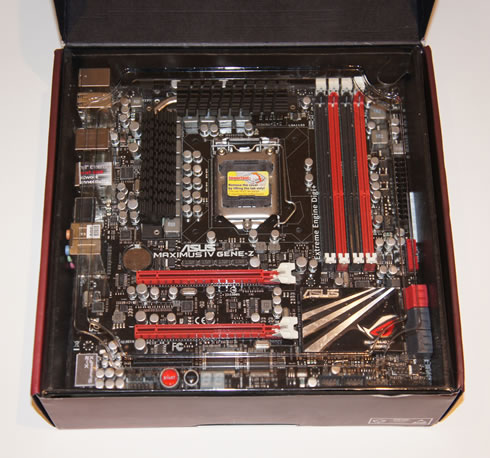
In the picture below you see the retail package of the Asus Maximus IV Gene-Z, which is compact in size and features the company's Republic of Gamers style box with key points listed along the bottom:

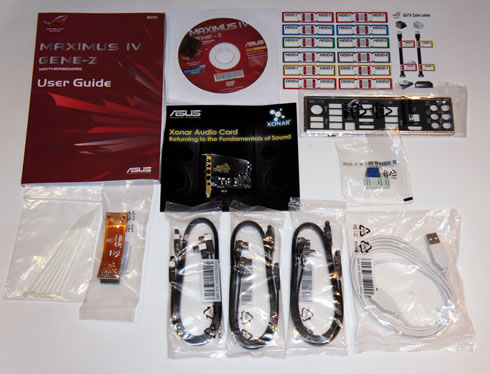
The package comes complete with the following:
- The motherboard
- 1x User's manual
- 1x I/O Shield
- 2 x SATA 3Gb/s cable(s)
- 1 x SATA 6Gb/s cable(s)
- 1 x SLI bridge(s)
- 1 x Q-connector(s) (2 in 1)
- 1 x ROG Connect cable(s)
- 1 x Cable ties pack(s)
- 1 x ROG theme label(s)
- 1 x 12 in 1 ROG Cable Label(s)
- 1x Support DVD with drivers and applications (ASUS AI Suite II, ROG CPU-Z, ROG GameFirst Utility, Sound Blaster X-Fi MB2 Utility, ROG Mem TweakIt Utility, ASUS AI Charger+, DAEMON Tools Pro Standard & Kaspersky Anti-Virus 1-year license)
The motherboard is compact in size (24.4 x 24.4cm) and its design is clear and easy to understand. The color scheme here is sharp looking; the PCB is entirely black, with various components highlighted in red and white, continuing the ROG theme. As you see in the picture below, there are not any PCI slots due to the PCB's limited size. The CPU area is open enough to allow for easy installation of large CPU coolers, although such a large component extend above the RAM slots, especially if you use high profile memory modules.

ASUS has employed a hybrid power management system, which they call the Extreme Engine Digi+. Essentially this means they've gone with digital VRMs but have used multi-phase MOSFETs and analog features in the overall PWM. This allows for a wider range of switching frequencies and the ability to remain stable under voltage changes, improved resiliency under thermal load, and lower electrical resistance.
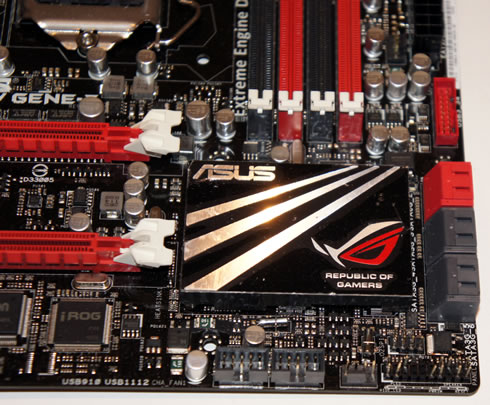
There is also passive cooling by means of two primary finned heatsinks and a continuous heatpipe across the top of the board. The lower "Southbridge" heatsink design is features a ROG label and logo:

In the four memory slots available you can install up to 32GB of memory, with support of up to 2400MHz. The DIMM slots are designed with Q-DIMM, which are essentially tab-less bottom clips to avoid conflict with long graphics cards, and making memory installation/removal easier.
To the right is the GO Button, which is handy if you're having boot problems. If you press it while powered down, it will act as the Mem OK! button and the system will automatically reset your memory to a stable state. This comes in very handy after failed overclocks. The GO Button also works if you press it while in the Windows environment, but it will instead overclock your system according to a preset profile that you can define in the BIOS.
Next to the DIMM slots there are the ProbeIt headers, which allow for included contact wires to be attached that keep the voltometer probes more easily in place, and measure critical real-time voltage readings using a multimeter while overclocking.

No PATA connection port is available but if you have are buying a Republic of Gamer motherboard then you can likely afford a SATA drive.
Overall, the rear I/O panel includes:
- 1 x PS/2 keyboard/mouse combo port(s)
- 1 x HDMI
- 2 x eSATA 3Gb/s
- 1 x LAN (RJ45) port(s)
- 2 x USB 3.0
- 8 x USB 2.0 (one port can be switched to ROG Connect)
- 1 x Optical S/PDIF out
- 6 x Audio jack(s)
- 1 x Clear CMOS button(s)
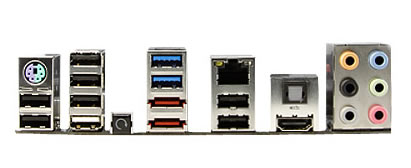
The motherboard supports:
- 2 x PCIe 2.0 x16 (x16 or dual x8)
- 1 x PCIe 2.0 x4

The 2 x SATA 6Gb/s ports 4 x SATA 3Gb/s port are colored in red and gray, respectively:
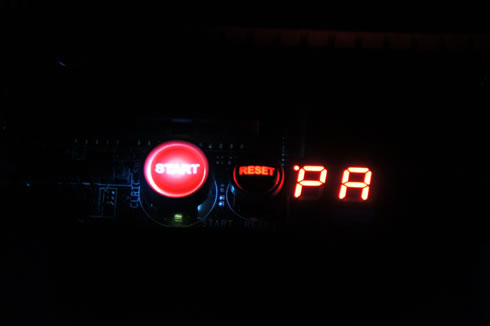
At the bottom left side of the PCB there are two buttons (Start/Reset) as well as a LED readout display, which provides information about the status of the motherboard and possible errors that have occurred. A a list of these error codes is available in the manual.
The following connectors and headers are available on the board:
- 1 x USB 3.0 connector(s) support(s) additional 2 USB 3.0 port(s)
- 2 x USB 2.0 connector(s) support(s) additional 4 USB 2.0 port(s)
- 2 x SATA 6Gb/s connector(s)
- 4 x SATA 3Gb/s connector(s)
- 2 x CPU Fan connector(s)
- 3 x Chassis Fan connector(s)
- 1 x S/PDIF out header(s)
- 1 x 24-pin EATX Power connector(s)
- 1 x 8-pin ATX 12V Power connector(s)
- 1 x Front panel audio connector(s) (AAFP)
- 1 x System panel(s)
- 6 x ProbeIt Measurement Points
- 1 x Power-on button(s)
- 1 x Reset button(s)
- 1 x ROG Connect switch(es)
- 1 x Go Button(s)
- 1 x Clear CMOS jumper(s)
Review Pages