Breaking News

Greenliant heads to electronica 2026 with its full industrial SSD lineup CORSAIR Brings Comfort in Full Bloom with Dark Cherry Blossom TC500 and TC100 RELAXED Gaming Chairs ASUS Republic of Gamers Announces Availability of ROG Swift OLED PG259QWS Ace and Strix OLED XG259QWPG Ace ASUS Announces TUF Gaming Radeon RX 9070 XT Onimusha Special Edition ASUS Republic of Gamers Announces ROG XG Station 3

logo

  • Share Us
    • Facebook
    • Twitter
  • Home
  • Home
  • News
  • Reviews
  • Essays
  • About
    • Submit News

    • Contact Us
    • Privacy

    • Promotion
    • Advertise

    • RSS Feed

Search form

Asus SaberTooth P67 B3 review

Sep 5,2011 0

4. Tests


Review Pages

1. Features
2. A closer look
3. The uEFI BIOS
4. Tests
5. Overclocking
6. Final words


Test setup:

- Motherboard: Asus Sabertooth P67 with 1850 motherboard
- CPU: Intel i5-2500K retail
- CPU Cooler: Arctic Cooling Freezer 13 Extreme
- Memory: Crucial Ballistix DDR3 PC3-17000 (BL2KIT25664FN2139)
- VGA: Gigabyte GT-430
- HDD: WD 5001ALLS (500GB, 7200rpm Black Scorpio series)
- OS: Windows 7 x64 SP1 with all the latest updates installed
- VGA driver: Nvidia 275.33 x64 drivers

Our Asus Sabertooth motherboard had the 1850 BIOS installed. After installing the Intel i5-2500K processor under the Auto mode (BIOS), the Enhanced Intel SpeedStep Technology (EIST) kicked in, ready to offer CPU cores running from from 1.60GHz up to 3.51GHz, by controlling multiplier:

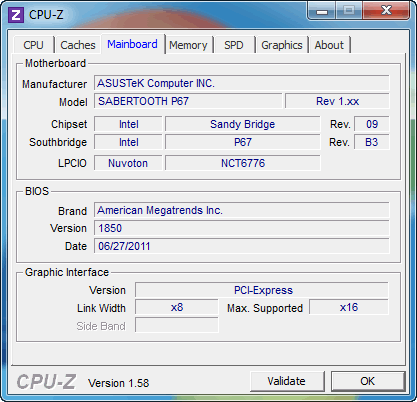
The memory was locked at DDR3-1333 and some manual configuration was needed in order to get the DDR3-2133 speed:

In order to do this, go to the uEFI's Advanced area and select the XMP mode to the "Overclock" page. The motherboard will read - provided that your memory supports it - the XMP settings and adjust memory's timing accordingly. In our case, the memory was set to 2133MHz and the CPU at 3.70GHz (automatically):
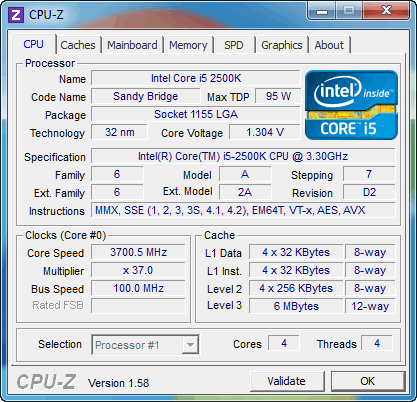
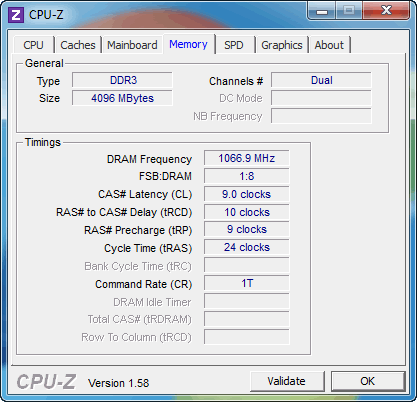
We ran a series of tests with the CPU core set to 1.6 ~3.5GHZ, 3.7GHz and finally after overclocking the CPU (see next page) at 4.8GHz. Here are the results:

 
PCMark 7
CineBench R11.5
Sandra Memory
Intel i5-2500k @ 1.6~3.5GHz with DDR3-1333
3128
5.40pts
17.70MB/sec
Intel i5-2500k @ 3.7GHz with DDR3-2133
3272
5.90pts
27.72MB/sec
Intel i5-2500K @ 4.8GHz with DDR3-2133
3621
7.59pts
28.00MB/sec

Without messing up with the Bios settings, we got 3272 points from PC Mark 7 at 3.7GHz, a significant improvement over the results we got with the CPU running at default speeds (3128 points). At the same time, we got an impressive memory boost from 16.80MB/sec to 27.72MB/sec.

Overclocking the processor at 4,8GHz further boosted the PC Mark 7 performance to 3621 points while the CineBench R11.5 result was also increased to 7.59pts over the previous 5.90pts. At the same time, the memory performance was not dramatically affected.


Review Pages

1. Features
2. A closer look
3. The uEFI BIOS
4. Tests
5. Overclocking
6. Final words


Pages

  • « first
  • ‹ previous
  • 1
  • 2
  • 3
  • 4
  • 5
  • 6
  • next ›
  • last »

ASUS

Tags: ASUS
Previous Post
Foxconn Rattler P67 review (Quantum Force)
Next Post
Numark DJ2Go Controller review

Related Posts

  • ASUS Announces TUF Gaming Radeon RX 9070 XT Onimusha Special Edition

  • ASUS Hardware Showcase: AI Accelerators, Collector GPUs, and Esport Monitors

  • ASUS Announces ExpertBook A7 (AMD)

  • ASUS ProArt RTX Spark Windows PCs Available for Immediate Pre-Order

  • ASUS Announces New 64GB Configuration of ASUS Ascent GX10

  • Announcing the New ASUS Googlebook 14

  • ASUS Announces Ascent QN10 Mini PC

  • ASUS Announces WiFi 8 Router

Latest Reviews

The Best Online Casino Games to Play on a Browser
Enterprise & IT

The Best Online Casino Games to Play on a Browser

be quiet! Light Wings Pro IO fan
Cooling Systems

be quiet! Light Wings Pro IO fan

Why Intelligent Firmware Matters More Than Peak Throughput in NAS Systems
Enterprise & IT

Why Intelligent Firmware Matters More Than Peak Throughput in NAS Systems

Fanxiang MP83 M.2 NVMe SSD Enclosure
Enterprise & IT

Fanxiang MP83 M.2 NVMe SSD Enclosure

Ugreen CM642 USB4.0 Enclosure
PC components

Ugreen CM642 USB4.0 Enclosure

Popular News

MSI’s Latest AMD X870E MAX & EVO Series Motherboards

MSI’s Latest AMD X870E MAX & EVO Series Motherboards

COLORFUL Launches iGame B850M ULTRA Series Micro-ATX Motherboards

COLORFUL Launches iGame B850M ULTRA Series Micro-ATX Motherboards

COLORFUL Launches iGame B850I MINI OC V14 Motherboard

COLORFUL Launches iGame B850I MINI OC V14 Motherboard

COLORFUL Presents Limited Edition Chitu MAG-60 Magnetic Keyboard Inspired by the Year of the Horse

COLORFUL Presents Limited Edition Chitu MAG-60 Magnetic Keyboard Inspired by the Year of the Horse

COLORFUL Launches the iGame X870E VULCAN W OC Motherboard

COLORFUL Launches the iGame X870E VULCAN W OC Motherboard

COLORFUL Presents iGame Z890 ULTRA-S W and iGame Z890M ULTRA Z Motherboards

COLORFUL Presents iGame Z890 ULTRA-S W and iGame Z890M ULTRA Z Motherboards

COLORFUL Expands B850 Motherboard Lineup with New CVN, Battle-Ax, and MEOW Models

COLORFUL Expands B850 Motherboard Lineup with New CVN, Battle-Ax, and MEOW Models

ASRock Adds Support for One Sub-Channel DRAM Module on Intel DDR5 Motherboards

ASRock Adds Support for One Sub-Channel DRAM Module on Intel DDR5 Motherboards

Main menu

  • Home
  • News
  • Reviews
  • Essays
  • About
    • Submit News

    • Contact Us
    • Privacy

    • Promotion
    • Advertise

    • RSS Feed
  • About
  • Privacy
  • Contact Us
  • Promotional Opportunities @ CdrInfo.com
  • Advertise on out site
  • Submit your News to our site
  • RSS Feed