Breaking News

Razer introduces Soma Pro And Soma Sensa HD Haptics Gaming Chairs Noctua introduces NT-CP1 Carbice carbon nanotube thermal pad for AM5 CORSAIR Launches the HX1000i SHIFT CRYSTAL Power Supply GIGABYTE Expands Its Local AI Portfolio with the Launch of AI TOP AERO Powered by NVIDIA RTX SPARK Viltrox Announces Exclusive Deals and Shopping Rewards for Black Friday 2026

logo

  • Share Us
    • Facebook
    • Twitter
  • Home
  • Home
  • News
  • Reviews
  • Essays
  • About
    • Submit News

    • Contact Us
    • Privacy

    • Promotion
    • Advertise

    • RSS Feed

Search form

ONES Software

Oct 18,2004 0

3. Program Layout


Review Pages

1. Introduction
2. Usefull Wizards
3. Program Layout
4. Disc Copy - Audio Compilation - Data Mastering
5. Handling Image Files - Record Video_TS
6. Extraction and Tools
7. Conclusion


ONES Software Review - Page 4

Program Layout

As soon as the program launches, you will see the following window. All the available drives are listed, along with some information about supported media for each recorder and disc content (if there is any media inserted).
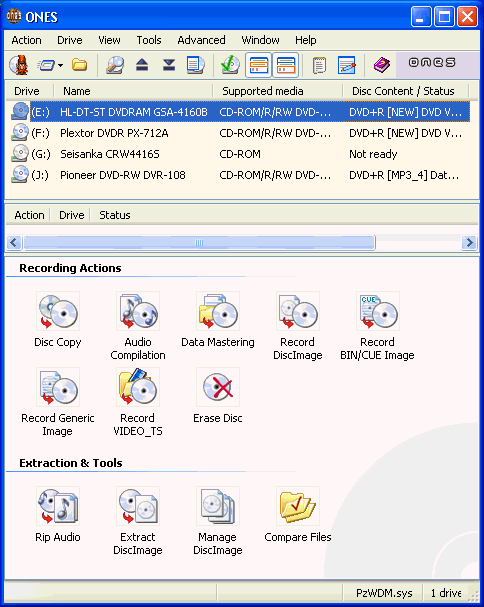
You can choose more than one recorder to perform a selected action. You may also want to choose to have more information available in this screen for each drive, such as physical address, firmware versions, bus type, etc.

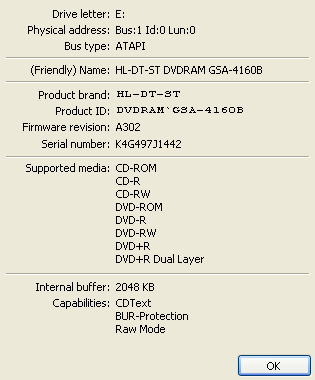
The program has several features that are not easily found in other recording software, like the ability to lock/unlock the tray of a drive, or even stop drive activity. It can also provide more information about any drive, like the snapshot below indicates...
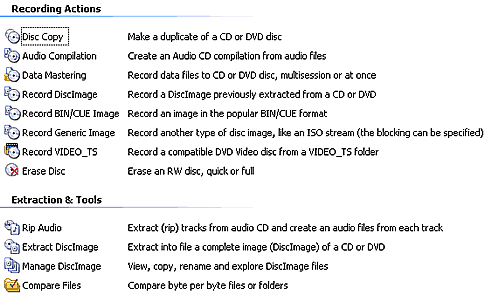
... or maybe show a brief description for every action the software can perform at this point:
Using the "Options" menu tab, you can change several settings in order to change the behaviour of the program. Remember that Fuzzy Logic is always enabled but will not warn you if you mess things up at this point. However, it will check all settings prior to burning any media.


Review Pages

1. Introduction
2. Usefull Wizards
3. Program Layout
4. Disc Copy - Audio Compilation - Data Mastering
5. Handling Image Files - Record Video_TS
6. Extraction and Tools
7. Conclusion


Pages

  • « first
  • ‹ previous
  • 1
  • 2
  • 3
  • 4
  • 5
  • 6
  • 7
  • next ›
  • last »

Prassi

Tags: Prassi
Previous Post
ONES - Simple AudioCD guide
Next Post
LG GSA-4160B

Related Posts

  • ONES recording software review

  • ONES - Simple DVD-Video guide

  • ONES - Simple AudioCD guide

  • January, 2003 - Prassi is back!

  • Prassi keeps "CD Rep" after the lawsuit settlement

  • Roxio settles Prassi lawsuit

  • VERITAS Software acquires Prassi Europe!

  • Hot news: Prassi USA has been acquired by ...?

Latest Reviews

GMK TriggerKey
Gadgets

GMK TriggerKey

The Best Online Casino Games to Play on a Browser
Enterprise & IT

The Best Online Casino Games to Play on a Browser

be quiet! Light Wings Pro IO fan
Cooling Systems

be quiet! Light Wings Pro IO fan

Why Intelligent Firmware Matters More Than Peak Throughput in NAS Systems
Enterprise & IT

Why Intelligent Firmware Matters More Than Peak Throughput in NAS Systems

Fanxiang MP83 M.2 NVMe SSD Enclosure
Enterprise & IT

Fanxiang MP83 M.2 NVMe SSD Enclosure

Popular News

MSI’s Latest AMD X870E MAX & EVO Series Motherboards

MSI’s Latest AMD X870E MAX & EVO Series Motherboards

COLORFUL Launches iGame B850M ULTRA Series Micro-ATX Motherboards

COLORFUL Launches iGame B850M ULTRA Series Micro-ATX Motherboards

COLORFUL Launches iGame B850I MINI OC V14 Motherboard

COLORFUL Launches iGame B850I MINI OC V14 Motherboard

COLORFUL Presents Limited Edition Chitu MAG-60 Magnetic Keyboard Inspired by the Year of the Horse

COLORFUL Presents Limited Edition Chitu MAG-60 Magnetic Keyboard Inspired by the Year of the Horse

COLORFUL Launches the iGame X870E VULCAN W OC Motherboard

COLORFUL Launches the iGame X870E VULCAN W OC Motherboard

COLORFUL Presents iGame Z890 ULTRA-S W and iGame Z890M ULTRA Z Motherboards

COLORFUL Presents iGame Z890 ULTRA-S W and iGame Z890M ULTRA Z Motherboards

COLORFUL Launches iGame X870E ULTRA-S V14 Motherboard

COLORFUL Launches iGame X870E ULTRA-S V14 Motherboard

COLORFUL Expands B850 Motherboard Lineup with New CVN, Battle-Ax, and MEOW Models

COLORFUL Expands B850 Motherboard Lineup with New CVN, Battle-Ax, and MEOW Models

Main menu

  • Home
  • News
  • Reviews
  • Essays
  • About
    • Submit News

    • Contact Us
    • Privacy

    • Promotion
    • Advertise

    • RSS Feed
  • About
  • Privacy
  • Contact Us
  • Promotional Opportunities @ CdrInfo.com
  • Advertise on out site
  • Submit your News to our site
  • RSS Feed