Breaking News

Greenliant heads to electronica 2026 with its full industrial SSD lineup CORSAIR Brings Comfort in Full Bloom with Dark Cherry Blossom TC500 and TC100 RELAXED Gaming Chairs ASUS Republic of Gamers Announces Availability of ROG Swift OLED PG259QWS Ace and Strix OLED XG259QWPG Ace ASUS Announces TUF Gaming Radeon RX 9070 XT Onimusha Special Edition ASUS Republic of Gamers Announces ROG XG Station 3

logo

  • Share Us
    • Facebook
    • Twitter
  • Home
  • Home
  • News
  • Reviews
  • Essays
  • About
    • Submit News

    • Contact Us
    • Privacy

    • Promotion
    • Advertise

    • RSS Feed

Search form

Optorite DD0203 DVD±RW

Jul 8,2003 0

11. HD BURN


Review Pages

1. Introduction
2. CD Reading Tests
3. CD Error Correction Tests
4. DVD Reading Tests
5. DVD Error Correction Tests
6. Protected Disc Tests
7. DAE Tests
8. CDR Tests
9. CD Writing Quality Tests
10. HS-RW Writing Tests
11. HD BURN
12. DVD Recording Tests
13. KProbe PI/PO Quality Tests
14. Conclusion


Optorite DD0203 dual DVD±RW recorder - Page 11

HD BURN FUNCTION

As we have mentioned in the first page of this article, the HD-BURN feature allows writing twice the amount of data than can normally fit on a CD-R disc. This means that up to 1.4GB of data can be recorded on 700MB CD-R media. Although the feature is currently supported by a DVD recorder, it is only applied to CD-R writing.

Burning on CD-RW media is not yet supported, as well as writing audio CDs under the HD-Burn. Sanyo is currently working towards this direction.

The HD-BURN is supported by Nero Burning Rom by Ahead and the B's Gold 5 by BHA, bundled in the Optorite DD0203 retail package. Under the HD-BURN mode user is able to create a "CD-ROM" (ISO, UDF, ISO/UDF, Bootable), HD-BURN -Video or just copy an HD-BURN disc.

Burning an HD-BURN video is an alternative solution for writing your favorite video files on CD-R media, which are much cheaper than DVD recordable media. A 30min video can be written even when using the DVD video format. Moreover, HD-BURN makes possible to write the image data of about two hours under the VideoCD format.

HD-BURN Writing

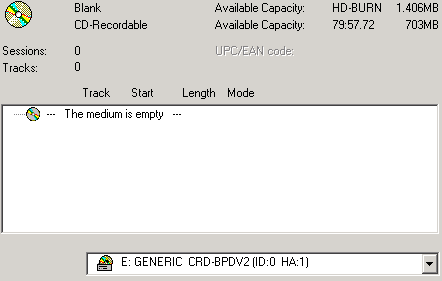
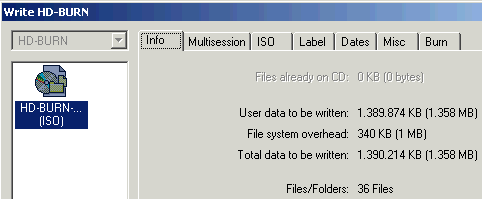
We used Nero HD-Burn writing method to compile a new CD-ROM ISO. We inserted a 700MB CD-R disc and created a new project with a 1358MB capacity. Below you can media information according to Nero Burning Rom:
The compilation information is available in the following screen shot:
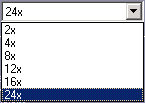
Burning under the HD-BURN is allowed at the maximum speed of 24X.

Writing is only allowed under the Disc at Once mode so the "Finalize" selection is always enabled. In addition, writing simulation is not supported, and the Burn Proof is applied under the HD-BURN writing mode:

The duration of the writing process at 24x was 10:57min:

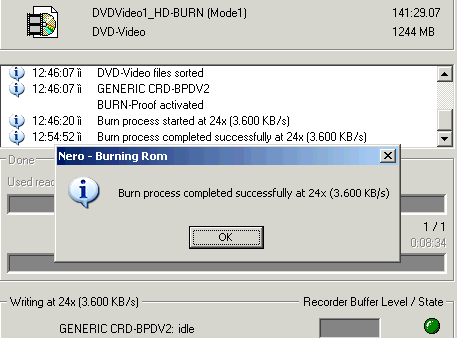
We also created a 1.244MB DVD Video file and burn it with Nero Burning Rom at 24x. Recording was successfully finished in 8:34min:
Optorite DD0203 cannot write at 90min or 99min CD-R media under the HD-BURN function.

Reading the HD-BURN discs

The produced HD-BURN ISO and HD-BURN Video discs were completely readable in the Optorite DD0203 drive. However, the discs could not be recognized or read by any other drive we tested. This is also confirmed by Sanyo, declaring that the discs are not readable by the drives or players currently available in the market. However, DVD-ROM drives and DVD recorders can be compliant to HD-BURN discs by changing the firmware.

In the following screenshots you can see the Nero CDSpeed transfer graphs with the recorded discs:

Nero CDSpeed recognized the discs as DVD-R media, due to their increased amount of data it held. The drive read both discs in a similar way, starting at 6.5x and finishing at 8.6x, approximately. The reported seek times were also very low.

The interesting part of the CDSpeed graphs is that although the transfer rate line refers to CAV reading, the rotation speed of the disc is not constant throughout the whole reading process. The drive seems to accelerate towards the outer tracks of the discs, to maintain synchronization and reading accuracy.


Review Pages

1. Introduction
2. CD Reading Tests
3. CD Error Correction Tests
4. DVD Reading Tests
5. DVD Error Correction Tests
6. Protected Disc Tests
7. DAE Tests
8. CDR Tests
9. CD Writing Quality Tests
10. HS-RW Writing Tests
11. HD BURN
12. DVD Recording Tests
13. KProbe PI/PO Quality Tests
14. Conclusion


Pages

  • « first
  • ‹ previous
  • …
  • 6
  • 7
  • 8
  • 9
  • 10
  • 11
  • 12
  • 13
  • 14
  • next ›
  • last »

Tags:
Previous Post
DVD Media Format Compatibility Tests
Next Post
Mitsumi CR-485FTE CD-RW

Related Posts

Latest Reviews

The Best Online Casino Games to Play on a Browser
Enterprise & IT

The Best Online Casino Games to Play on a Browser

be quiet! Light Wings Pro IO fan
Cooling Systems

be quiet! Light Wings Pro IO fan

Why Intelligent Firmware Matters More Than Peak Throughput in NAS Systems
Enterprise & IT

Why Intelligent Firmware Matters More Than Peak Throughput in NAS Systems

Fanxiang MP83 M.2 NVMe SSD Enclosure
Enterprise & IT

Fanxiang MP83 M.2 NVMe SSD Enclosure

Ugreen CM642 USB4.0 Enclosure
PC components

Ugreen CM642 USB4.0 Enclosure

Popular News

MSI’s Latest AMD X870E MAX & EVO Series Motherboards

MSI’s Latest AMD X870E MAX & EVO Series Motherboards

COLORFUL Launches iGame B850M ULTRA Series Micro-ATX Motherboards

COLORFUL Launches iGame B850M ULTRA Series Micro-ATX Motherboards

COLORFUL Launches iGame B850I MINI OC V14 Motherboard

COLORFUL Launches iGame B850I MINI OC V14 Motherboard

COLORFUL Presents Limited Edition Chitu MAG-60 Magnetic Keyboard Inspired by the Year of the Horse

COLORFUL Presents Limited Edition Chitu MAG-60 Magnetic Keyboard Inspired by the Year of the Horse

COLORFUL Launches the iGame X870E VULCAN W OC Motherboard

COLORFUL Launches the iGame X870E VULCAN W OC Motherboard

COLORFUL Presents iGame Z890 ULTRA-S W and iGame Z890M ULTRA Z Motherboards

COLORFUL Presents iGame Z890 ULTRA-S W and iGame Z890M ULTRA Z Motherboards

COLORFUL Expands B850 Motherboard Lineup with New CVN, Battle-Ax, and MEOW Models

COLORFUL Expands B850 Motherboard Lineup with New CVN, Battle-Ax, and MEOW Models

ASRock Adds Support for One Sub-Channel DRAM Module on Intel DDR5 Motherboards

ASRock Adds Support for One Sub-Channel DRAM Module on Intel DDR5 Motherboards

Main menu

  • Home
  • News
  • Reviews
  • Essays
  • About
    • Submit News

    • Contact Us
    • Privacy

    • Promotion
    • Advertise

    • RSS Feed
  • About
  • Privacy
  • Contact Us
  • Promotional Opportunities @ CdrInfo.com
  • Advertise on out site
  • Submit your News to our site
  • RSS Feed