
Breaking News

SAMA Introduces the S32 WOOD, a Compact M-ATX Case Bundled with an 80 PLUS Gold PSU Thypoch Completes Simera-C Cine Prime Lineup with New 100mm T1.9 Lens CORSAIR Launches the RM1200e Power Supply with Built-in PinProtect GPU Overcurrent Protection and Platinum-certified Efficiency CORSAIR Changes the Game with PureVector, a Science-Based Personalized Aiming Technology, Launching Exclusively in the SABRE v3 PRO PureVector Mouse Series AMD FSR Upscaling 4.1 Boosts Frames and Image Quality on More Devices

logo

  • Share Us
    • Facebook
    • Twitter
  • Home
  • Home
  • News
  • Reviews
  • Essays
  • About
    • Submit News

    • Contact Us
    • Privacy

    • Promotion
    • Advertise

    • RSS Feed

Search form

Spire MegaPodIII

Nov 5,2007 0

3. Benchmarks


Review Pages

1. Specifications
2. Inside the box
3. Benchmarks
4. Summary


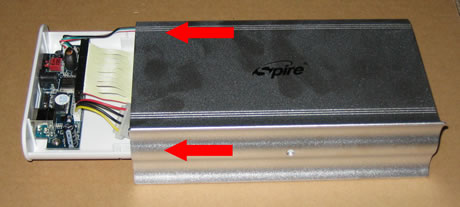
Let's now see the installation procedure. First, you have to remove the mounting screw located on the bottom and then pull the rear end out, as shown in the picture below. This will extract the mounting plate.
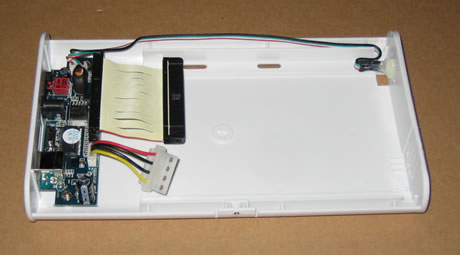
Nothing fancy here, just a plastic base, I/O circuitry board and the IDE and Power connectors.
For our purposes, we will use a 200GB Western Digital drive.
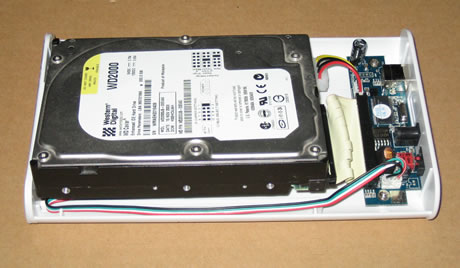
Take some care with the installation of the drive. It must sit correctly, otherwise you won't be able to insert it back into the main enclosure body.
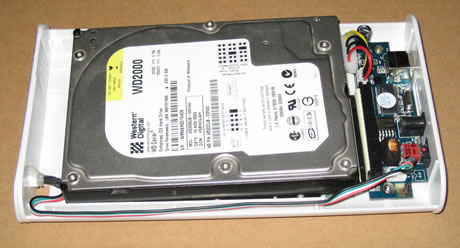
You use the supplied mounting screws to screw the HDD to the assembly. Use the mounting holes located on the side of the HDD for this. Once secure, you can slide it back into the enclosure.

- Tests

To test the enclosure's performance, we fired up HD Tach v3.0.1.0 and executed the full bench test. What we want to see here, is whether the enclosure adversely affects or hinders the HDD's performance.

The full bench test scans the entire capacity of the HDD and displays a graph of its average reading/writing performance:

The performance is very good and is very close to the performance of the drive when connected directly to the motherboard's IDE interface. We logged 80MB/sec reading speed at the starting point, which gradually dropped to 40MB/sec, resulting in an average speed of 66.7MB/sec. The Burst Speed is also very good as you can see. Lastly, the CPU % usage is very low, at only 4%.


Review Pages

1. Specifications
2. Inside the box
3. Benchmarks
4. Summary


Pages

  • « first
  • ‹ previous
  • 1
  • 2
  • 3
  • 4
  • next ›
  • last »

Spire

Tags: Spire
Previous Post
Spire PowerFuse
Next Post
Lexar Jumpdrive Lightning 4GB

Related Posts

  • Spire launches UD50C White PC chassis

  • Spire Unveils Cutting-Edge ARGB Cooling Fan Set: A 25-Year Legacy of Excellence in PC Cooling

  • Introducing Spire’s New Ergonomic Workstations and Desk Peripherals

  • SPIRE PC announces EagleForce series 80PLUS certified

  • Spire Thermal Stone Keeps Your Hands Warm

  • Spire Thermal Eclipse II review

  • Spire Previews Coolers For The Upcoming Intel 1156 Core i5 Platform

  • Spire PowerFuse

Latest Reviews

be quiet! Light Wings Pro IO fan
Cooling Systems

be quiet! Light Wings Pro IO fan

Why Intelligent Firmware Matters More Than Peak Throughput in NAS Systems
Enterprise & IT

Why Intelligent Firmware Matters More Than Peak Throughput in NAS Systems

Fanxiang MP83 M.2 NVMe SSD Enclosure
Enterprise & IT

Fanxiang MP83 M.2 NVMe SSD Enclosure

Ugreen CM642 USB4.0 Enclosure
PC components

Ugreen CM642 USB4.0 Enclosure

be quiet! Dark Power 14 IO
PC components

be quiet! Dark Power 14 IO

Popular News

MSI’s Latest AMD X870E MAX & EVO Series Motherboards

MSI’s Latest AMD X870E MAX & EVO Series Motherboards

COLORFUL Launches iGame B850M ULTRA Series Micro-ATX Motherboards

COLORFUL Launches iGame B850M ULTRA Series Micro-ATX Motherboards

COLORFUL Presents Limited Edition Chitu MAG-60 Magnetic Keyboard Inspired by the Year of the Horse

COLORFUL Presents Limited Edition Chitu MAG-60 Magnetic Keyboard Inspired by the Year of the Horse

COLORFUL Launches iGame B850I MINI OC V14 Motherboard

COLORFUL Launches iGame B850I MINI OC V14 Motherboard

COLORFUL Launches the iGame X870E VULCAN W OC Motherboard

COLORFUL Launches the iGame X870E VULCAN W OC Motherboard

COLORFUL Presents iGame Z890 ULTRA-S W and iGame Z890M ULTRA Z Motherboards

COLORFUL Presents iGame Z890 ULTRA-S W and iGame Z890M ULTRA Z Motherboards

COLORFUL Expands B850 Motherboard Lineup with New CVN, Battle-Ax, and MEOW Models

COLORFUL Expands B850 Motherboard Lineup with New CVN, Battle-Ax, and MEOW Models

ASRock Adds Support for One Sub-Channel DRAM Module on Intel DDR5 Motherboards

ASRock Adds Support for One Sub-Channel DRAM Module on Intel DDR5 Motherboards

Main menu

  • Home
  • News
  • Reviews
  • Essays
  • About
    • Submit News

    • Contact Us
    • Privacy

    • Promotion
    • Advertise

    • RSS Feed
  • About
  • Privacy
  • Contact Us
  • Promotional Opportunities @ CdrInfo.com
  • Advertise on out site
  • Submit your News to our site
  • RSS Feed


