Breaking News

CyberPowerPC Expands AI Workstation Line with Compact AMD Ryzen AI Max 395-Powered Desktop PlayStation Plus Monthly Games for December 2026 Kioxia to Showcase XL-FLASH Generation 3 Technology Geometric Future Debuts a Color-Matching PSU and Fan Lineup: Alpha Series and Squama 3005​ Nikon Announces Firmware Version 2.00 for the Nikon ZR

logo

  • Share Us
    • Facebook
    • Twitter
  • Home
  • Home
  • News
  • Reviews
  • Essays
  • About
    • Submit News

    • Contact Us
    • Privacy

    • Promotion
    • Advertise

    • RSS Feed

Search form

Stellar Data Recovery For Mac

May 19,2025 0

3. Menus - GUI


Review Pages

1. Introduction
2. Installation
3. Menus - GUI
4. Conclusion


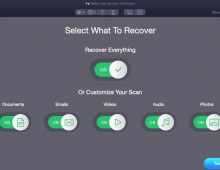
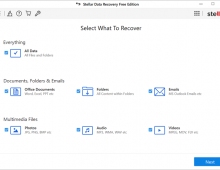
The overall GUI is the same as the version we saw for the Windows operating system, to recover files, there is also option to select "Recover Everything". The software supports 4K/2K sectors in the drive and many filesystems (APFS, HFS+, FAT32, NTFS, ExFAT, EXT2, EXT3, EXT4, CDFS, UDF). The Technician edition of the software supports Virtual Machine Recovery (VMDK, VDI, VHD, and VHDX), while data can be extracted from desktop/laptop hard drives, external hard drives, pen drives, memory cards, SSD drives, SD cards, etc. Mac-based systems do have extra protection, and the software supports data recovery from systems with T2 security chips and both Intel/M1, M2, M3, and M4 chips. 

Users also have a drive monitor software available.

Which can report the disk status, SMART, and other useful information about your internal/external HDD/SSDs.

Proceeding with the Recover From tab, we can select Volumes either internal or external.

The third option is to recover data from a nonbooting Mac.

You can also resume recovery, provided that you have already run a scan before.

Disk images also can be created for internal/external volumes/disks.

Under preferences, several options are present.

While there is a huge list of supported file types/names for almost all files you can imagine. Of course, users can add their file types if needed or tweak the existing ones.

macOS users have also more tools available with the Stellar Data Recovery software, like SpeedUp their system.

You need to assign full disk access for this function to work properly.

There are three different types of Speedup, Clean junk files, Privacy scan, or Speed optimizations.

Scanning our system, the software found several things that can be removed safely.

This function is only available for the retail builds of the Stellar Data Recovery and not for the Demo version.

Going back to the first tab, let's recover files from our system.

The software recommends disabling System Integrity Protection (SIP) to give even better results.

Instructions are given on how to achieve this.

After some time, our HDD was scanned and many files were found that could be recovered. The amount of time the software needs to scan your drive depends upon many factors, capacity, drive speed, file number, etc..

Files can be either in folders with corresponding categories (App, Video, Photo, Docs, Txt, etc)

Inside each folder, you can view the filename and file type.

The same applies also for photos

Users can also preview the deleted files that were found and can be recovered.

Files bigger than 1GB are not possible to recover, you need the full version, but up to that limit, the DEMO build will work just fine.


Review Pages

1. Introduction
2. Installation
3. Menus - GUI
4. Conclusion


Pages

  • « first
  • ‹ previous
  • 1
  • 2
  • 3
  • 4
  • next ›
  • last »

Stellar Data Recovery

Stellar

Tags: Stellar Data Recovery Stellar
Previous Post
EnGenius Wi-Fi 7
Next Post
Addlink P30 1TB Portable SSD

Related Posts

  • Stellar Data Recovery For Windows

  • Stellar SpeedUp Mac Software Review

  • Stellar Data Recovery MAC Edition

  • Stellar Data Recovery (Windows Edition)

Latest Reviews

NAS Security Is a Matter of Configuration Best Practices for Protecting Systems and Data
Enterprise & IT

NAS Security Is a Matter of Configuration Best Practices for Protecting Systems and Data

GMK TriggerKey
Gadgets

GMK TriggerKey

The Best Online Casino Games to Play on a Browser
Enterprise & IT

The Best Online Casino Games to Play on a Browser

be quiet! Light Wings Pro IO fan
Cooling Systems

be quiet! Light Wings Pro IO fan

Why Intelligent Firmware Matters More Than Peak Throughput in NAS Systems
Enterprise & IT

Why Intelligent Firmware Matters More Than Peak Throughput in NAS Systems

Popular News

MSI’s Latest AMD X870E MAX & EVO Series Motherboards

MSI’s Latest AMD X870E MAX & EVO Series Motherboards

COLORFUL Launches iGame B850M ULTRA Series Micro-ATX Motherboards

COLORFUL Launches iGame B850M ULTRA Series Micro-ATX Motherboards

COLORFUL Launches iGame B850I MINI OC V14 Motherboard

COLORFUL Launches iGame B850I MINI OC V14 Motherboard

COLORFUL Presents Limited Edition Chitu MAG-60 Magnetic Keyboard Inspired by the Year of the Horse

COLORFUL Presents Limited Edition Chitu MAG-60 Magnetic Keyboard Inspired by the Year of the Horse

COLORFUL Launches the iGame X870E VULCAN W OC Motherboard

COLORFUL Launches the iGame X870E VULCAN W OC Motherboard

COLORFUL Launches iGame X870E ULTRA-S V14 Motherboard

COLORFUL Launches iGame X870E ULTRA-S V14 Motherboard

COLORFUL Presents iGame Z890 ULTRA-S W and iGame Z890M ULTRA Z Motherboards

COLORFUL Presents iGame Z890 ULTRA-S W and iGame Z890M ULTRA Z Motherboards

COLORFUL Expands B850 Motherboard Lineup with New CVN, Battle-Ax, and MEOW Models

COLORFUL Expands B850 Motherboard Lineup with New CVN, Battle-Ax, and MEOW Models

Main menu

  • Home
  • News
  • Reviews
  • Essays
  • About
    • Submit News

    • Contact Us
    • Privacy

    • Promotion
    • Advertise

    • RSS Feed
  • About
  • Privacy
  • Contact Us
  • Promotional Opportunities @ CdrInfo.com
  • Advertise on out site
  • Submit your News to our site
  • RSS Feed