
Breaking News

SAMA Introduces the S32 WOOD, a Compact M-ATX Case Bundled with an 80 PLUS Gold PSU Thypoch Completes Simera-C Cine Prime Lineup with New 100mm T1.9 Lens CORSAIR Launches the RM1200e Power Supply with Built-in PinProtect GPU Overcurrent Protection and Platinum-certified Efficiency CORSAIR Changes the Game with PureVector, a Science-Based Personalized Aiming Technology, Launching Exclusively in the SABRE v3 PRO PureVector Mouse Series AMD FSR Upscaling 4.1 Boosts Frames and Image Quality on More Devices

logo

  • Share Us
    • Facebook
    • Twitter
  • Home
  • Home
  • News
  • Reviews
  • Essays
  • About
    • Submit News

    • Contact Us
    • Privacy

    • Promotion
    • Advertise

    • RSS Feed

Search form

Thermaltake Big Typhoon

Mar 22,2005 0

3. Performance/Overclocking


Review Pages

1. Introduction
2. Installation
3. Performance/Overclocking
4. Conclusion


Thermaltake Big Typhoon - 03 - Performance/Overclocking

To measure the CPU's temperature, we used SpeedFan v4.21 which provided us with real time monitoring and created a graph of the temperature over time. After letting the processor cool down in idle mode, we fired up Prime95 and ran the In-place large FFT test to heat it up to its maximum level. This is the graph of the temperature with the original Intel fansink:

The temperature starts at 36C and reaches 58C when running the stress test.

After installing the Big Typhoon, we again ran SpeedFan and watched as it produced the graph again.
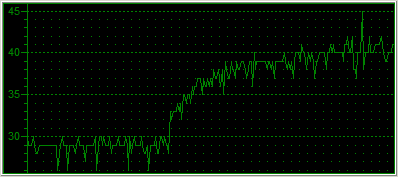
As you can see from the graph, the idle temperature is around 29 degrees Celsius. That's an amazing 7C drop for starters, and as the CPU started computing the Prime95 in-place FFT test, the temperature increased only up to 40 degrees, 18 degrees less than with the original Intel fansink.

Overclocking

The default settings for our Intel P4 LGA775 were 15 x 200MHz = 3.0GHz. In order to overclock our processor, we entered the BIOS and played around with the FSB clock and CPU Voltage settings. After some time experimenting with the FSB value, we concluded at setting the voltage to 1.6V and the FSB at 260MHz. This means the 3.0GHz P4 was now running at 15 x 260MHz = 3.9GHz.

At that speed, the system was able to boot and when running Prime95, which is very sensitive and hence ideal for identifying errors, reported all correct calculations. However, when trying to run 3D applications, the system would stall after a while and pop up an error message saying that the graphics card stopped responding.

So, we rebooted into the BIOS once again and set the FSB a little lower to 255MHz. The processor was now running excellently at 3.825GHz and both computational and 3D applications ran troublefree. Let's see the graph showing the temperature of the CPU starting from idle up to the same Prime95 torture test.
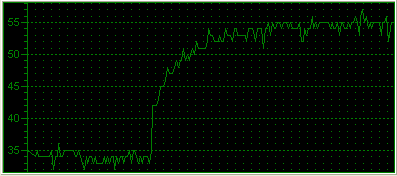
The idle temperature now starts from 35C due to the increased Voltage for the CPU. As we run the torture test, the line climbs up exponentially, stabilizing at around 55C.

With the installation of the Big Typhoon, we achieved a 825MHz increase in CPU clock while keeping the temperature at a lower level (2°C lower to be exact).


Review Pages

1. Introduction
2. Installation
3. Performance/Overclocking
4. Conclusion


Pages

  • « first
  • ‹ previous
  • 1
  • 2
  • 3
  • 4
  • next ›
  • last »

Thermaltake

Tags: Thermaltake
Previous Post
IOData AvelLink Player2
Next Post
Samsung TS-H552U

Related Posts

  • Thermaltake Launches AW360/420 AIO Liquid Cooler and WAir CPU Cooler for Workstations

  • Begin the Racing Journey with the Thermaltake GR300 Racing Simulator Cockpit

  • Thermaltake Unveils the Massive EXTREME with Cross-flow Fan

  • Thermaltake Releases the Toughpower TF3 1300W with Support for RTX50 Series GPUs

  • Thermaltake Unveils G6 Direct Drive Racing Wheel Bundle and GM5 3DOF Motion System

  • Thermaltake Launches the TT150 LED Bag in Different Sizes and New Colors

  • Thermaltake New TH V2 Ultra EX ARGB Sync AIO – Snow Edition is Now Available Worldwide

  • Thermaltake Coolers Support New-Gen Intel and AMD CPUs

Latest Reviews

be quiet! Light Wings Pro IO fan
Cooling Systems

be quiet! Light Wings Pro IO fan

Why Intelligent Firmware Matters More Than Peak Throughput in NAS Systems
Enterprise & IT

Why Intelligent Firmware Matters More Than Peak Throughput in NAS Systems

Fanxiang MP83 M.2 NVMe SSD Enclosure
Enterprise & IT

Fanxiang MP83 M.2 NVMe SSD Enclosure

Ugreen CM642 USB4.0 Enclosure
PC components

Ugreen CM642 USB4.0 Enclosure

be quiet! Dark Power 14 IO
PC components

be quiet! Dark Power 14 IO

Popular News

MSI’s Latest AMD X870E MAX & EVO Series Motherboards

MSI’s Latest AMD X870E MAX & EVO Series Motherboards

COLORFUL Launches iGame B850M ULTRA Series Micro-ATX Motherboards

COLORFUL Launches iGame B850M ULTRA Series Micro-ATX Motherboards

COLORFUL Presents Limited Edition Chitu MAG-60 Magnetic Keyboard Inspired by the Year of the Horse

COLORFUL Presents Limited Edition Chitu MAG-60 Magnetic Keyboard Inspired by the Year of the Horse

COLORFUL Launches iGame B850I MINI OC V14 Motherboard

COLORFUL Launches iGame B850I MINI OC V14 Motherboard

COLORFUL Launches the iGame X870E VULCAN W OC Motherboard

COLORFUL Launches the iGame X870E VULCAN W OC Motherboard

COLORFUL Presents iGame Z890 ULTRA-S W and iGame Z890M ULTRA Z Motherboards

COLORFUL Presents iGame Z890 ULTRA-S W and iGame Z890M ULTRA Z Motherboards

COLORFUL Expands B850 Motherboard Lineup with New CVN, Battle-Ax, and MEOW Models

COLORFUL Expands B850 Motherboard Lineup with New CVN, Battle-Ax, and MEOW Models

ASRock Adds Support for One Sub-Channel DRAM Module on Intel DDR5 Motherboards

ASRock Adds Support for One Sub-Channel DRAM Module on Intel DDR5 Motherboards

Main menu

  • Home
  • News
  • Reviews
  • Essays
  • About
    • Submit News

    • Contact Us
    • Privacy

    • Promotion
    • Advertise

    • RSS Feed
  • About
  • Privacy
  • Contact Us
  • Promotional Opportunities @ CdrInfo.com
  • Advertise on out site
  • Submit your News to our site
  • RSS Feed


