Breaking News

SAMA Introduces the S32 WOOD, a Compact M-ATX Case Bundled with an 80 PLUS Gold PSU Thypoch Completes Simera-C Cine Prime Lineup with New 100mm T1.9 Lens CORSAIR Launches the RM1200e Power Supply with Built-in PinProtect GPU Overcurrent Protection and Platinum-certified Efficiency CORSAIR Changes the Game with PureVector, a Science-Based Personalized Aiming Technology, Launching Exclusively in the SABRE v3 PRO PureVector Mouse Series AMD FSR Upscaling 4.1 Boosts Frames and Image Quality on More Devices

logo

  • Share Us
    • Facebook
    • Twitter
  • Home
  • Home
  • News
  • Reviews
  • Essays
  • About
    • Submit News

    • Contact Us
    • Privacy

    • Promotion
    • Advertise

    • RSS Feed

Search form

Thermaltake Blue Orb II

Oct 26,2005 0

2. Installation


Review Pages

1. Introduction
2. Installation
3. Performance
4. Conclusion


The Blue Orb II can be attached to both Intel 775 and AMD 939 sockets. Let's start with an AMD 939 socket based motherboard.

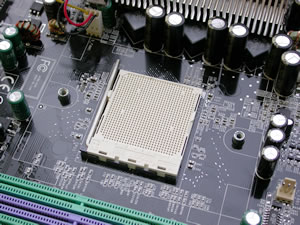
The 939 socket with the stock mounting system
...remove the plastic base...

Begin by removing the old cooler and cleaning up any previous thermal compound that may still be on the CPU, making sure you leave no residue or scraps of compound whatsoever. Take note of the stock mounting points which will probably differ from those on Thermaltake's backplate. In that case, you'll have to remove the stock backplate from your motherboard.
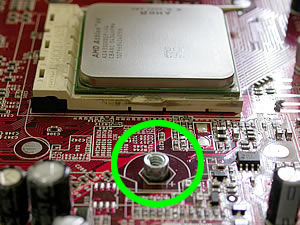
note the stock mounting points will probably differ from those on Thermaltake's backplate...
the stock backplate is sometimes compatible with the Blue Orb II
if not, one is included in the retail package...

Next step is to use the two screws with which to mount the Thermaltake cooler. This is necessary with AMD based processors...
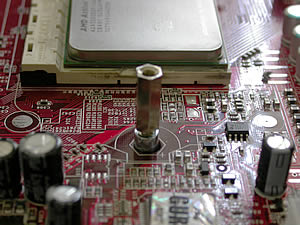
the screws required with AMD processors...

As soon as you've done this, you're almost finished. Just make sure you use some thermal compound before installing the Blue Orb II.

don't forget the thermal compound...

Last thing, mounting the cooler on the thermaltake brackets, as describe below.

mounting the cooler on the thermaltake brackets...
Exactly as in case with the Golden Orb II

On Intel motherboards, no backplate is needed at all... however you must remove the board from the PC case in order to put the screws on the back.
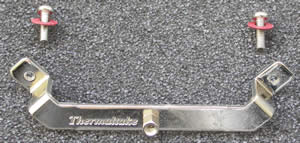
the screws needed for the Intel processors...

As soon as you install the brackets, the rest is easy... almost the same as in case with AMD.

the first installation could prove a little bit harder, more pressure must be applied...

Not much to do now but to plug the 3 pin power connector onto the motherboard and the cooler is all set and ready to work...

the 3 pin connector...

Noticable volume, don't you think?

And the outcome of this process...

The blue glow from the fan is really impressive...

A very helpful video at Thermaltake's official website will provide you with further details about the installation process. Find more here.

The installation procedure is simple in the case of AMD platforms, there being no need to replace the back plate. But with Intel 775 platforms, you'll have to remove the motherboard from your PC, something that isn't very convinient. This is something to keep in mind. Notice the most important thing with a cooling system is how efficient it is. Let us check the performance in the following page...


Review Pages

1. Introduction
2. Installation
3. Performance
4. Conclusion


Pages

  • « first
  • ‹ previous
  • 1
  • 2
  • 3
  • 4
  • next ›
  • last »

Thermaltake

Tags: Thermaltake
Previous Post
Plasmon UDO30D-SE
Next Post
Thermaltake Max4

Related Posts

  • Thermaltake Launches AW360/420 AIO Liquid Cooler and WAir CPU Cooler for Workstations

  • Begin the Racing Journey with the Thermaltake GR300 Racing Simulator Cockpit

  • Thermaltake Unveils the Massive EXTREME with Cross-flow Fan

  • Thermaltake Releases the Toughpower TF3 1300W with Support for RTX50 Series GPUs

  • Thermaltake Unveils G6 Direct Drive Racing Wheel Bundle and GM5 3DOF Motion System

  • Thermaltake Launches the TT150 LED Bag in Different Sizes and New Colors

  • Thermaltake New TH V2 Ultra EX ARGB Sync AIO – Snow Edition is Now Available Worldwide

  • Thermaltake Coolers Support New-Gen Intel and AMD CPUs

Latest Reviews

be quiet! Light Wings Pro IO fan
Cooling Systems

be quiet! Light Wings Pro IO fan

Why Intelligent Firmware Matters More Than Peak Throughput in NAS Systems
Enterprise & IT

Why Intelligent Firmware Matters More Than Peak Throughput in NAS Systems

Fanxiang MP83 M.2 NVMe SSD Enclosure
Enterprise & IT

Fanxiang MP83 M.2 NVMe SSD Enclosure

Ugreen CM642 USB4.0 Enclosure
PC components

Ugreen CM642 USB4.0 Enclosure

be quiet! Dark Power 14 IO
PC components

be quiet! Dark Power 14 IO

Popular News

MSI’s Latest AMD X870E MAX & EVO Series Motherboards

MSI’s Latest AMD X870E MAX & EVO Series Motherboards

COLORFUL Launches iGame B850M ULTRA Series Micro-ATX Motherboards

COLORFUL Launches iGame B850M ULTRA Series Micro-ATX Motherboards

COLORFUL Presents Limited Edition Chitu MAG-60 Magnetic Keyboard Inspired by the Year of the Horse

COLORFUL Presents Limited Edition Chitu MAG-60 Magnetic Keyboard Inspired by the Year of the Horse

COLORFUL Launches iGame B850I MINI OC V14 Motherboard

COLORFUL Launches iGame B850I MINI OC V14 Motherboard

COLORFUL Launches the iGame X870E VULCAN W OC Motherboard

COLORFUL Launches the iGame X870E VULCAN W OC Motherboard

COLORFUL Presents iGame Z890 ULTRA-S W and iGame Z890M ULTRA Z Motherboards

COLORFUL Presents iGame Z890 ULTRA-S W and iGame Z890M ULTRA Z Motherboards

COLORFUL Expands B850 Motherboard Lineup with New CVN, Battle-Ax, and MEOW Models

COLORFUL Expands B850 Motherboard Lineup with New CVN, Battle-Ax, and MEOW Models

ASRock Adds Support for One Sub-Channel DRAM Module on Intel DDR5 Motherboards

ASRock Adds Support for One Sub-Channel DRAM Module on Intel DDR5 Motherboards

Main menu

  • Home
  • News
  • Reviews
  • Essays
  • About
    • Submit News

    • Contact Us
    • Privacy

    • Promotion
    • Advertise

    • RSS Feed
  • About
  • Privacy
  • Contact Us
  • Promotional Opportunities @ CdrInfo.com
  • Advertise on out site
  • Submit your News to our site
  • RSS Feed