Breaking News

CyberPowerPC Expands AI Workstation Line with Compact AMD Ryzen AI Max 395-Powered Desktop PlayStation Plus Monthly Games for December 2026 Kioxia to Showcase XL-FLASH Generation 3 Technology Geometric Future Debuts a Color-Matching PSU and Fan Lineup: Alpha Series and Squama 3005​ Nikon Announces Firmware Version 2.00 for the Nikon ZR

logo

  • Share Us
    • Facebook
    • Twitter
  • Home
  • Home
  • News
  • Reviews
  • Essays
  • About
    • Submit News

    • Contact Us
    • Privacy

    • Promotion
    • Advertise

    • RSS Feed

Search form

VapoChill Micro series

Nov 7,2005 0

2. Installation


Review Pages

1. Introduction
2. Installation
3. Performance
4. Conclusion


The first thing to keep in mind before getting a new CPU cooling system is how easily the new cooling system can be installed.

The Asetek VapoChill can be installed on both Intel 775 and AMD 939 sockets. Let's start with an AMD 939 socket based motherboard.

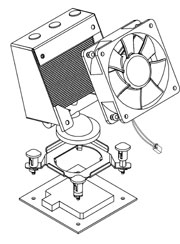
The 939 socket with the stock mounting system

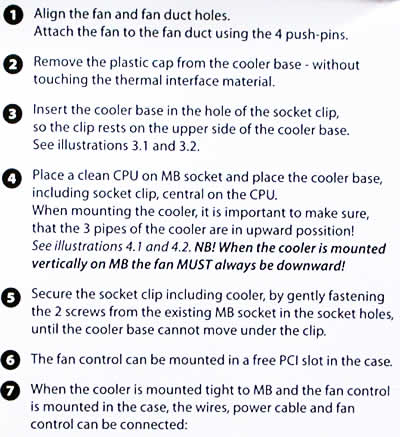
Before mounting the VapoChill Micro cooler on the processor, make sure you have removed the plastic strip protecting the thermal compound on the base. Also very importantly, clean the CPU of any previous thermal compound may still be on it, making sure there aren't any traces of old compound whatsoever.
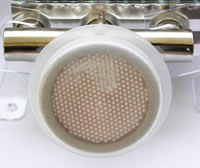
...remove the plastic cover strip...
...no extra thermal compound is necessary.

There is no need to remove the motherboard from the PC case in order to install the VapoChill Micro cooler. This is an advantage...

The above image is from the manual and describes exactly how the cooler should be installed. It is simple.
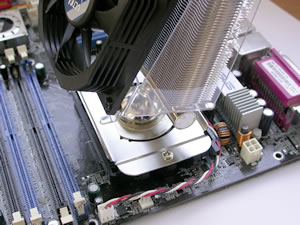
On Intel CPU based motherboards, the installation is as easy as installing the stock cooler. All you have to do is to mount the four mounting brackets and that's it.. Couldn't be simpler. :-)
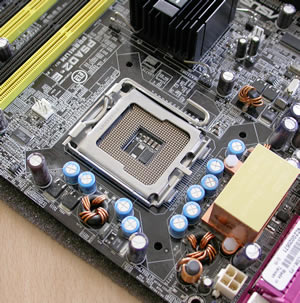
the P4 775 socket...as simple as it gets

What you don't usually see is the mounting method being the same as Intel's.
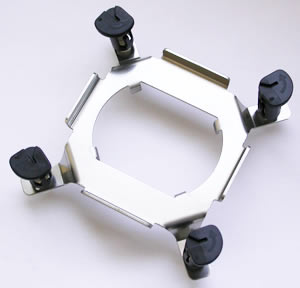
same as stock mounting method...


...remove the plastic base...

In the case of the P4 S478, the installation process is described in the following drawing from Asetek.

Exactly as in the case with the Golden Orb II

The final step is to install the fan regulator. It is not necessary to do this, the cooling system will work even without the regulator. If you read the instructions carefully, installation is simple and easy.

 
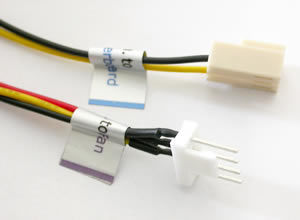
There are labels on each cable for easier installation.

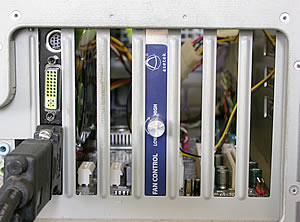
Installation of the regulator on the PC case...

The installation of the regulator on the back of the PC case is also easy. But you'll use up a PCI slot.

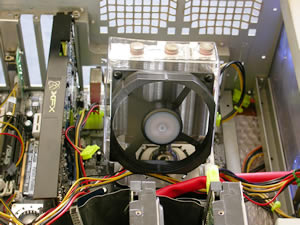
As soon as the regulator is installed, everything is ready and we can turn on our system.

up and working...


Review Pages

1. Introduction
2. Installation
3. Performance
4. Conclusion


Pages

  • « first
  • ‹ previous
  • 1
  • 2
  • 3
  • 4
  • next ›
  • last »

asetek

Tags: asetek
Previous Post
MSI K8N Diamond
Next Post
XFX 7800GT

Related Posts

  • Noctua and Asetek Announce Flagship AIO Liquid Coolers

  • Asetek SimSports launches Next-Gen steering wheels and pedals

  • Asetek Announces Revolutionary New AI Optimized Cold Plate Solution

Latest Reviews

NAS Security Is a Matter of Configuration Best Practices for Protecting Systems and Data
Enterprise & IT

NAS Security Is a Matter of Configuration Best Practices for Protecting Systems and Data

GMK TriggerKey
Gadgets

GMK TriggerKey

The Best Online Casino Games to Play on a Browser
Enterprise & IT

The Best Online Casino Games to Play on a Browser

be quiet! Light Wings Pro IO fan
Cooling Systems

be quiet! Light Wings Pro IO fan

Why Intelligent Firmware Matters More Than Peak Throughput in NAS Systems
Enterprise & IT

Why Intelligent Firmware Matters More Than Peak Throughput in NAS Systems

Popular News

MSI’s Latest AMD X870E MAX & EVO Series Motherboards

MSI’s Latest AMD X870E MAX & EVO Series Motherboards

COLORFUL Launches iGame B850M ULTRA Series Micro-ATX Motherboards

COLORFUL Launches iGame B850M ULTRA Series Micro-ATX Motherboards

COLORFUL Launches iGame B850I MINI OC V14 Motherboard

COLORFUL Launches iGame B850I MINI OC V14 Motherboard

COLORFUL Presents Limited Edition Chitu MAG-60 Magnetic Keyboard Inspired by the Year of the Horse

COLORFUL Presents Limited Edition Chitu MAG-60 Magnetic Keyboard Inspired by the Year of the Horse

COLORFUL Launches the iGame X870E VULCAN W OC Motherboard

COLORFUL Launches the iGame X870E VULCAN W OC Motherboard

COLORFUL Launches iGame X870E ULTRA-S V14 Motherboard

COLORFUL Launches iGame X870E ULTRA-S V14 Motherboard

COLORFUL Presents iGame Z890 ULTRA-S W and iGame Z890M ULTRA Z Motherboards

COLORFUL Presents iGame Z890 ULTRA-S W and iGame Z890M ULTRA Z Motherboards

COLORFUL Expands B850 Motherboard Lineup with New CVN, Battle-Ax, and MEOW Models

COLORFUL Expands B850 Motherboard Lineup with New CVN, Battle-Ax, and MEOW Models

Main menu

  • Home
  • News
  • Reviews
  • Essays
  • About
    • Submit News

    • Contact Us
    • Privacy

    • Promotion
    • Advertise

    • RSS Feed
  • About
  • Privacy
  • Contact Us
  • Promotional Opportunities @ CdrInfo.com
  • Advertise on out site
  • Submit your News to our site
  • RSS Feed