
Breaking News

SAMA Introduces the S32 WOOD, a Compact M-ATX Case Bundled with an 80 PLUS Gold PSU Thypoch Completes Simera-C Cine Prime Lineup with New 100mm T1.9 Lens CORSAIR Launches the RM1200e Power Supply with Built-in PinProtect GPU Overcurrent Protection and Platinum-certified Efficiency CORSAIR Changes the Game with PureVector, a Science-Based Personalized Aiming Technology, Launching Exclusively in the SABRE v3 PRO PureVector Mouse Series AMD FSR Upscaling 4.1 Boosts Frames and Image Quality on More Devices

logo

  • Share Us
    • Facebook
    • Twitter
  • Home
  • Home
  • News
  • Reviews
  • Essays
  • About
    • Submit News

    • Contact Us
    • Privacy

    • Promotion
    • Advertise

    • RSS Feed

Search form

Windows Vista Public Beta 1 - Part 2

Aug 29,2005 0

19. Other improvements and Tweaks


Review Pages

1. Introduction
2. Technical Improvements Page 1
3. Technical Improvements Page 2
4. Technical Improvements Page 3
5. Technical Improvements Page 4
6. Technical Improvements Page 5
7. Technical Improvements Page 6
8. Technical Improvements Page 7
9. Technical Improvements Page 8
10. Visual Improvements & New features Page 1
11. Visual Improvements & New features Page 2
12. Visual Improvements & New features Page 3
13. Visual Improvements & New features Page 4
14. Visual Improvements & New features Page 5
15. Visual Improvements & New features Page 6
16. Visual Improvements & New features Page 7
17. New Applications Page 1
18. New Applications Page 2
19. Other improvements and Tweaks
20. Current Bugs and other Problems
21. Final thoughts


Except for the usual new features that Windows Vista has delivered including visual changes, I have found some other smaller improvements that I would like to share with you.

Changes in some drop down menus:

When you right click on a Shortcut, a "Find Target" link can be found at the bottom of the menu. Very convenient.

Click to enlarge

When a user Renamed a file in any previous releases and show extensions was enabled, by default Windows highlighted the whole filename including the extension. Now it highlights only the name part without the extension. Very helpful for users like me that use Windows with the extensions visible.

When a user performs a search, he can now resize the details column to fit in the screen.

Click to enlarge

Task dialogs and confirmation messages have also been improved. See the screenshots below:
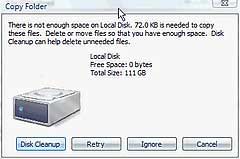
Click to enlarge
Click to enlarge Click to enlarge
Click to enlarge
Task Dialogs, confirmation messages and other screenshots


Review Pages

1. Introduction
2. Technical Improvements Page 1
3. Technical Improvements Page 2
4. Technical Improvements Page 3
5. Technical Improvements Page 4
6. Technical Improvements Page 5
7. Technical Improvements Page 6
8. Technical Improvements Page 7
9. Technical Improvements Page 8
10. Visual Improvements & New features Page 1
11. Visual Improvements & New features Page 2
12. Visual Improvements & New features Page 3
13. Visual Improvements & New features Page 4
14. Visual Improvements & New features Page 5
15. Visual Improvements & New features Page 6
16. Visual Improvements & New features Page 7
17. New Applications Page 1
18. New Applications Page 2
19. Other improvements and Tweaks
20. Current Bugs and other Problems
21. Final thoughts


Pages

  • « first
  • ‹ previous
  • …
  • 13
  • 14
  • 15
  • 16
  • 17
  • 18
  • 19
  • 20
  • 21
  • next ›
  • last »

Windows

Tags: Windows
Previous Post
DVD Technical Guide
Next Post
Pioneer DVR-110D

Related Posts

  • Microsoft latest update for Windows 11 includes support for Android applications

  • GIGABYTE Motherboards Feature TPM 2.0 + BIOS Function to Support Windows 11 Upgrade

  • Introducing Windows 11

  • Migrate Windows Installation to SSD

  • Microsoft Works on New Windows logo and App Icons

  • Microsoft Talks About a "Modern OS"

  • Visual Studio Supports Development of 64-bit Apps for Windows 10 on ARM

  • Next Windows version Coming In 2015: report

Latest Reviews

be quiet! Light Wings Pro IO fan
Cooling Systems

be quiet! Light Wings Pro IO fan

Why Intelligent Firmware Matters More Than Peak Throughput in NAS Systems
Enterprise & IT

Why Intelligent Firmware Matters More Than Peak Throughput in NAS Systems

Fanxiang MP83 M.2 NVMe SSD Enclosure
Enterprise & IT

Fanxiang MP83 M.2 NVMe SSD Enclosure

Ugreen CM642 USB4.0 Enclosure
PC components

Ugreen CM642 USB4.0 Enclosure

be quiet! Dark Power 14 IO
PC components

be quiet! Dark Power 14 IO

Popular News

MSI’s Latest AMD X870E MAX & EVO Series Motherboards

MSI’s Latest AMD X870E MAX & EVO Series Motherboards

COLORFUL Launches iGame B850M ULTRA Series Micro-ATX Motherboards

COLORFUL Launches iGame B850M ULTRA Series Micro-ATX Motherboards

COLORFUL Presents Limited Edition Chitu MAG-60 Magnetic Keyboard Inspired by the Year of the Horse

COLORFUL Presents Limited Edition Chitu MAG-60 Magnetic Keyboard Inspired by the Year of the Horse

COLORFUL Launches iGame B850I MINI OC V14 Motherboard

COLORFUL Launches iGame B850I MINI OC V14 Motherboard

COLORFUL Launches the iGame X870E VULCAN W OC Motherboard

COLORFUL Launches the iGame X870E VULCAN W OC Motherboard

COLORFUL Presents iGame Z890 ULTRA-S W and iGame Z890M ULTRA Z Motherboards

COLORFUL Presents iGame Z890 ULTRA-S W and iGame Z890M ULTRA Z Motherboards

COLORFUL Expands B850 Motherboard Lineup with New CVN, Battle-Ax, and MEOW Models

COLORFUL Expands B850 Motherboard Lineup with New CVN, Battle-Ax, and MEOW Models

ASRock Adds Support for One Sub-Channel DRAM Module on Intel DDR5 Motherboards

ASRock Adds Support for One Sub-Channel DRAM Module on Intel DDR5 Motherboards

Main menu

  • Home
  • News
  • Reviews
  • Essays
  • About
    • Submit News

    • Contact Us
    • Privacy

    • Promotion
    • Advertise

    • RSS Feed
  • About
  • Privacy
  • Contact Us
  • Promotional Opportunities @ CdrInfo.com
  • Advertise on out site
  • Submit your News to our site
  • RSS Feed


