
Breaking News

DeepCool Launches the LT360 VISION ARGB Noctua and Asetek Announce Flagship AIO Liquid Coolers Toshiba Begins Sampling of 30-34 TB SMR Nearline Hard Disk Drives ASUS ROG Strix Laptop Lineup Returns With the Latest Intel Core Ultra 9 290HX Plus Processors EnGenius Brings AI-Powered Analytics and Sophisticated Cloud Management to Existing ONVIF Cameras

logo

  • Share Us
    • Facebook
    • Twitter
  • Home
  • Home
  • News
  • Reviews
  • Essays
  • Forum
  • Legacy
  • About
    • Submit News

    • Contact Us
    • Privacy

    • Promotion
    • Advertise

    • RSS Feed
    • Site Map

Search form

Nero Recode 2

Dec 5,2003 0

4. Remake a DVD


Review Pages

1. Introduction
2. DVD9 to DVD5
3. DVD5 to MPEG4
4. Remake a DVD


Nero Recode 2 software - Page 04

Remake a DVD

This time choose "Remake a DVD". This is the screen you will see after your selection:
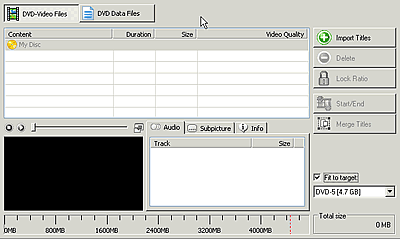
Once again you import the titles you want, even if they are from different movies. You can create your own DVD using parts from different DVD sources, remove subtitles or audio tracks, trim the movie and fit it in a blank 4.7GB DVD disc. The settings are familiar with those in the previous pages. If you read carefully the two other projects we have described, you will easy manage to continue with this one.

This time of course you can burn the compilation you have chosen in a 4.7 GB media or to your hard drive. The output format is either DVD-Video or DVD ISO/UDF (data). No MPEG-4 encoding is available in this task.

In case of DVD-Video, user should import DVD files from a Video TS folder on his hard disk. Note that Nero Recode 2 will only work with VOB, IFO and BUP files. You cannot import MPEG, AVI, WMV, ASF, MP4 or DV files directly.

Of course there are many other setting that will probably make your work easier. We hope you have get a basic idea of the software. More information will be available very soon. Stay tuned!


Review Pages

1. Introduction
2. DVD9 to DVD5
3. DVD5 to MPEG4
4. Remake a DVD


Pages

  • « first
  • ‹ previous
  • 1
  • 2
  • 3
  • 4

Tags:
Previous Post
Optorite DD0401 Dual DVD Recorder
Next Post
Cyberdrive DX082D DVD+RW

Related Posts

Latest Reviews

In the Age of AI Phishing, the Best User Experience Might Be the One That Feels Safest
Enterprise & IT

In the Age of AI Phishing, the Best User Experience Might Be the One That Feels Safest

SoundPeats C30
Consumer Electronics

SoundPeats C30

Why Streaming Live Casino Games Demands Smarter Tech
Enterprise & IT

Why Streaming Live Casino Games Demands Smarter Tech

Kioxia Exceria Plus G3 512GB microSD
Cameras

Kioxia Exceria Plus G3 512GB microSD

SoundPeats Cove Pro
Consumer Electronics

SoundPeats Cove Pro

Popular News

COLORFUL Presents CVN X870 ARK FROZEN Motherboard for AMD Ryzen 9000 CPUs

COLORFUL Presents CVN X870 ARK FROZEN Motherboard for AMD Ryzen 9000 CPUs

TEAMGROUP Launches EXPERT P34F Find My External SSD

TEAMGROUP Launches EXPERT P34F Find My External SSD

Samsung announces Galaxy Tab S11 and Galaxy S25 FE series

Samsung announces Galaxy Tab S11 and Galaxy S25 FE series

Viltrox Showcases Upcoming Lens Lineup and New TTL Flash at IBC 2025

Viltrox Showcases Upcoming Lens Lineup and New TTL Flash at IBC 2025

CORSAIR announces Vanguard Pro 96 and Vanguard 96 Gaming Keyboards

CORSAIR announces Vanguard Pro 96 and Vanguard 96 Gaming Keyboards

Panasonic Introduces the First Ultra-Telephoto Zoom Lens in the LUMIX S Series

Panasonic Introduces the First Ultra-Telephoto Zoom Lens in the LUMIX S Series

MSI Launches DATAMAG 40Gbps Magnetic Portable SSD

MSI Launches DATAMAG 40Gbps Magnetic Portable SSD

MSI Launches FORGE GK600 TKL WIRELESS Special Edition Compact Mechanical Keyboard

MSI Launches FORGE GK600 TKL WIRELESS Special Edition Compact Mechanical Keyboard

Main menu

  • Home
  • News
  • Reviews
  • Essays
  • Forum
  • Legacy
  • About
    • Submit News

    • Contact Us
    • Privacy

    • Promotion
    • Advertise

    • RSS Feed
    • Site Map
  • About
  • Privacy
  • Contact Us
  • Promotional Opportunities @ CdrInfo.com
  • Advertise on out site
  • Submit your News to our site
  • RSS Feed



