Breaking News

ASUS Announces T1 GeForce RTX 5070 and RTX 5060 Ti Graphics Cards COLORFUL Launches iGame B850M ULTRA Series Micro-ATX Motherboards Sony Unveils 1000X THE COLLEXION Samsung Launches Next-Gen Odyssey, ViewFinity and The Movingstyle Essential Monitors LG Electronics Introduces World’s First Native 1000Hz Full HD Gaming Monitor

logo

  • Share Us
    • Facebook
    • Twitter
  • Home
  • Home
  • News
  • Reviews
  • Essays
  • Forum
  • Legacy
  • About
    • Submit News

    • Contact Us
    • Privacy

    • Promotion
    • Advertise

    • RSS Feed
    • Site Map

Search form

Terramaster F4-210 NAS Server

Nov 20,2020 0

5. Apps/Performance


Review Pages

1. Introduction
2. The Package/Overview
3. Install/Power up
4. TOS System
5. Apps/Performance
6. Conclusion


The Terramaster F4-210 NAS server offers many ways to interact with well known online services. In short you will find the following pre-compiled apps with the following categories:

Backup

  • Alibaba Cloud OSS Sync
  • Amazon S3 Sync
  • AOMEI Backupper
  • Box Sync
  • Dropbox Synce
  • Duple Backup Vault
  • Duple Backup
  • Google Drive Synce
  • Koofr Synce
  • Megadisk Synce
  • OneDrive Synce
  • OpenDrive Synce
  • pCloud Synce
  • USB copy
  • Yandex Disk Synce

Business

  • Docker
  • Mail Server
  • WordPress

Tools

  • Apache Tomcat
  • Git
  • Java Virtual Machine
  • MariaDB
  • Node.js
  • phpMyAdmin
  • Python3
  • SVN Server

Multimedia

  • DLNA Media Server
  • Emby Server
  • Itunes Server
  • Plex Media Server

Security

  • Clam Antivirus
  • Snapshot

Utilities

  • Aria2
  • BackBlaze B2 Sync
  • chryrp
  • coppermine
  • e107_cms
  • FreshRSS
  • IceHrm
  • iSCSI Target
  • Joomla
  • LimeSurvey
  • MantisBT
  • Matomo
  • MyBB
  • Net2FTP
  • opencart
  • OrangeHrm
  • PDF Reader
  • phpBB
  • PodcastGenerator
  • PrestaShop
  • Transmission
  • Text Editor
  • Vtiger CRM
  • Web Server

In our case we installed the Plex Media server app to test its performance.
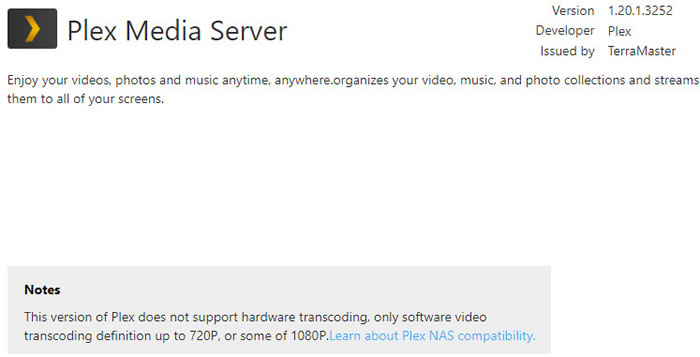
As it seems the compatibility of the F4-210 NAS server with the Plex Media Server is limited to software transcoding SD/HD 720p and some HD 1080p files. 4K media serving is not supported due to harware limitations. Also hardware accelerated transcoding also isnt supported (only with Intel based systems) as the official Plex compatibility page shows.

Click to enlarge!

Setup the Plex Media Server is rather easy after installing the plug-in you need to get into the desktop area of NAS and you will find an icon at the bottom left area. From there you can start the setup process. Via the local network we trasferred our data to the /public folder for the NAS server and into the Plex Media Server we added a libary with the following path (/mnt/md0/public/Media) to be possible to scan your media files.

When installing the Plex server we got around 36% cpu usage.

The performance when copying files was very good with almost full local 1Gbit network bandwitdh and around 45% cpu usage.

When playing an 1080p x265 source file over local ethernet network, the system cpu usage was around 100% and with frequent video drops (automatic), making it impossible to view. The system also alerted us with a notification about very high cpu usage:

Switching to 1080p x264 source files,things become much easier with around 3~10% cpu usage with original file quality. Copying and playback at the same time 1080p x264 file seems to produce around ~75% cpu usage which doesnt affect playback performance.

Passing to more advanced tests we can see that the 1080p x264 content is playable and even multi-channel audio files aren't an issue with the Plex media server. On the other hand x265 files aren't playable at all, even with low bitrate files.

media format
max playback at original quality via local network
cpu usage %
x264 8bit
jellyfish-110-mbps-hd-h264.mkv
7~10%
x264 10bit
test_10bitvideo.mkv (takes times to load but plays OK)
100%
x265
not playable even the lowest bitrate jellyfish-3-mbps-hd-hevc
100%
Dolby Digital 7.1
yes (x264 file)
35%
TruHD 7.1
DTS HD-MA 7.1
DTS-X


Review Pages

1. Introduction
2. The Package/Overview
3. Install/Power up
4. TOS System
5. Apps/Performance
6. Conclusion


Pages

  • « first
  • ‹ previous
  • 1
  • 2
  • 3
  • 4
  • 5
  • 6
  • next ›
  • last »

TerraMaster

Tags: TerraMaster
Previous Post
8 Best Tips to Improve MacBook Performance
Next Post
How Smartphones are Changing Industries

Related Posts

  • TerraMaster announces D1 SSD Rugged Enclosure

  • TerraMaster Spring Sale 2026 Upgraded Up To 30%

  • TerraMaster Spring Sale Up to 30% Off NAS & DAS Storage

  • TerraMaster launces D1 SSD Pro 80Gbps Thunderbolt 5 Enclosure

  • TerraMaster TOS 7 Beta Now Open Worldwide

  • TerraMaster Black Friday & Cyber Monday 2025 Mega Sale Is Here

  • TerraMaster Unveils TOS 7 Insider Preview

  • TerraMaster Launches F2-425 2-Bay NAS

Latest Reviews

The Technology Stack Behind Modern Digital Gaming Platforms
Consumer Electronics

The Technology Stack Behind Modern Digital Gaming Platforms

be quiet! Dark Rock Pro 6
Cooling Systems

be quiet! Dark Rock Pro 6

How Online Casinos Use Encryption, Verification, and Risk Controls to Build User Trust
Enterprise & IT

How Online Casinos Use Encryption, Verification, and Risk Controls to Build User Trust

Why Low-Latency Infrastructure Matters More Than Raw Specs
Enterprise & IT

Why Low-Latency Infrastructure Matters More Than Raw Specs

In the Age of AI Phishing, the Best User Experience Might Be the One That Feels Safest
Enterprise & IT

In the Age of AI Phishing, the Best User Experience Might Be the One That Feels Safest

Popular News

TEAMGROUP Launches EXPERT P34F Find My External SSD

TEAMGROUP Launches EXPERT P34F Find My External SSD

CORSAIR announces Vanguard Pro 96 and Vanguard 96 Gaming Keyboards

CORSAIR announces Vanguard Pro 96 and Vanguard 96 Gaming Keyboards

Samsung announces Galaxy Tab S11 and Galaxy S25 FE series

Samsung announces Galaxy Tab S11 and Galaxy S25 FE series

Viltrox Showcases Upcoming Lens Lineup and New TTL Flash at IBC 2025

Viltrox Showcases Upcoming Lens Lineup and New TTL Flash at IBC 2025

MSI Launches FORGE GK600 TKL WIRELESS Special Edition Compact Mechanical Keyboard

MSI Launches FORGE GK600 TKL WIRELESS Special Edition Compact Mechanical Keyboard

Panasonic Introduces the First Ultra-Telephoto Zoom Lens in the LUMIX S Series

Panasonic Introduces the First Ultra-Telephoto Zoom Lens in the LUMIX S Series

MSI Launches DATAMAG 40Gbps Magnetic Portable SSD

MSI Launches DATAMAG 40Gbps Magnetic Portable SSD

Viltrox Joins the L-Mount Alliance, Expanding Creative Possibilities

Viltrox Joins the L-Mount Alliance, Expanding Creative Possibilities

Main menu

  • Home
  • News
  • Reviews
  • Essays
  • Forum
  • Legacy
  • About
    • Submit News

    • Contact Us
    • Privacy

    • Promotion
    • Advertise

    • RSS Feed
    • Site Map
  • About
  • Privacy
  • Contact Us
  • Promotional Opportunities @ CdrInfo.com
  • Advertise on out site
  • Submit your News to our site
  • RSS Feed