
Stellar SpeedUp Mac Software Review
1. Introduction
As we use our Mac, several unwanted applications, large files that are no longer required, old files, cache files downloaded while internet surfing, widgets, plug-ins and many more keep growing inside the hard drive. These files use valuable drive space and decrease the system's speed and performance. The Stellar SpeedUp MAC software promises to power up your existing MAC installation and give you control over your system.
SpeedUp Mac cleans up drive space and enhances system performance by removing these unwanted files, duplicates and unused applications from Macintosh hard drive. The software can also work as an Uninstaller that removes avoidable applications, widgets and plug-ins from the system. You can also remove login items through this software. SpeedUp Mac is a complete booster for your Mac system.

Key Features:
- Remove Junk: Erase unwanted Cache and Log files, Language files, Mail Attachments, iTunes Junks, Photo Junks, Download Junks, System Junks, Trashes and Leftovers and Manage Extensions from the boot volume.
- Uninstall Applications and Delete Unwanted Files: Uninstall unwanted applications by simple drag and drop, remove plugins and widgets, search and erase duplicate files and language packs.
- SpeedUp Non-Boot Volume: The software lists all the secondary volumes of your Mac and scans to remove the Language Files, Large files and Duplicate files from them.
- Clean up Mac Removable Devices: The software also helps to remove unwanted junk files from the removable devices when connected to the Mac system.
- Optimize System Memory: The software can refresh and clean up the system memory by removing memory pages that are no longer needed.
- Maintain Ignore list: Allows you to add or remove large files or applications that you don't want to scan.
- Disable Login Items: Disable the unwanted login items that reduce the speed of the system while booting up.
- Filters to Refine Search: The software provides various filters to refine your search for removing large or duplicate files.
- Scheduler to Automate Tasks: Define Scheduler preferences to perform various SpeedUp Mac tasks at a desired time and frequency.
- Operating System: Compatible with macOS 10.9 and above.
The SpeedUp Mac supports macOS Big Sur 11, Catalina 10.15, Mojave 10.14, 10.13, 10.12, 10.11, 10.10 & 10.9 with only Intel compatible processors (x86, x64) and asks for a minimum 4 GB memory (8 GB is recommended).
Stellar SpeedUp Mac software comes with a 30-day free trial that lets you access all its features with complete confidence. The software cleans up Mac start-up disk by deleting inessential items and boosting the performance of a slow Macintosh HD. In short, you can use the software free for 30 days and access all its features. After the 30-days trial, you would need to activate the software for continued usage.
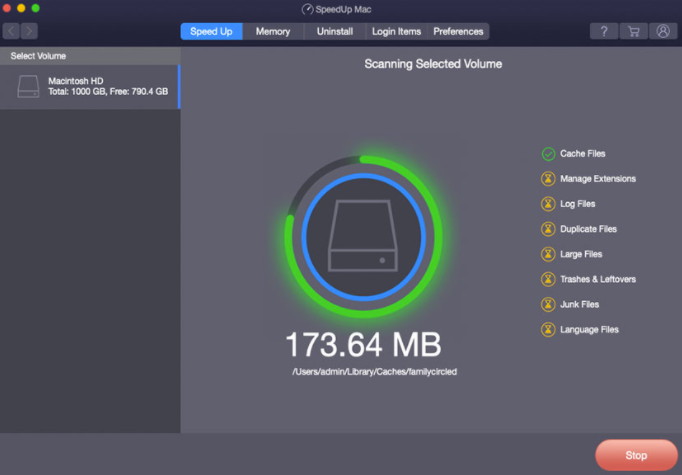
Some typical scenarios are listed below on how to use the software:
- You can use this free Mac speedup software to remove user cache, iOS cache, system cache, duplicate pictures, videos, music files, and unwanted large files. It also removes the files and leftovers that are present in Trash.
- You can remove duplicate files from Aperture, iWork, iMovie, iPhoto, and iTunes. You can remove duplicates data from Documents, Movies, Compressed Files, Applications, and Sound files.
- You can clean up junks, duplicates and large files from an external hard drive or SD card is possible with this free SpeedUp Mac software.
- SpeedUp Mac software has a built-in Mac Uninstaller to provide the user with a single interface for removing a selected application and its associated files completely from macOS. At times, Mac's default drag-drop feature fails to remove an application entirely. This leaves behind associated data from the application due to improper uninstallation. SpeedUp Mac addresses this issue and ensures that no associated files remain on the disk drive.
- When you drag an application into Trash, SpeedUp Mac Automatic Uninstaller is launched which pops up the message. The feature which is toggled ON by default lets you to directly uninstall an application instead of deleting it.
- The software cannot restore the language files, once they are deleted. However, you can get them back by reinstalling the macOS. If in case, those language files belong to any application, you need to reinstall the application to get them back.
- Login items can be those frequently used application, document, server's Internet Location file, or other items that auto-start at boot time and open automatically when you log in to your Mac. This increases the booting time of your Mac system. To decrease the booting time, you are advised to remove the unwanted login items.
- SpeedUp Mac can scan user cache, iOS cache, system cache, user logs, system logs, and system junk including universal binaries and language files from the applications in the system. It can also scan leftovers, extension files, executable files, application bundles, language files, duplicate files and large files.





