Breaking News

ASUS Hardware Showcase: AI Accelerators, Collector GPUs, and Esport Monitors Apple Unveils Major Hardware and Creative Suite Ecosystem Updates XPG Launches Third-Generation CORE REACTOR III for Next-Gen Power Safety TCL’s New Monitor Range Fits Every Kind of Gaming Setup Viltrox Launches AF 35mm F1.4 Pro FE/Z

logo

  • Share Us
    • Facebook
    • Twitter
  • Home
  • Home
  • News
  • Reviews
  • Essays
  • About
    • Submit News

    • Contact Us
    • Privacy

    • Promotion
    • Advertise

    • RSS Feed

Search form

Aopen MVP player

Sep 6,2004 0

3. HDD Enclosure Installation


Review Pages

1. Introduction - Retail Package
2. Inside the MVP Player
3. HDD Enclosure Installation
4. MVP Configuration
5. Video/Audio files analysis
6. File Mode
7. Photo Mode
8. Video Mode
9. Music Mode
10. Conclusions


AOpen MVP Player - Page 3

HDD Enclosure Installation

All you have to do to install the device is just plug it in, and you are ready to go! We used several multimedia cards along with a Seagate Momentus 40GB 2.5" hard disk drive.
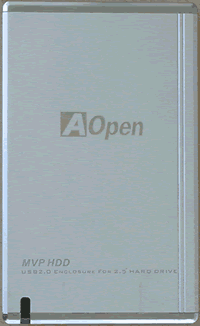
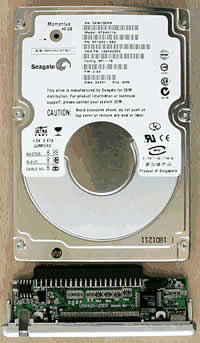
Unfortunately, no hard disk is included in the retail package, so you have to purchase it seperately. The image above shows the HDD enclosure that is provided by AOpen. The small led appears on the bottom left of the enclosure, lights up green when the device is idle and red when data is being transfered.

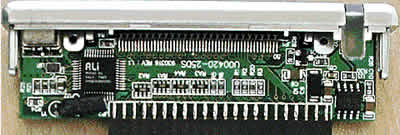
On the back panel of the enclosure, you can see the USB2.0 connector and the MVP connector. As explained earlier, there is no need for any additional power connection since the USB ports provide all the required power.

We had no problem installing this drive on our test PC running Microsoft Windows XP Pro operating system. However, there is a driver installation CD included in the package for older operating systems.

We formatted the drive for different file systems. NTFS file system discs cannot be read by the MVP player, indicating that the disc is empty, even if the disc is nearly full. Only FAT and FAT32 file systems are readable. The device supports long filenames.


Review Pages

1. Introduction - Retail Package
2. Inside the MVP Player
3. HDD Enclosure Installation
4. MVP Configuration
5. Video/Audio files analysis
6. File Mode
7. Photo Mode
8. Video Mode
9. Music Mode
10. Conclusions


Pages

  • « first
  • ‹ previous
  • 1
  • 2
  • 3
  • 4
  • 5
  • 6
  • 7
  • 8
  • 9
  • next ›
  • last »

Aopen

Tags: Aopen
Previous Post
BenQ DW1620A
Next Post
Optorite DD1205

Related Posts

  • AOPEN Introduces AMD-based Multi-Screen 4K Video Wall Solutions

  • SAMSUNG and AOpen To Jointly Promote Their Digital Signage Systems

  • AOpen Launched The XC mini MP45-BDR with Blu-ray Capabilities

  • AOpen's First Blu-ray Disc Drive BDR0412SA Released

  • AOpen Unveils 20X SATA DVD Burner

  • AOpen's DSW2012P 20X DVD burner

  • AOpen DSW1812P 18x DVD Burner Launched in the U.S.

  • Aopen Cube goes dual core

Latest Reviews

be quiet! Light Wings Pro IO fan
Cooling Systems

be quiet! Light Wings Pro IO fan

Why Intelligent Firmware Matters More Than Peak Throughput in NAS Systems
Enterprise & IT

Why Intelligent Firmware Matters More Than Peak Throughput in NAS Systems

Fanxiang MP83 M.2 NVMe SSD Enclosure
Enterprise & IT

Fanxiang MP83 M.2 NVMe SSD Enclosure

Ugreen CM642 USB4.0 Enclosure
PC components

Ugreen CM642 USB4.0 Enclosure

be quiet! Dark Power 14 IO
PC components

be quiet! Dark Power 14 IO

Popular News

MSI’s Latest AMD X870E MAX & EVO Series Motherboards

MSI’s Latest AMD X870E MAX & EVO Series Motherboards

COLORFUL Launches iGame B850M ULTRA Series Micro-ATX Motherboards

COLORFUL Launches iGame B850M ULTRA Series Micro-ATX Motherboards

COLORFUL Presents Limited Edition Chitu MAG-60 Magnetic Keyboard Inspired by the Year of the Horse

COLORFUL Presents Limited Edition Chitu MAG-60 Magnetic Keyboard Inspired by the Year of the Horse

COLORFUL Launches iGame B850I MINI OC V14 Motherboard

COLORFUL Launches iGame B850I MINI OC V14 Motherboard

COLORFUL Launches the iGame X870E VULCAN W OC Motherboard

COLORFUL Launches the iGame X870E VULCAN W OC Motherboard

COLORFUL Presents iGame Z890 ULTRA-S W and iGame Z890M ULTRA Z Motherboards

COLORFUL Presents iGame Z890 ULTRA-S W and iGame Z890M ULTRA Z Motherboards

COLORFUL Expands B850 Motherboard Lineup with New CVN, Battle-Ax, and MEOW Models

COLORFUL Expands B850 Motherboard Lineup with New CVN, Battle-Ax, and MEOW Models

ASRock Adds Support for One Sub-Channel DRAM Module on Intel DDR5 Motherboards

ASRock Adds Support for One Sub-Channel DRAM Module on Intel DDR5 Motherboards

Main menu

  • Home
  • News
  • Reviews
  • Essays
  • About
    • Submit News

    • Contact Us
    • Privacy

    • Promotion
    • Advertise

    • RSS Feed
  • About
  • Privacy
  • Contact Us
  • Promotional Opportunities @ CdrInfo.com
  • Advertise on out site
  • Submit your News to our site
  • RSS Feed