Intel P35 Motherboard Roundup Vol2
17. Overclocking DDR2 Motherboards
Review Pages
2. Asus Blitz Formula SE Retail Package
3. Asus Blitz Formula SE BIOS
4. Asus Blitz Extreme Retail Package
5. Asus Blitz Extreme BIOS
6. Biostar TP35D3-A7 Deluxe Retail Package
7. Biostar TP35D3-A7 Deluxe BIOS
8. Test Configuration
9. Everest Ultimate Edition 2007
10. SiSOFT Sandra
11. PCMARK - 3DMARK
12. Science Mark - PovRay - x264 Benchmark
13. Maxon Cinebench
14. SuperPi
15. SYSmark 2007 - WorldBench
16. Lost Planet: Extreme Condition
17. Overclocking DDR2 Motherboards
18. Overclocking DDR3 motherboards
19. Conclusion
1st Test
In our first test, each motherboards must achieve the highest overclocking speed with all BIOS settings left Auto. This means it is up to each motherboard to calculate voltages in order to have an absolutely stable system at the maximum overclocking speeds. Memory dividers and memory/FSB/MCH voltages are also left at Auto. In other words, it's the easiest overclocking approach (for the user) you can achieve.
For this test, we used a retail Intel E6600 with it's CPU multiplier locked at x9 and raised the FSB until we got a perfectly stable system (Orthos2004+PovRay running). An additional 8cm rotating fan was used to help with the cooling.
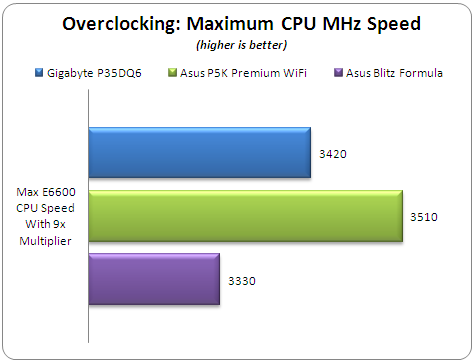
The Asus Blitz Formula needs some additional work to achieve better results with the Auto settings. The Asus P5K Premium is well tuned and produced the highest CPU speed of 3.510 GHz, while the Gigabyte GA-P35-DQ6 was also a very good performer with 3.420 GHz.
2nd Test
Apart from the maximum overclocking speed, we have to find the maximum possible FSB frequency with our CPU. Again, all BIOS settings were left at Auto and the CPU multiplier is dropped down to 6x. Memory timings and dividers are also left at auto. An additional 8cm rotating fan is installed to help with air cooling.

The best performance comes from the Gigabyte GA-P35-DQ6 with 490FSB, while both the Asus motherboards follow very closely. From our experience, Asus tends to improve its overclocking performance with BIOS updates. The Asus Blitz Extreme reached 480MHz with total stability.
3rd Test
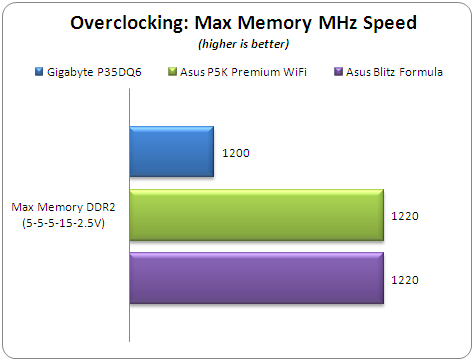
Our final overclocking test is to find how good each motherboard is at overclocking the memory. In this test, we used one pair of OCZ PC2-8500 SLI dual memory (2x1GB) with following settings:
- Timings: 5-5-5-15-2T
- Voltage: 2.50V
- FSB:DRAM divider: 1:2
- Additional 8cm rotating fan
- All other BIOS settings left Auto
Raising the FSB, we tested for stability. Both Asus boards easily reached 1220MHz, while the Gigabyte GA-P35-DQ6 was somewhat slower with 1200MHz. Note, that the Asus Blitz Extreme was able to boot into windows at 1260MHz, but the system wasn't stable.
- Overclocking stability
We will not comment here on the already tested Gigabyte GA-P35-DQ6 and Asus P5K Premium WiFi, but will concentrate on the Asus Blitz Formula, which follows in the Asus tradition. It will POST after an overclocking failure and prompt you to change the BIOS settings. The BIOS readings for MB/CPU/NB/SB help to monitor temperature levels. Overall, the overclocking stability was very good.
Review Pages
2. Asus Blitz Formula SE Retail Package
3. Asus Blitz Formula SE BIOS
4. Asus Blitz Extreme Retail Package
5. Asus Blitz Extreme BIOS
6. Biostar TP35D3-A7 Deluxe Retail Package
7. Biostar TP35D3-A7 Deluxe BIOS
8. Test Configuration
9. Everest Ultimate Edition 2007
10. SiSOFT Sandra
11. PCMARK - 3DMARK
12. Science Mark - PovRay - x264 Benchmark
13. Maxon Cinebench
14. SuperPi
15. SYSmark 2007 - WorldBench
16. Lost Planet: Extreme Condition
17. Overclocking DDR2 Motherboards
18. Overclocking DDR3 motherboards
19. Conclusion