
Breaking News

ASUS Announces XG Core Radeon RX 9060 XT LP 16GB GDDR6 Razer Unveils the Hammerhead V3 Chroma Sony Introduces USB-C Wired Headphones MDR-3R Greenliant heads to electronica 2026 with its full industrial SSD lineup CORSAIR Brings Comfort in Full Bloom with Dark Cherry Blossom TC500 and TC100 RELAXED Gaming Chairs

logo

  • Share Us
    • Facebook
    • Twitter
  • Home
  • Home
  • News
  • Reviews
  • Essays
  • About
    • Submit News

    • Contact Us
    • Privacy

    • Promotion
    • Advertise

    • RSS Feed

Search form

How to create a Mesh Wi-Fi Network!

Apr 19,2023 0

1. Introduction


Review Pages

1. Introduction
2. EnGenius ECW130
3. EnGenius ECW215
4. Creating Mesh Wi-Fi Network
5. Conclusion


Wifi networks are around us and connect us to the network. Many times we have in our homes a local Wifi Network that simply won't deliver speed and stability, especially if you have a big house or with many floors. For that purpose, many products have been introduced to the market, such as WiFi repeaters and Mesh networks. While both products have similar functionality they do differ in both easiness and performance.

Looking at Wikipedia, we can find more information about mesh networks: is a local area network topology in which the infrastructure nodes (i.e. bridges, switches, and other infrastructure devices) connect directly, dynamically, and non-hierarchically to as many other nodes as possible and cooperate with one another to efficiently route data to and from clients. This lack of dependency on one node allows for every node to participate in the relay of information. Mesh networks dynamically self-organize and self-configure, which can reduce installation overhead. The ability to self-configure enables the dynamic distribution of workloads, particularly in the event a few nodes should fail.

In short words, MeshWi-Fi uses multiple devices around your home to create one seamless network. Each of these is called a ‘node’ and they all work together to extend your Wi-Fi signal to your whole home. One node usually connects to your home router via Ethernet cable, and the rest of the nodes are placed around your home to where you need Wi-Fi. You don’t have to manually switch to another network, the nodes automatically keep you connected to whichever node has the strongest signal, giving you seamless coverage everywhere.
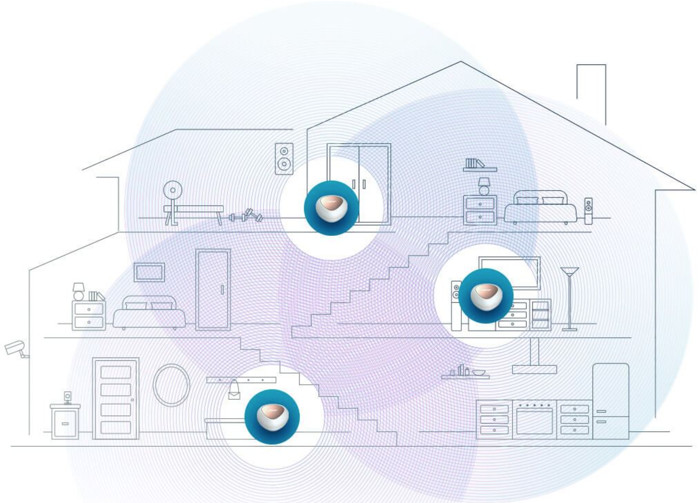

Courtesy of DLink

Mesh Wi-Fi networks are very easy to set up, and are good for:

  • Extending your Wi-Fi to your whole home or bigger offices.
  • Moving around at home and always staying connected to your Wi-Fi.
  • Removing all signal dead zones.

A Wi-Fi extender is one simple device that extends your Wi-Fi signal by rebroadcasting it further into your home. Wi-Fi extenders are also sometimes called Wi-Fi ‘boosters’, or ‘repeaters’, but they mean the same thing - they extend your Wi-Fi signal coverage. You have to manually switch from your home router’s Wi-Fi network to the extender’s Wi-Fi network.

Wi-Fi extenders usually connect to your home router via Wi-Fi, but certain models also allow Ethernet or Powerline connections. Extenders are good for:

  • Bringing Wi-Fi to rooms out of reach of your router’s signal.
  • Removing signal dead zones.
  • Having two separate networks, one for your router, one for the extender.


Courtesy of DLink

The difference between the two is that Wi-Fi extenders are used to rebroadcast your home router’s Wi-Fi signal. The main drawback is that your devices will not switch between Wi-Fi broadcasts automatically and you experience a disconnection while switching manually.

Mesh Wi-Fi uses multiple nodes to create a single, big and seamless Wi-Fi network that covers your whole home. Your devices will connect to the closest node automatically and without any disruptions as you move around your house.

  Positive Negative
Wifi Extenders
  • Simple solution for extending your home Wi-Fi signal.
  • Plugs straight into a power outlet.
  • More affordable.
  • You have to manually switch over to the extender’s network.
  • Not ideal for larger homes.
  • Harder to configure.
Mesh networks
  • One big, seamless Wi-Fi network for your whole home. 
  • No need to manually switch to any different network.
  • Self-organises to keep you connected to the closest node with the strongest Wi-Fi signal.
  • Reliable even when one node fails.
  • Nodes can be moved to different locations.
  • Just add more nodes to increase your Wi-Fi signal coverage.
  • Easier to set up and control via a phone app.
  • Stylish node design.
  • More expensive than extenders.
  • Nodes don’t plug straight into the wall as extenders do.

Today we will examine how we can create a simple Mesh network with EnGenius ECW130AP and ECW215AP products that are very affordable for entry level users with affordable price for the quality and tech of EnGenius.


Review Pages

1. Introduction
2. EnGenius ECW130
3. EnGenius ECW215
4. Creating Mesh Wi-Fi Network
5. Conclusion


Pages

  • 1
  • 2
  • 3
  • 4
  • 5
  • next ›
  • last »

EnGenius

Wifi

Mesh Wi-Fi

Tags: EnGenius Wifi Mesh Wi-Fi
Previous Post
JSAUX HB0100 and HB1101 Steam Deck Accessories
Next Post
JSAUX Modcase PC0104

Related Posts

  • EnGenius announces ECW560 Wi-Fi 7 Outdoor Router

  • EnGenius ECW515 Brings Wi-Fi 7 Performance to In-Room and In-Unit Deployments

  • EnGenius Unveils Cloud-Managed ECW536S Wi-Fi 7 with 24/7 AirGuard Security

  • EnGenius ECW520 AP

  • EnGenius Brings Wi-Fi 7 to Small Businesses with Affordable ECW510 Access Point

  • EnGenius Multi-Gigabit Switch Delivers 2.5G Performance with 90W PoE

  • EnGenius Announces Affordable ECW520 Access Point

  • EnGenius Launches Cloud-Lite Switch Series

Latest Reviews

GMK TriggerKey
Gadgets

GMK TriggerKey

The Best Online Casino Games to Play on a Browser
Enterprise & IT

The Best Online Casino Games to Play on a Browser

be quiet! Light Wings Pro IO fan
Cooling Systems

be quiet! Light Wings Pro IO fan

Why Intelligent Firmware Matters More Than Peak Throughput in NAS Systems
Enterprise & IT

Why Intelligent Firmware Matters More Than Peak Throughput in NAS Systems

Fanxiang MP83 M.2 NVMe SSD Enclosure
Enterprise & IT

Fanxiang MP83 M.2 NVMe SSD Enclosure

Popular News

MSI’s Latest AMD X870E MAX & EVO Series Motherboards

MSI’s Latest AMD X870E MAX & EVO Series Motherboards

COLORFUL Launches iGame B850M ULTRA Series Micro-ATX Motherboards

COLORFUL Launches iGame B850M ULTRA Series Micro-ATX Motherboards

COLORFUL Launches iGame B850I MINI OC V14 Motherboard

COLORFUL Launches iGame B850I MINI OC V14 Motherboard

COLORFUL Presents Limited Edition Chitu MAG-60 Magnetic Keyboard Inspired by the Year of the Horse

COLORFUL Presents Limited Edition Chitu MAG-60 Magnetic Keyboard Inspired by the Year of the Horse

COLORFUL Launches the iGame X870E VULCAN W OC Motherboard

COLORFUL Launches the iGame X870E VULCAN W OC Motherboard

COLORFUL Presents iGame Z890 ULTRA-S W and iGame Z890M ULTRA Z Motherboards

COLORFUL Presents iGame Z890 ULTRA-S W and iGame Z890M ULTRA Z Motherboards

COLORFUL Expands B850 Motherboard Lineup with New CVN, Battle-Ax, and MEOW Models

COLORFUL Expands B850 Motherboard Lineup with New CVN, Battle-Ax, and MEOW Models

ASRock Adds Support for One Sub-Channel DRAM Module on Intel DDR5 Motherboards

ASRock Adds Support for One Sub-Channel DRAM Module on Intel DDR5 Motherboards

Main menu

  • Home
  • News
  • Reviews
  • Essays
  • About
    • Submit News

    • Contact Us
    • Privacy

    • Promotion
    • Advertise

    • RSS Feed
  • About
  • Privacy
  • Contact Us
  • Promotional Opportunities @ CdrInfo.com
  • Advertise on out site
  • Submit your News to our site
  • RSS Feed