
GMK TriggerKey
1. Introduction - Retail package - How It Works
For years, the mechanical keyboard industry has focused on switches, sensors, firmware, and keycap materials. The GMK TriggerKey takes a different approach. Instead of replacing your keyboard or introducing another switch technology, GMK has created a mechanical add-on that fundamentally changes how individual keys are pressed and how they feel when actuated. GMK dates to 1992 and is best known among enthusiasts for its double-shot keycaps. The TriggerKey shells use the same ABS as its keycaps, so they pair visually with GMK sets.

Most keyboard accessories change how a key looks or sounds. The TriggerKey changes how it moves. It replaces the keycap on an MX-style switch with a hinged shell, so your finger presses a lever instead of pushing straight down. It's meant for a handful of keys such as WASD, not a full board. At first glance, the idea seems almost gimmicky: a replacement key mechanism that fits over standard MX-style switches. However, after analyzing GMK's technical material and examining the product hands-on, we feel the TriggerKey is genuinely different from the keyboard accessories released in recent years.
What Is GMK TriggerKey?
The TriggerKey is a patented, lever-based mechanical key system that replaces conventional keycaps with a hinged trigger mechanism. Instead of pressing straight down on a keycap, you use a pivoting lever, similar in concept to a controller trigger. The retail box is tiny next to a keyboard or keycap set. Inside is a hard plastic clamshell holding every part, which you see as soon as you open the retail case.
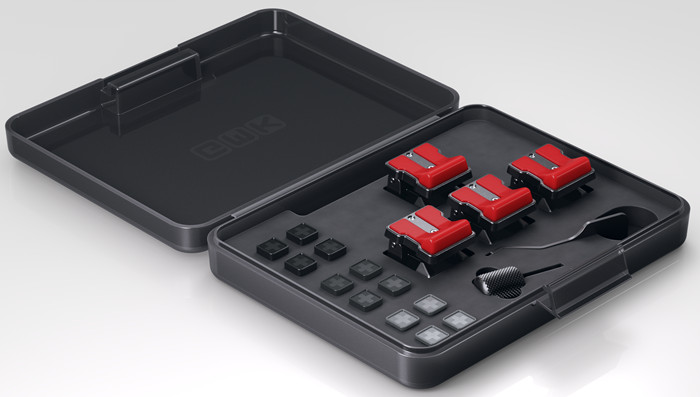
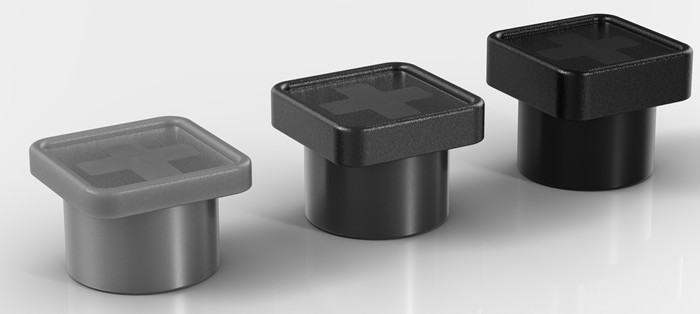
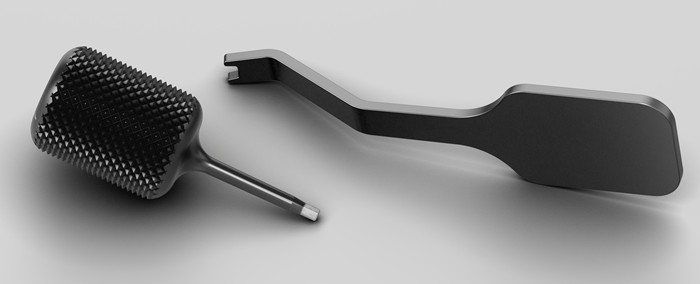
You get 12 stem caps (three heights for each of the four keys), spare screws, and two tools.
The kit is complete, so you can set up WASD straight away. Retail pricing is €49 / $49 per four-pack (some coverage lists $49.99).
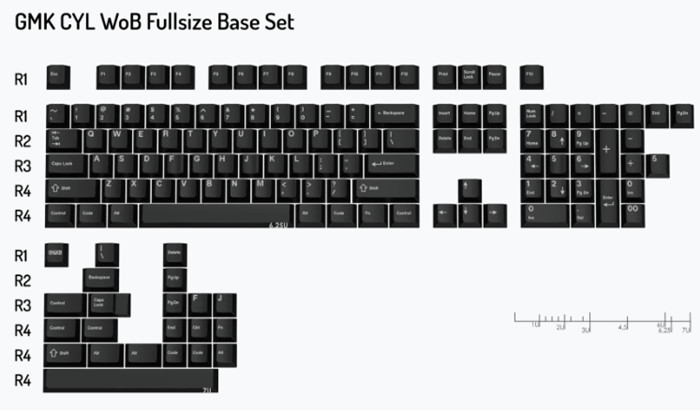
GMK also sent us a retail package of its CYL WoB (White on Black) Keycaps, which work on any MX-compatible mechanical keyboard and round out the GMK experience. It is a premium double-shot ABS keycap set with 1.5 mm thick walls, uses the CYL profile (GMK's take on Cherry profile, rows 1-1-2-3-4-4), and is designed and manufactured by GMK Lab in Germany. Sets are available for many keyboard layouts and languages, with a retail price of around €145.
Specs at a glance
| Mechanism | Patented lever, hinged shell clipped onto the switch housing |
| Actuation adjustment | Screw, up to 2 mm travel, plus 3 stem cap heights |
| Screw pitch | 0.4 mm per full turn (0.30 mm per 274° in GMK's video) |
| Tilt | Up to 34° |
| Stem caps | POM, textured; 1.7 mm (black), 1.2 mm (dark gray), 0.7 mm (light gray) |
| Orientation | North- or south-facing |
| Switch support | MX-style housings with a free grip pocket in the bottom body |
| Colours | 13 |
| Price | $49 / €49 |
| Warranty and durability | Two-year warranty and a claim of 100+ installation cycles |
| Box | 4 TriggerKeys, 3 sets of 4 stem caps, installation and adjustment tools, spare screws, case |
Design and Build Quality
GMK's reputation in the keyboard community is built on premium double-shot keycaps manufactured in Germany, and that heritage is evident here. The TriggerKey shell uses the same high-quality ABS construction that GMK enthusiasts already know.

Unlike many enthusiast accessories that lean heavily on 3D-printed aesthetics, the TriggerKey looks like a fully engineered retail product. The mechanism is compact, visually clean, and available in multiple color combinations to match existing builds.

The engineering is refreshingly simple:
- No electronics
- No software
- No firmware dependency
The material split is sensible. The shell is ABS, while the part that actually slides against the switch, the stem cap, is POM. POM is a naturally slippery, wear-resistant plastic, which is why it is widely used for switch stems, so it suits a part that rubs against the stem on every press. One thing to keep in mind is that ABS tends to develop shine with heavy use, and WASD are the most-pressed keys on a gaming keyboard, so expect the shells to polish up over time.
Design and how the mechanism works
The product is physically small, not much bigger than a full-size switch. It is a shell that sits over the switch: a housing mounted directly on the switch, with a wide, movable plate on a hinge.
Traditional MX switches lock you into a fixed travel and actuation point. The TriggerKey lets you physically move the trigger position closer to the switch's actuation point through an adjustable stem system and integrated adjustment screws.
For competitive gaming, this means you can set movement keys to trigger earlier in the lever's movement while keeping your preferred switch characteristics.
This is particularly interesting because it can give a feel similar to rapid-trigger setups without requiring Hall-effect switches or a completely new keyboard ecosystem. It does not turn a mechanical switch into an analog one, however (see Gaming Performance below).
How it attaches. GMK's compatibility diagram shows the key detail: the shell doesn't just rest on the switch. It grips a pocket in the bottom body of the housing. That's why the shell clicks into place on a compatible switch, and it's the rule behind the whole compatibility list.
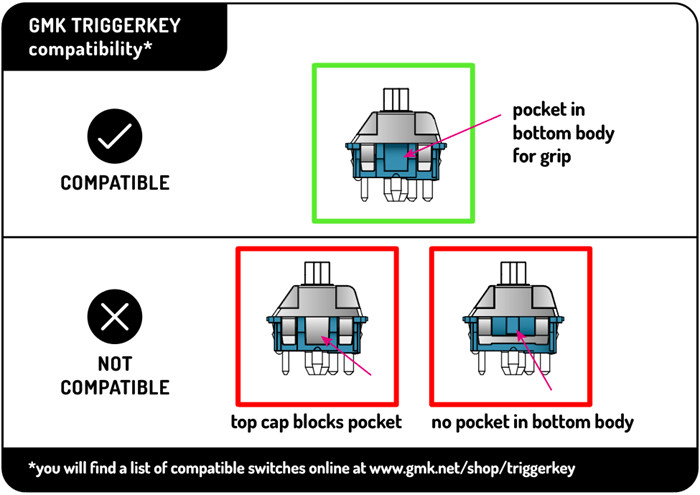
The two screws do different jobs:

- Upper screw: changes the tilt angle, up to 34°.
- Lower screw: pushes the stem cap up or down, changing where the lever meets the switch, up to 2 mm.
- Screw pitch: one full 360° turn moves the adjustment 0.4 mm. By simple arithmetic, the full 2 mm range is about five turns. A 0.4 mm pitch is also the standard thread pitch of an M2 metric screw, which suggests GMK uses off-the-shelf M2 hardware, a good sign for finding replacements.
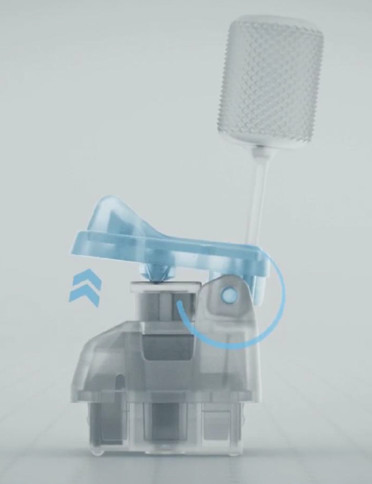
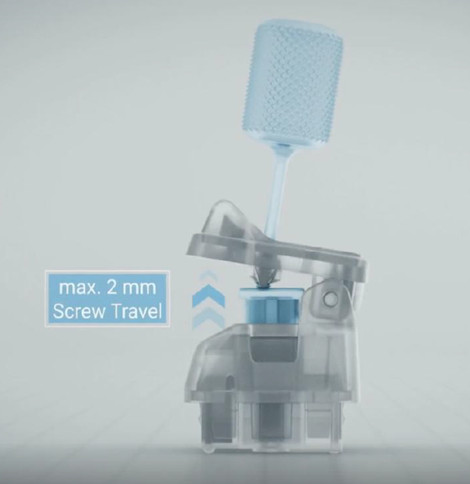
The stem cap is the third variable. It's a POM piece that sits on the switch stem, and its height (0.7, 1.2, or 1.7 mm) sets the baseline contact point before you fine-tune with the screw.
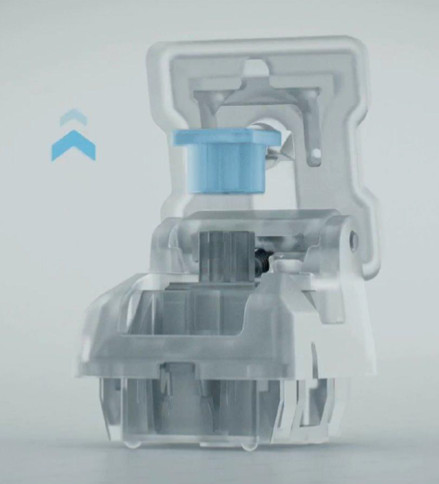
The caps are made of durable, textured POM. A lever like this converts finger movement into a smaller vertical push on the stem, so the pivot geometry matters a lot.

Under the Hood: The Lever Physics
GMK doesn't publish the lever's geometry, but the renders make the layout clear: the hinge pin sits at one end of the shell, and a small contact nub under the lid presses on the stem cap somewhere between the hinge and the area your finger presses. Mechanically, that is a simple lever, and it has three consequences worth understanding.
1. Longer travel, lighter force. Because your finger presses farther from the hinge than the nub does, your finger moves further than the switch stem does, and needs less force to push it. The trade is set by the ratio of the two distances. As an illustration only (GMK hasn't published the real ratio): if your finger sat twice as far from the hinge as the nub, a Cherry MX Red with 45 cN of force and 2.0 mm of pre-travel would feel like roughly 22-23 cN spread over about 4 mm at your fingertip.
2. Where you press matters. The same lever logic means the feel changes depending on where your finger lands. Press near the front edge and the key is lighter with longer travel; press closer to the hinge and it gets heavier and shorter. That's why the TriggerKey rewards a consistent finger position, and why it feels awkward when you hit it like a normal keycap.
3. Tilt changes the angle of attack. Raising the lid with the upper screw changes the angle at which the nub meets the stem cap. At steeper settings, part of the force pushes sideways on the stem rather than straight down. The POM stem cap's low friction helps here, but it's worth checking for extra stem wobble at the most aggressive tilt settings.