Aopen MVP player
8. Video Mode
AOpen MVP Player - Page 8
Video Mode
The MVP player supports almost all popular video formats. The video playback mode uses small thumbnails to preview a few seconds of every video file. Thumbnail images are moving pictures and not still images. Clicking on a thumbnail will start the selected movie.
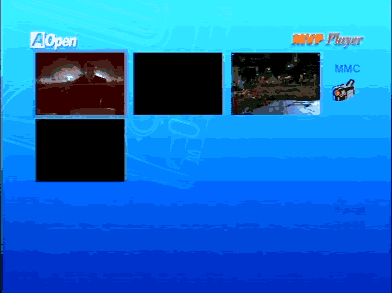
During playback, you can always see information about the video file playing. This function is controlled through the remote control.
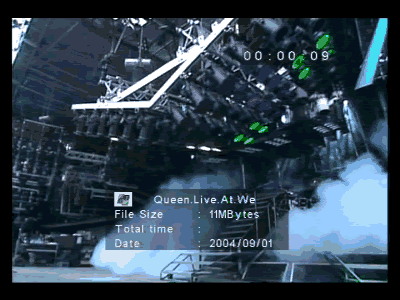

These pictures show video playback of DivX and XviD video formats. You will notice that the total playback time cannot be calculated for compressed video formats. Only playing time and file name are shown.

On the other hand, total playback time can be calculated by the MVP player when MPEG-1 and MPEG-2 files are used.
If you have too many video files stored, file mode might be more handy for handling video files. Using file mode makes it easier to find the file you want to view.
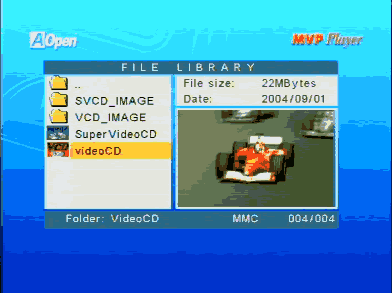
You can see a small preview of the video file that is highlighted, and you can also see some information about the file, like file size and file creation date.
In order to check the DivX/XviD subtitle support of the MVP player, we created a small DivX and small XviD file and used the same file name for the subtitle files. We converted the subtitle to MicroDVD format (.sub, .txt) and to SubRip format (.srt, .txt) which are the most popular subtitle formats. The following screenshot shows the video file along with the subtitle files in the same folder.

The question mark on the left side of the subtitles' filenames indicates that the MVP player does not support this filetype. However, when we tried to playback the movie, no subtitles were shown. So in general, the MPV player does not support DivX/XviD subtitles.
We also tried to playback compressed video files with Quarter Pixel flags to see if the MVP can handle files with the QPEL function enabled. In file mode, the following image was produced. The error message shown indicates that the MVP player cannot handle video streams with Quarter Pixel flags.

The following table indicates the video file formats that were tested and the results we observed.
AOpen MVP Player |
|
Video Codec / Format |
Compatibility |
DivX 5.1.1 |
Playback is perfect |
DivX 5.2 |
Playback is perfect |
DivX 3.11 alpha version |
Playback is perfect |
DivX 2 |
Playback is perfect |
DivX 3 |
Playback is perfect |
3ivX 4.5.1 |
Playback is jerky |
Cinepak 1.10.0.11 |
Playback is perfect |
Indeo Video 4.5 |
Playback is perfect |
Indeo Video 5.10 |
Playback is perfect |
DivX 4.1 |
Video format is not supported |
XviD 1.01 |
Playback is perfect |
Microsoft Media 9 |
Video format is not supported |
MPEG-1 VideoCD |
Playback is perfect |
Canopus Soft DVSD |
Video format is not supported |
DAT VideoCD |
Playback is perfect |
Super VideoCD MPEG |
Playback is perfect |
MPEG-2 |
Playback is perfect |
VOB MPEG-2 |
Playback is perfect |
DivX and Xvid with subtitles |
Playback is perfect but no subtitle support |
It should be noted that no DVD menu functions are supported. This means that if you have VOB and IFO files in a folder, you will be able to view movie files but IFO file information is not passed through the VOB file playback.
It should also be noted that the MVP only offers stereo outputs, and there is no support for 5.1 or Dolby Surround output. Unfortunately, video files that contain special 5.1 audio streams have to be downmixed to simple stereo / stereo wide audio streams.