Breaking News

ASUS Hardware Showcase: AI Accelerators, Collector GPUs, and Esport Monitors Apple Unveils Major Hardware and Creative Suite Ecosystem Updates XPG Launches Third-Generation CORE REACTOR III for Next-Gen Power Safety TCL’s New Monitor Range Fits Every Kind of Gaming Setup Viltrox Launches AF 35mm F1.4 Pro FE/Z

logo

  • Share Us
    • Facebook
    • Twitter
  • Home
  • Home
  • News
  • Reviews
  • Essays
  • About
    • Submit News

    • Contact Us
    • Privacy

    • Promotion
    • Advertise

    • RSS Feed

Search form

Apacer Steno AB320 MP3 Player Review

Aug 17,2005 0

2. Using the device


Review Pages

1. Introduction
2. Using the device
3. Flashing with new firmware
4. Perfromance tests
5. Playback impressions
6. Conclusion


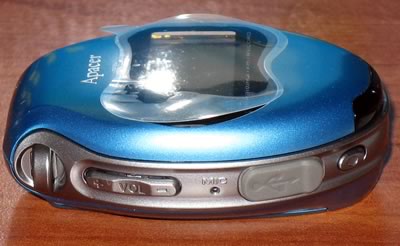
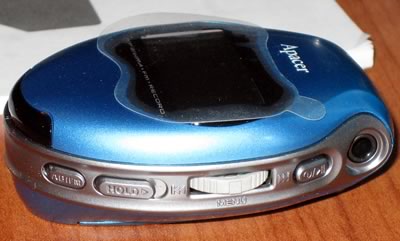
The Apacer Steno AB320 is a very small MP3 device. Below we can see the front, left and right side views along with an explanation of the various functions:

We also present several photos below, showing the AB320 player in all its glory:

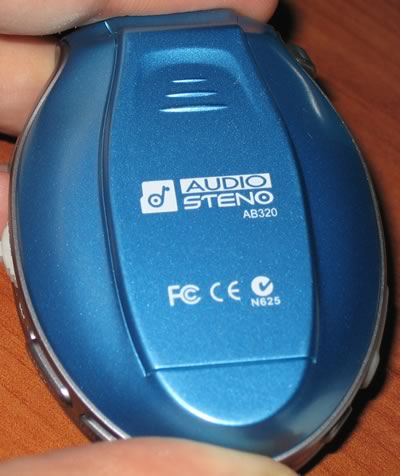
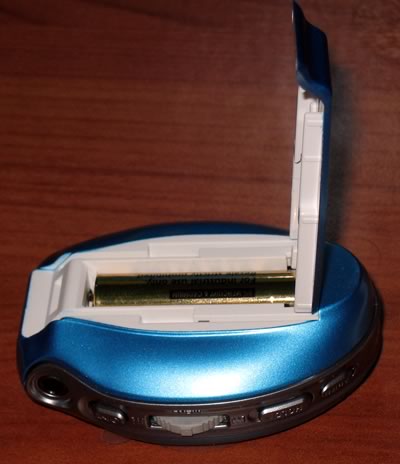
On the back, we find the product brand name, the "Audio Steno AB320". Opening the back cover reveals the compartment where the AAA battery is installed:
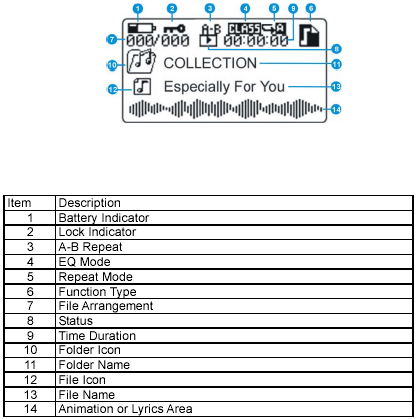
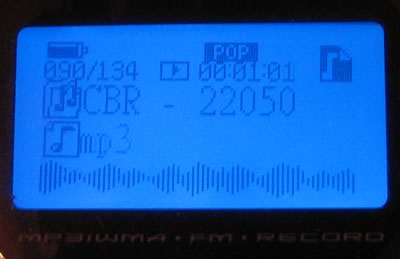
To start the device, you have to press the "Play/Pause" button for more than 3 seconds, after which a welcome screen appears with the Apacer logo and we can immediately start using the player's capabilities. The LCD screen is backlit in a blue colour with black for the foreground characters. Its resolution is 128x64 pixels, which is a medium resolution, especially under little light. The LCD display's layout can be seen below:
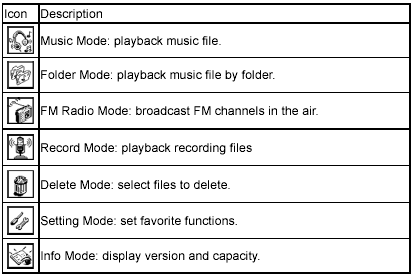
By pressing the <> button, we enter "Mode Selection", where the user will find several important settings for playback mode, select the playback folder, enter the FM Radio mode, start recording from the MIC and set various other settings such as screen brightness, equalizer, play mode, power saving, screen saver, etc.
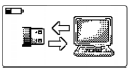
When the device is connected via the mini-USB with a host PC, the USB/PC icon appears on the display to indicate that the device is in USB connection mode. The AB320 is recognized as a flash memory device and the user can use drag & drop to transfer his/her favorite MP3/WMA/WAV files for playback, as well as data files.
 

Review Pages

1. Introduction
2. Using the device
3. Flashing with new firmware
4. Perfromance tests
5. Playback impressions
6. Conclusion


Pages

  • « first
  • ‹ previous
  • 1
  • 2
  • 3
  • 4
  • 5
  • 6
  • next ›
  • last »

apacer

MP3

Tags: apacer MP3
Previous Post
Windows Vista Public Beta 1 - Part 1
Next Post
Arctic Cooling NV Silencer 5

Related Posts

  • Apacer Powers the Future of AI and Green Computing with Next-Gen Storage Solutions at COMPUTEX 2025

  • Apacer’s Fully Lead-Free Memory Modules are a Game Changer

  • Apacer Offers FIPS 140-2 Validated SSDs and High Capacities SSDs up to 16TB On Display at WEST 2024

  • Apacer introduces AS2280F4 M.2 PCIe Gen5 x4 NVME SSD

  • Apacer Launches CFexpress Type B 8.3K 60P RAW Video Recording Memory Card

  • Apacer Unveils High-tech Products at Embedded World 2022 in Nuremberg

  • Apacer Unveils COMPUTEX 2022 Event Series

  • Apacer Launches AS2280Q4U M.2 Gen4 x4 SSD for PS5

Latest Reviews

be quiet! Light Wings Pro IO fan
Cooling Systems

be quiet! Light Wings Pro IO fan

Why Intelligent Firmware Matters More Than Peak Throughput in NAS Systems
Enterprise & IT

Why Intelligent Firmware Matters More Than Peak Throughput in NAS Systems

Fanxiang MP83 M.2 NVMe SSD Enclosure
Enterprise & IT

Fanxiang MP83 M.2 NVMe SSD Enclosure

Ugreen CM642 USB4.0 Enclosure
PC components

Ugreen CM642 USB4.0 Enclosure

be quiet! Dark Power 14 IO
PC components

be quiet! Dark Power 14 IO

Popular News

MSI’s Latest AMD X870E MAX & EVO Series Motherboards

MSI’s Latest AMD X870E MAX & EVO Series Motherboards

COLORFUL Launches iGame B850M ULTRA Series Micro-ATX Motherboards

COLORFUL Launches iGame B850M ULTRA Series Micro-ATX Motherboards

COLORFUL Launches iGame B850I MINI OC V14 Motherboard

COLORFUL Launches iGame B850I MINI OC V14 Motherboard

COLORFUL Presents Limited Edition Chitu MAG-60 Magnetic Keyboard Inspired by the Year of the Horse

COLORFUL Presents Limited Edition Chitu MAG-60 Magnetic Keyboard Inspired by the Year of the Horse

COLORFUL Launches the iGame X870E VULCAN W OC Motherboard

COLORFUL Launches the iGame X870E VULCAN W OC Motherboard

COLORFUL Presents iGame Z890 ULTRA-S W and iGame Z890M ULTRA Z Motherboards

COLORFUL Presents iGame Z890 ULTRA-S W and iGame Z890M ULTRA Z Motherboards

COLORFUL Expands B850 Motherboard Lineup with New CVN, Battle-Ax, and MEOW Models

COLORFUL Expands B850 Motherboard Lineup with New CVN, Battle-Ax, and MEOW Models

ASRock Adds Support for One Sub-Channel DRAM Module on Intel DDR5 Motherboards

ASRock Adds Support for One Sub-Channel DRAM Module on Intel DDR5 Motherboards

Main menu

  • Home
  • News
  • Reviews
  • Essays
  • About
    • Submit News

    • Contact Us
    • Privacy

    • Promotion
    • Advertise

    • RSS Feed
  • About
  • Privacy
  • Contact Us
  • Promotional Opportunities @ CdrInfo.com
  • Advertise on out site
  • Submit your News to our site
  • RSS Feed