
52x CD-RW Roundup Vol3 (Optorite CW5201 & Plextor Premium)
1. Introduction - Plextor Premium
Review Pages
2. Introduction - Optorite CW5201
3. Data CD Reading Tests
4. Error Correction Tests - Plextor Premium
5. Error Correction Tests - Optorite CW5201
6. Protected Data Disc Tests
7. DAE Tests
8. CDR Writing Tests
9. PlexTools Professional Tests
10. Writing Quality Tests 1 - Plextor Premium
11. Writing Quality Tests 2 - Plextor Premium
12. Writing Quality Tests 1 - Optorite CW5201
13. Writing Quality Tests 2 - Plextor Premium
14. RW Writing Tests
15. Conclusion
52x CDRW Roundup - Page 1
- Plextor Premium
 Plextor
decided to support the 52x writing speed with the new Plexwriter Premium. The
drive supports
52x CAV writing/reading and 32x Ultra High Speed rewriting.
However, the "Premium" name states that the drive has more to offer.
Plextor gives the candidate user the chance to further control and experiment
with
the operations of the drive, through the attached software. The PlexTools Professional
is updated and among the already known options it supports some more advanced
benchmarking and quality check features. In addition, the new GigaRec option
increases the nominal capacity of a normal CD-R disc up to 40%. More information
about Plextools Professional are following in the next pages.
Plextor
decided to support the 52x writing speed with the new Plexwriter Premium. The
drive supports
52x CAV writing/reading and 32x Ultra High Speed rewriting.
However, the "Premium" name states that the drive has more to offer.
Plextor gives the candidate user the chance to further control and experiment
with
the operations of the drive, through the attached software. The PlexTools Professional
is updated and among the already known options it supports some more advanced
benchmarking and quality check features. In addition, the new GigaRec option
increases the nominal capacity of a normal CD-R disc up to 40%. More information
about Plextools Professional are following in the next pages.

- Features
 GigaRec
is a new feature supported by the Premium drive, which allows an increase in
the capacity of CD-R media beyond the normal limitation. This means that data
storage
up
to 1GB can be achieved on standard 80min media, by setting the compression
rate. Both pits and lands written on the disc are compressed up to 1.4 times.
The background of GigaREC technology is
similar to the HD-BURN, developed and patented by Sanyo. The Sanyo solution
and the Premium drive share same components (LSI) and same pit size but different
implementation.
GigaRec
is a new feature supported by the Premium drive, which allows an increase in
the capacity of CD-R media beyond the normal limitation. This means that data
storage
up
to 1GB can be achieved on standard 80min media, by setting the compression
rate. Both pits and lands written on the disc are compressed up to 1.4 times.
The background of GigaREC technology is
similar to the HD-BURN, developed and patented by Sanyo. The Sanyo solution
and the Premium drive share same components (LSI) and same pit size but different
implementation.
 SecuRec
is another new feature of PlexTools Professional. It allows user to password
protect the data of their CD-R from unauthorized or unwanted
access. Protection activation and password setting can be done only through the
SecuRec function in Plextools Professional, bundled in the retail package.
Writing
and reading of a SecuRec disc is limited to the Pemium drive. A SecuRec protected
disc can be accessed only when the password is known. Otherwise, the Operation
System will give a read error upon accesss
attempts of the disc.
SecuRec
is another new feature of PlexTools Professional. It allows user to password
protect the data of their CD-R from unauthorized or unwanted
access. Protection activation and password setting can be done only through the
SecuRec function in Plextools Professional, bundled in the retail package.
Writing
and reading of a SecuRec disc is limited to the Pemium drive. A SecuRec protected
disc can be accessed only when the password is known. Otherwise, the Operation
System will give a read error upon accesss
attempts of the disc.
In the new PlexTools Professional, the VariREC feature is updated to VariREC II, in the new Plextools Professional. VariREC II allows you to change the laser power. The default setting reflects an optimized laser power with lowest jitter. Note that ejecting or loading a disc will disable VariRec.
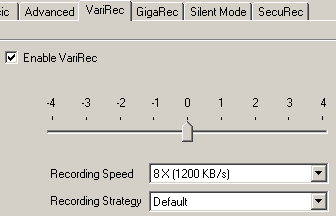
VariREC II allows writing your CD-Rs at 8x maximum. In addition, depending on the dye type of your media, you can change the Recording Strategy accordingly, to have your favorable results.
Last but not least, the Silent Mode is here to keep the Premium operation noise in low levels. This is achieved changing various settings of the drive such as the maximum writing/reading speed, the access time and the tray speed, in order to get a noise-free or silent operation.

- The access time can be set to Fast (60 ms), Middle (80 ms) or Slow (120 ms).
- The Tray Speed bar changes the loading and eject speeds of the tray between 2 (Low) and 6 (High) seconds.
User is able to save the settings into the drive’s flash memory. In this case, the Silent Mode will remain active even after a powerdown of the drive. In order to clear these settings, use the Reset Values button, which turns of all Silent Mode settings.
- Specifications
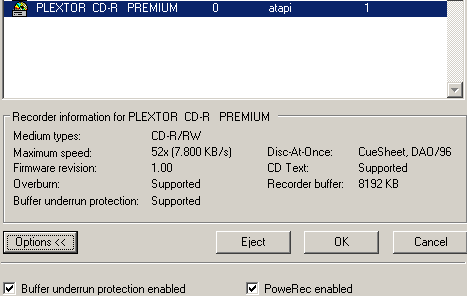
Let's have a look in the drives specifications (picture taken from PlexTools):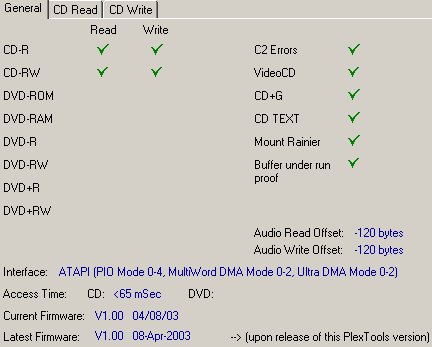
As you can see the drive supports retrieving of C2 errors, VideoCD, CD-text and is Mount Rainier compliant. Buffer underun protection is available, along with the PoweRec (Plextor Optimized Writing Error Reduction Control) technology for controlling the write strategy for quality and stable recording at high speeds. In addition, the VariREC function is included in the latest Plextor drive in order to give a personal taste in your audio compilations.
The drive is equipped with a 8MB buffer and supports the following writing modes: DAO, SAO, TAO, Packet Writing, RAW SAO 96 and RAW DAO 96.

By default, the Premium will read your discs at 18-40x CAV. The 52x (22-52x CAV) reading speed is also available when the SpeedRead is enabled. Enabling the SpeedRead can be done through the PlexTools software. Note that ejecting the disc will reset the SpeedRead function to the default value.

CD-R writing is allowed at 52x CAV (22-52x). Premium also supports 32x (20-32x P-CAV) Ultra High Speed rewriting. Of course this can be achieved with specific media only, and currently 32x US-RW discs are not widely available in the market. For now, the 20-24x CAV rewriting speed can be used with Mitsubishi Chemicals media. A future firmware upgrade will support 32x rewriting as soon as it will be included in the Orange Book specifications.
Below you can see the CAV writing strategy of the Plextor Premium, with 80min blank CD-R media:
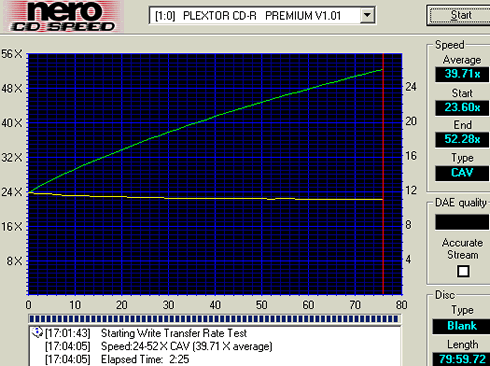
The drive starts writing at 23.60x and accelerates up to 52.28x, giving an average writing speed of 39.71x. The 52x CAV speed is achieved at address 80:00:00.
- The package
 The
retail package includes the Premium drive, the Premium Manual,
a Quick Reference Guide and Plextools Professional Software CD.
The
retail package includes the Premium drive, the Premium Manual,
a Quick Reference Guide and Plextools Professional Software CD.
Nero Burning Rom is also included as the main CD-R writing software along with InCD and EasyWrite utilities. The specific version of Nero supports the GigaRec function.
Last, in the retail package you can find the usual internal audio cable, an IDE cable and mounting screws.
On the disc loading tray you can see "US-RW" , "Premium" and the "BPRec" (BurnProof) logos. The eject button is placed below the tray, on the right side of the front panel, as usual. The indication LED is active when a disc is loaded or the drive performs a read/write task. The drive has also a headphone plug and a volume control button, for audio CDs.

On the rear of the drive you have the usual IDE interface, power connection and analogue and digital audio output connectors.
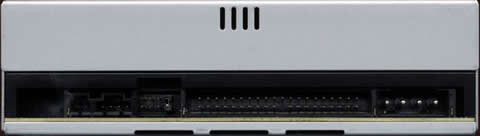
Next to the master/slave jumpers there is another jumper, allowing user to set the drive to Mutliword DMA. The UDMA 33 is enabled by default. You can also put the drive into a test mode by enabling the cable select and slave jumpers.
After removing the screws on the bottom we can see the drive's internal design. On the basic chips you can recognize the Plextor logo. Possibly Sanyo has developed that particular chipset since the drive does include the "BPRec" logo…


- Installation
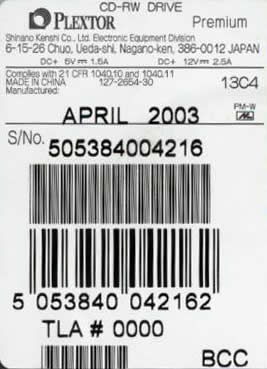
The Plextor drive was identified as "PLEXTOR CD-R PREMIUM" under WinXP. The drive was installed to the secondary IDE channel of our test PC as a "Master"and worked in Ultra DMA Mode 2 transfer mode. The model came with firmware version v1.00 installed, but the tests were done with a newer v1.01. The hardware revision was TLA#000 and our drive was made in China.
Update: Plextor released a newer firmware revision, v1.02 that fixes writing problems, you can download it over here.
Review Pages
2. Introduction - Optorite CW5201
3. Data CD Reading Tests
4. Error Correction Tests - Plextor Premium
5. Error Correction Tests - Optorite CW5201
6. Protected Data Disc Tests
7. DAE Tests
8. CDR Writing Tests
9. PlexTools Professional Tests
10. Writing Quality Tests 1 - Plextor Premium
11. Writing Quality Tests 2 - Plextor Premium
12. Writing Quality Tests 1 - Optorite CW5201
13. Writing Quality Tests 2 - Plextor Premium
14. RW Writing Tests
15. Conclusion





