Breaking News

CORSAIR Launches the RM1200e Power Supply with Built-in PinProtect GPU Overcurrent Protection and Platinum-certified Efficiency CORSAIR Changes the Game with PureVector, a Science-Based Personalized Aiming Technology, Launching Exclusively in the SABRE v3 PRO PureVector Mouse Series AMD FSR Upscaling 4.1 Boosts Frames and Image Quality on More Devices TerraMaster TerraSync Update COLORFUL Launches iGame X870E ULTRA-S V14 Motherboard

logo

  • Share Us
    • Facebook
    • Twitter
  • Home
  • Home
  • News
  • Reviews
  • Essays
  • About
    • Submit News

    • Contact Us
    • Privacy

    • Promotion
    • Advertise

    • RSS Feed

Search form

Corsair Flash Padlock 2GB

Oct 22,2007 0

1. Introduction


Review Pages

1. Introduction
2. Tests
3. Conclusion


The USB stick market has matured to the point where companies now offer some interesting solutions with specific features.

One rather hot issue is that of security, especially when it comes to the data we all carry in our USB sticks. There are several software solutions based on encryption, but most of them have been found to be either incomplete or not very user friendly. Moreover, they require the use of special software, meaning it limits the data exchange between different platforms and operating systems. Corsair has a new solution for such needs, in the form of their "Flash PadLock".

- Corsair Flash Padlock

Corsair’s Flash Padlock gives users the confidence of having a hardware-secured lock to protect their data on a USB drive. Featuring auto-lock hardware security, Flash Padlock is the best way to secure your data while on the go. This prevents any unauthorized access or “Brute Force” attack to the data on Flash Padlock. Users can program in a PIN, much like they do for an ATM machine, to lock and unlock their data. An easy to use keypad in conjunction with lock/unlock indicator lights, makes the Flash Padlock highly intuitive to use. Lastly, the Flash Padlock is fully plug-and-play, and requires no software or drivers to work properly.

- Features
  • Auto-Locking – Self locking after removal from computer
  • Customizable PIN – Set your own PIN and make it easy to remember
  • Easy to Use – Direct keypad access and indicator lights make locking/unlocking simple
  • Plug and Play – Hardware based security works without installing or running software
  • Platform independent – Works on Windows, MAC and Linux platforms without the use of software

- Package

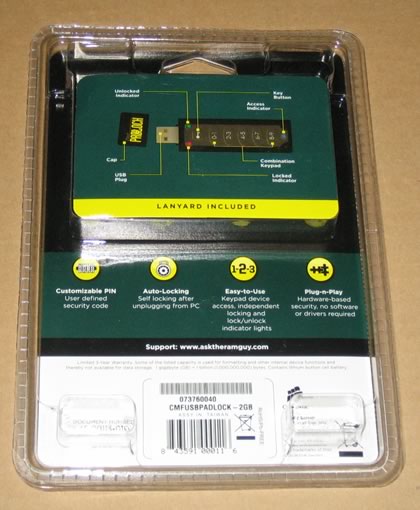
Corsair provided us with the Flash Padlock 2GB version. The USB stick is well protected in a plastic shell. Users can find the Corsair Flash PadLock at the retail price of US$34.99 - $39.99 (+shipping) as found at several online stores.

Apart from the USB drive (with internal 3V lithium battery installed), also included are:

  • A users manual
  • a USB extension cable
  • and a lanyard.

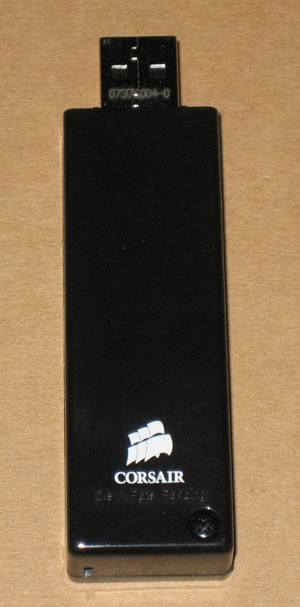
Opening the package gives us a closer look at the USB module:

On the front, there are buttons with the digits 0 to 9 and the lock/unlock functions:

The basic idea behind Corsair's Flash Padlock is to hardware lock the device with a PIN number that needs to be keyed in before gaining access. There are 10 digits available (0-9) for creating the PIN. Corsair offers you the option of storing the PIN on their web site so you can retrieve it if you forget it. As Corsair warns, if the PIN is lost, there is no way to retrieve it, so be careful...

Removing the protective cap:

The Flash PadLock ships unlocked with AutoLock disabled. In order to secure your data, there are five steps that take more or less around half a minute to complete. The buttons are big and easy to push. After the pin is entered, the Flash Padlock will auto lock. After that, you cannot access your data, and Windows won't recognize it unless you unlock it. You need to key in the PIN and unlock the Flash PadLock to gain access. As a last note, the stick supports Window's ReadyBoost. When the Corsair Flash PadLock works, it has two operating LEDs, indicating the read/write functions and the lock/unlock status.


Review Pages

1. Introduction
2. Tests
3. Conclusion


Pages

  • 1
  • 2
  • 3
  • next ›
  • last »

Corsair

usb flash drives

Security

Tags: Corsair usb flash drives Security
Previous Post
OCZ ATV Turbo 4GB
Next Post
Thermaltake Ixoft Pad

Related Posts

  • CORSAIR Launches the RM1200e Power Supply with Built-in PinProtect GPU Overcurrent Protection and Platinum-certified Efficiency

  • CORSAIR Changes the Game with PureVector, a Science-Based Personalized Aiming Technology, Launching Exclusively in the SABRE v3 PRO PureVector Mouse Series

  • CORSAIR Launches the HS80 v2 MAX WIRELESS Gaming Headset

  • CORSAIR Deploys the WARTHOG Airflow Mid-Tower PC Case

  • CORSAIR Launches Second Generation Nautilus II AIO CPU Coolers

  • CORSAIR Launches VOXARA USB Gaming Condenser Microphone

  • CORSAIR Expands the iCUE LINK Ecosystem with Quieter, Higher-Performance AIOs and Fans

  • CORSAIR Launches RMe Series Platinum Power Supplies with ThermalProtect 12V-2x6 Cable for Enhanced GPU Protection

Latest Reviews

Why Intelligent Firmware Matters More Than Peak Throughput in NAS Systems
Enterprise & IT

Why Intelligent Firmware Matters More Than Peak Throughput in NAS Systems

Fanxiang MP83 M.2 NVMe SSD Enclosure
Enterprise & IT

Fanxiang MP83 M.2 NVMe SSD Enclosure

Ugreen CM642 USB4.0 Enclosure
PC components

Ugreen CM642 USB4.0 Enclosure

be quiet! Dark Power 14 IO
PC components

be quiet! Dark Power 14 IO

SanDisk High Endurance 512GB microSDXC
Cameras

SanDisk High Endurance 512GB microSDXC

Popular News

MSI’s Latest AMD X870E MAX & EVO Series Motherboards

MSI’s Latest AMD X870E MAX & EVO Series Motherboards

COLORFUL Launches iGame B850M ULTRA Series Micro-ATX Motherboards

COLORFUL Launches iGame B850M ULTRA Series Micro-ATX Motherboards

COLORFUL Presents Limited Edition Chitu MAG-60 Magnetic Keyboard Inspired by the Year of the Horse

COLORFUL Presents Limited Edition Chitu MAG-60 Magnetic Keyboard Inspired by the Year of the Horse

COLORFUL Launches iGame B850I MINI OC V14 Motherboard

COLORFUL Launches iGame B850I MINI OC V14 Motherboard

COLORFUL Launches the iGame X870E VULCAN W OC Motherboard

COLORFUL Launches the iGame X870E VULCAN W OC Motherboard

COLORFUL Presents iGame Z890 ULTRA-S W and iGame Z890M ULTRA Z Motherboards

COLORFUL Presents iGame Z890 ULTRA-S W and iGame Z890M ULTRA Z Motherboards

COLORFUL Expands B850 Motherboard Lineup with New CVN, Battle-Ax, and MEOW Models

COLORFUL Expands B850 Motherboard Lineup with New CVN, Battle-Ax, and MEOW Models

ASRock Adds Support for One Sub-Channel DRAM Module on Intel DDR5 Motherboards

ASRock Adds Support for One Sub-Channel DRAM Module on Intel DDR5 Motherboards

Main menu

  • Home
  • News
  • Reviews
  • Essays
  • About
    • Submit News

    • Contact Us
    • Privacy

    • Promotion
    • Advertise

    • RSS Feed
  • About
  • Privacy
  • Contact Us
  • Promotional Opportunities @ CdrInfo.com
  • Advertise on out site
  • Submit your News to our site
  • RSS Feed