
Breaking News

Thypoch Introduces New Sculptor AF Lens Series with 23mm f1.4 Prime for Fujifilm X-Mount ASUS Announces Availability of ProArt GR1X Xiaomi and Leica Present the Xiaomi 18 Pro Series JEDEC Previews Next-Generation DDR6 DRAM XPG INVADER X MINI Chroma Series Debuts in Four Vibrant Colors

logo

  • Share Us
    • Facebook
    • Twitter
  • Home
  • Home
  • News
  • Reviews
  • Essays
  • About
    • Submit News

    • Contact Us
    • Privacy

    • Promotion
    • Advertise

    • RSS Feed

Search form

ASUS EAX1300PRO

Feb 27,2006 0

15. Overclocking


Review Pages

1. Introduction
2. Specifications
3. A Closer Look
4. Test System
5. 3DMark2005
6. 3DMark2003
7. Codecreatures
8. Aquamark - 3DMark01
9. F.E.A.R.
10. Need For Speed - Most Wanted
11. Quake 4
12. Half Life 2
13. Far Cry
14. Ground Control II
15. Overclocking
16. Conclusion


No matter your graphics card, there comes a time in your computer's life when it can no longer cope with the latest technology the ever so popular games use. This is one of the main reasons for overclocking your graphics card. Gamers are always looking forward for a little extra boost in terms of framerate. Even though most of the times the boost is far from noticeable, overclocking remains the last resort when you can't afford to buy a brand new VGA card.
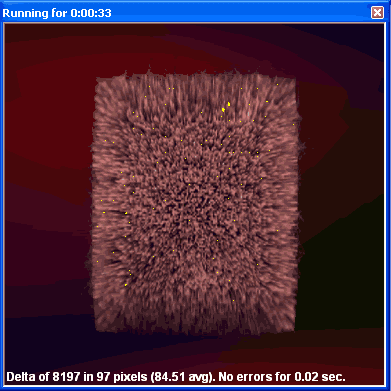
Increasing the memory clock too much,
produces the so-called "artifacts".

The stock clock speeds for the ASUS EAX1300PRO were 600MHz for the core and 400MHz for the memory.

Firing up ATITool, we loaded the card's default speeds and started tweaking them.
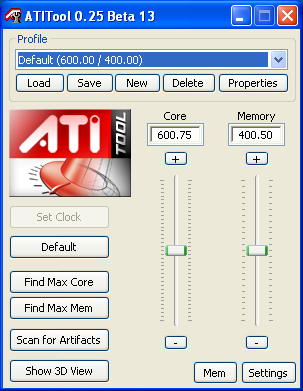
After a bit of tweaking and messing around with the core and memory clocks, we settled at a core speed of 660 and memory up to 450. Not much of an OC, but unfortunately the card could not give better results.

Let's see what difference that new settings can offer.

As we see above, due to the fact that the core and memory clocks could not be tweaked quite as high as we wanted, we have a small difference between the stock and OC version of the card. Overclocking is not necessary and wouldn't give significantly better results in any case.


Review Pages

1. Introduction
2. Specifications
3. A Closer Look
4. Test System
5. 3DMark2005
6. 3DMark2003
7. Codecreatures
8. Aquamark - 3DMark01
9. F.E.A.R.
10. Need For Speed - Most Wanted
11. Quake 4
12. Half Life 2
13. Far Cry
14. Ground Control II
15. Overclocking
16. Conclusion


Pages

  • « first
  • ‹ previous
  • …
  • 8
  • 9
  • 10
  • 11
  • 12
  • 13
  • 14
  • 15
  • 16
  • next ›
  • last »

ASUS

Tags: ASUS
Previous Post
Sansun Arctic Power Supply
Next Post
ASUS P5N32-SLI DELUXE

Related Posts

  • ASUS Announces Availability of ProArt GR1X

  • ASUS Announces ExpertCenter P300 Mini Tower

  • ASUS Showcases ProArt GR1X, ProArt P16 & P14 Laptops, ProArt OLED Monitors, and AI-Powered Solutions for Creatives at Adobe MAX 2026

  • ASUS Announces XG Core Radeon RX 9060 XT LP 16GB GDDR6

  • ASUS Announces TUF Gaming Radeon RX 9070 XT Onimusha Special Edition

  • ASUS Hardware Showcase: AI Accelerators, Collector GPUs, and Esport Monitors

  • ASUS Announces ExpertBook A7 (AMD)

  • ASUS ProArt RTX Spark Windows PCs Available for Immediate Pre-Order

Latest Reviews

NAS Security Is a Matter of Configuration Best Practices for Protecting Systems and Data
Enterprise & IT

NAS Security Is a Matter of Configuration Best Practices for Protecting Systems and Data

GMK TriggerKey
Gadgets

GMK TriggerKey

The Best Online Casino Games to Play on a Browser
Enterprise & IT

The Best Online Casino Games to Play on a Browser

be quiet! Light Wings Pro IO fan
Cooling Systems

be quiet! Light Wings Pro IO fan

Why Intelligent Firmware Matters More Than Peak Throughput in NAS Systems
Enterprise & IT

Why Intelligent Firmware Matters More Than Peak Throughput in NAS Systems

Popular News

MSI’s Latest AMD X870E MAX & EVO Series Motherboards

MSI’s Latest AMD X870E MAX & EVO Series Motherboards

COLORFUL Launches iGame B850M ULTRA Series Micro-ATX Motherboards

COLORFUL Launches iGame B850M ULTRA Series Micro-ATX Motherboards

COLORFUL Launches iGame B850I MINI OC V14 Motherboard

COLORFUL Launches iGame B850I MINI OC V14 Motherboard

COLORFUL Presents Limited Edition Chitu MAG-60 Magnetic Keyboard Inspired by the Year of the Horse

COLORFUL Presents Limited Edition Chitu MAG-60 Magnetic Keyboard Inspired by the Year of the Horse

COLORFUL Launches the iGame X870E VULCAN W OC Motherboard

COLORFUL Launches the iGame X870E VULCAN W OC Motherboard

COLORFUL Presents iGame Z890 ULTRA-S W and iGame Z890M ULTRA Z Motherboards

COLORFUL Presents iGame Z890 ULTRA-S W and iGame Z890M ULTRA Z Motherboards

COLORFUL Launches iGame X870E ULTRA-S V14 Motherboard

COLORFUL Launches iGame X870E ULTRA-S V14 Motherboard

COLORFUL Expands B850 Motherboard Lineup with New CVN, Battle-Ax, and MEOW Models

COLORFUL Expands B850 Motherboard Lineup with New CVN, Battle-Ax, and MEOW Models

Main menu

  • Home
  • News
  • Reviews
  • Essays
  • About
    • Submit News

    • Contact Us
    • Privacy

    • Promotion
    • Advertise

    • RSS Feed
  • About
  • Privacy
  • Contact Us
  • Promotional Opportunities @ CdrInfo.com
  • Advertise on out site
  • Submit your News to our site
  • RSS Feed