
Data NetBurner Software
1. Page 1
Data Net-Burner v4.0 Software Review - Page 1
Homepage | Download Latest Version
Data Net-Burner is a very simple program that creates data CDs. It is a new program and it is still at its initial stages. It is recommended for users that are not experienced enough while they prefer a very simple solution in order to create their CDs.
Who would need it? (From Data Net-Burner website)
- Software Authors: Publish your own CD's exactly the way you want. Control
versions and revisions. Customize the Title, Icon, and Autorun.inf. Make self-starting
programs and menu driven selections. Add security and encryption with third
party products.
- Home or office users: Besides publishing CDs to the Internet, it's also a quick and easy way to make a CD. With almost nothing to learn and no settings to select, you can record a disc and have fun doing it.
- Corporate Web Sites: Save time and money. Distribute data, files, patches, and programs to your customers without the effort of pressing and shipping CD's. Maintain internal control over the content. Reduce CD inventory to zero. Sell product with your existing shopping-cart software by completing the transaction then making the applet available for download.
- Network Administrators: Create "foolproof" update CD's for self-administration at remote office sites. Use scripting in conjunction with the autorun capability of CDs to build patches, updates, upgrades, and other PC maintenance tasks for the offsite users. Make an Applet with the Data Net-Burner Wizard. Ask them to use the easy Applet to make a CD, then have them insert the CD into each PC at their office. Your job is done!
- Families Stay In Touch: Arrange digital photo albums. Stay Organized. Send applets by email to family members (file size should be kept small).
Product Overview:
We used this program at its demo mode. It can be found at www.net-burner.com.
The file size is 1.20MB, which allows a fast download even for slow speed (modem)
Internet users. It is fully operational without any limitations but up to 4
trials. Then you need to purchase a licence in order to continue the use of
the application.

Photo 1: The Registration Dialog
Screen
The philosophy of the application is the following: It works with 4 simple steps. Finally it creates an applet that can be used whenever the user desires to burn the compilation to a CD.
The Demo version of the program allows the burning of no more than 665600KB (650MB). Overburning feature seems that is not yet supported, since it is not anywhere mentioned that this feature is supported. Possibly the company will include this feature in a newer version of the program..
The software interface is extremely user friendly. When the user opens the program, it prompts to enter the registration code since the software works in Demo mode. The Demo mode can be accessed for four times. For further use a registration code must be purchased. The user is also informed with some information that is relative to the software.
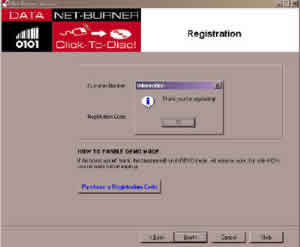
Photo 2: Successful Registration
of the program
The next and basically the main screen of the software is the window where the user creates the compilation. A horizontal-like line in the middle divides the window. In the upper part of the window the contents of the hard disk can be seen. The bottom part of the screen is still intentionally blank. This part is used in order to show the contents of the CD to be done. Using 'Drag and Drop' technique one can make the compilation of the CD.

When the 'Next' button is pressed, the program prompts the user to specify a name for the CD. This should be in accordance to ISO9660 rules.

Photo 4: The Screen where the
user specifies the Volume Name










