
Breaking News

Nikon releases the Z5IIC full-frame mirrorless camera Announcing the New ASUS Googlebook 14 Razer Unveils Kiyo V2 Pro 4K Webcam Transcend Launches 64GB DDR5-6400 Embedded DRAM Modules for High-Speed Performance and Enhanced System Stability Hollyland Introduces LARK M3 Wireless Audio System

logo

  • Share Us
    • Facebook
    • Twitter
  • Home
  • Home
  • News
  • Reviews
  • Essays
  • About
    • Submit News

    • Contact Us
    • Privacy

    • Promotion
    • Advertise

    • RSS Feed

Search form

DVDFab Decrypter

Dec 2,2005 0

This guide is going to show you how to use DVDFab Decrypter in order to transfer your favorite movies to your hard disk, bypassing any type of protection.

First of all, you have to download DVDFab Decrypter. DVDFab Decrypter is a simple version of DVDFab Express. It copies the entire DVD movie to the hard disk and removes any protection scheme (CSS, RC, RCE, APS, UOPs and Sony ARccOS).

The version we installed is the free, v2.9.6.2.

When you run DVDFab Decrypter for the first time, you will be asked to configure some settings. Choose your language and under the advanced section, choose your region. Since we are in Europe, we selected region 2, Western Europe, Japan and South Africa.
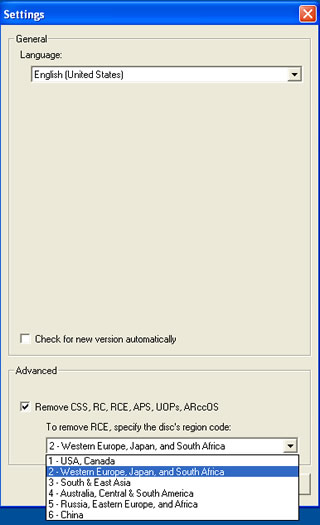
Click on OK and DVDFab Decrypter's main menu should appear.

Insert your DVD movie into your DVD drive and DVDFab Decrypter should recognize the source drive.
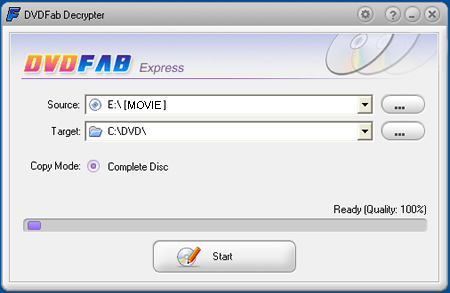
If not, simply click on the "..." button and select your DVD drive.
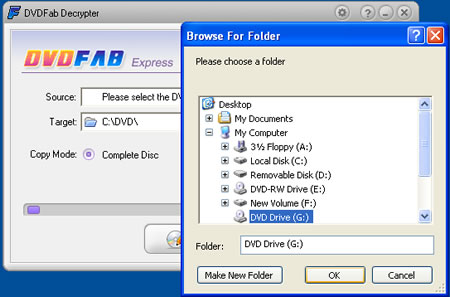
In the Target field, you need to specify where the movie should be saved. Make sure that you have plenty of free space on your Hard Disk, at least 5 to 9 GB are required.

We selected C:\DVD\ as our destination path.
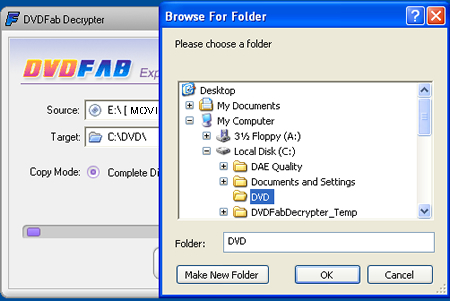
Click on start and you will receive a warning that any files in the selected target directory will be deleted (the message appears regardless of whether any files exist or not).

Click yes and the procedure should start.
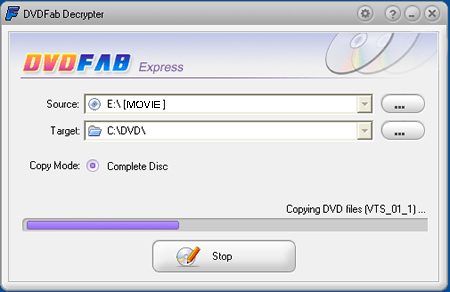
Several minutes later, a message will appear, informing you that the back-up is completed. The time needed depends on your system, but mostly your drive's maximum reading speed and hard disk's writing speed.
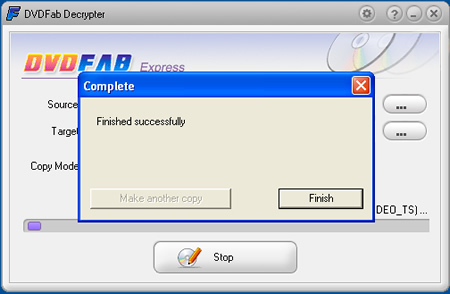
Now we are ready to watch the movie from the Hard Disk or burn it on a blank DVD disk with the appropriate software, Nero Burning Rom for example.

In conclusion, this is as far as we know, the only software that successfully bypasses all the latest protection schemes, so we strongly recommend you give it a try.

DVDFab Decrypter

Tags: DVDFab Decrypter
Previous Post
Corsair CMX1024-4000P
Next Post
Teac MP-400 MP3 Player

Related Posts

Latest Reviews

Fanxiang MP83 M.2 NVMe SSD Enclosure
Enterprise & IT

Fanxiang MP83 M.2 NVMe SSD Enclosure

Ugreen CM642 USB4.0 Enclosure
PC components

Ugreen CM642 USB4.0 Enclosure

be quiet! Dark Power 14 IO
PC components

be quiet! Dark Power 14 IO

SanDisk High Endurance 512GB microSDXC
Cameras

SanDisk High Endurance 512GB microSDXC

Samsung PRO Ultimate 512GB microSDXC
Cameras

Samsung PRO Ultimate 512GB microSDXC

Popular News

MSI’s Latest AMD X870E MAX & EVO Series Motherboards

MSI’s Latest AMD X870E MAX & EVO Series Motherboards

COLORFUL Launches iGame B850M ULTRA Series Micro-ATX Motherboards

COLORFUL Launches iGame B850M ULTRA Series Micro-ATX Motherboards

COLORFUL Presents Limited Edition Chitu MAG-60 Magnetic Keyboard Inspired by the Year of the Horse

COLORFUL Presents Limited Edition Chitu MAG-60 Magnetic Keyboard Inspired by the Year of the Horse

COLORFUL Presents iGame Z890 ULTRA-S W and iGame Z890M ULTRA Z Motherboards

COLORFUL Presents iGame Z890 ULTRA-S W and iGame Z890M ULTRA Z Motherboards

COLORFUL Launches iGame B850I MINI OC V14 Motherboard

COLORFUL Launches iGame B850I MINI OC V14 Motherboard

COLORFUL Expands B850 Motherboard Lineup with New CVN, Battle-Ax, and MEOW Models

COLORFUL Expands B850 Motherboard Lineup with New CVN, Battle-Ax, and MEOW Models

ASRock Adds Support for One Sub-Channel DRAM Module on Intel DDR5 Motherboards

ASRock Adds Support for One Sub-Channel DRAM Module on Intel DDR5 Motherboards

Exceed the Infinite with New ASRock X870E Taichi White Motherboard

Exceed the Infinite with New ASRock X870E Taichi White Motherboard

Main menu

  • Home
  • News
  • Reviews
  • Essays
  • About
    • Submit News

    • Contact Us
    • Privacy

    • Promotion
    • Advertise

    • RSS Feed
  • About
  • Privacy
  • Contact Us
  • Promotional Opportunities @ CdrInfo.com
  • Advertise on out site
  • Submit your News to our site
  • RSS Feed


