Breaking News

ARCTIC Introduces the BioniX P12/P14 A-RGB Series be quiet! expands its peripheral lineup with Light Mount TKL and Mousepad XL GIGABYTE Announces the Availability of AORUS GeForce RTX 50 INFINITY Series Graphics Cards LG Electronics Launches LG xboom Blast Party Speaker Intel Gamer Days 2026 Kicking Off with AAA Gaming Bundle - Partnerships

logo

  • Share Us
    • Facebook
    • Twitter
  • Home
  • Home
  • News
  • Reviews
  • Essays
  • About
    • Submit News

    • Contact Us
    • Privacy

    • Promotion
    • Advertise

    • RSS Feed

Search form

LiteOn SDW-431S

May 26,2004 0

13. Bitsetting Tests


Review Pages

1. Package - Installation
2. Data CD Reading Tests
3. CD Error Correction Tests
4. DVD reading tests
5. DVD Error Correction Tests
6. Protected Disc Tests
7. DAE Tests
8. CD Recording Tests
9. 3T Jitter Tests
10. C1 / C2 Error Measurements
11. DVD Recording Tests
12. KProbe PI/PO quality tests
13. Bitsetting Tests
14. Conclusion


LiteOn Slimtype SDW-431SX - Page 13

Bitsetting Tests

The LiteON IT Book Type Utility allows you to freely choose a DVD+RW or DVD+R disc to be written as DVD-Rom book type, the most recognizable format for DVD players.

The user is able to set the Booktype Setting to either the drive itself, in order to record all DVD+R/+RW media as a "DVD-ROM" or to already recorded DVD+RW discs. Note that the bitsetting of a recorded DVD+R cannot be changed. In the majority of cases, you will not need to change the book type of your DVD media, as most DVD players and DVD-ROM drives have no problem reading recordable DVD media. However, some players (especially older models) cannot recognize discs that are characterized as DVD+RW/-RW or DVD+R/-R book types. In these instances, this compatibility issue can be easily resolved by changing the book type of the DVD media being written to DVD-ROM.

We used the latest version of Book Type Utility v1.0.6 and a rewritable DVD+RW media.

When we launched Book Type Utility and the Query button was pressed, the disc was recognized as DVD+RW. By pressing the change button a new window popped up.

The SetBookType dialog box prompts us to select a new book type for the media and we chose DVD-ROM.

The Info dialog box informed us that the Set Book Type was OK!
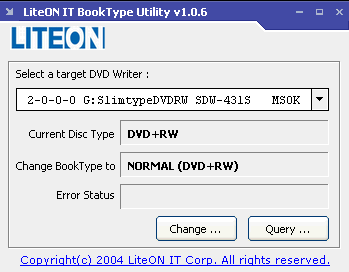
Although the previous message reported that the process ended successfully, the disc was still recognized as DVD+RW and not DVD-ROM as expected.

The end user should also notice the above limitations:

  • Only DVD+RW discs can “Change” the Book type after recording. DVD+R discs cannot change the Book type after recording.
  • The Book type must be set prior to recording the DVD+R disc on your DVD ReWritable drive.
  • This tool only used for LITEON drives (specific models only). Not all
    of the LITEON DVD ReWritable drives support this BookType utility.


Review Pages

1. Package - Installation
2. Data CD Reading Tests
3. CD Error Correction Tests
4. DVD reading tests
5. DVD Error Correction Tests
6. Protected Disc Tests
7. DAE Tests
8. CD Recording Tests
9. 3T Jitter Tests
10. C1 / C2 Error Measurements
11. DVD Recording Tests
12. KProbe PI/PO quality tests
13. Bitsetting Tests
14. Conclusion

 

Pages

  • « first
  • ‹ previous
  • …
  • 6
  • 7
  • 8
  • 9
  • 10
  • 11
  • 12
  • 13
  • 14
  • next ›
  • last »

LiteOn

Tags: LiteOn
Previous Post
LiteOn LVW-5005
Next Post
Sapphire 9100IGP-AA38 motherboard

Related Posts

  • LITE-ON Technology Delays Transfer of Its Solid State Drives Business to Kioxia

  • SSSTC is Sampling the CA6 PCIe Gen 4 SSDs

  • LITE-ON Technology Approves the Transfer of its Solid State Drives Business to Toshiba Memory

  • Toshiba to Buy Lite-On Technology’s Storage Business Unit

  • LITE-ON to Release Project Denali Compliant SSDs

  • LITE-ON Unveils New SSD for Enterprise Workloads

  • Lite-On to Unveil New NVRAM Hybrid Solid-State Drive at OCP 2018

  • LITE-ON Transfers its Camera Module Business to LuxVisions

Latest Reviews

be quiet! Light Loop IO LCD
Cooling Systems

be quiet! Light Loop IO LCD

KIOXIA Exceria Pro G2 NVME 2TB
PC components

KIOXIA Exceria Pro G2 NVME 2TB

Online Casino Games That Offer Something Different
Consumer Electronics

Online Casino Games That Offer Something Different

SOUNDPEATS Air6 HS
Consumer Electronics

SOUNDPEATS Air6 HS

Arctic MX-7
Cooling Systems

Arctic MX-7

Popular News

CORSAIR announces Vanguard Pro 96 and Vanguard 96 Gaming Keyboards

CORSAIR announces Vanguard Pro 96 and Vanguard 96 Gaming Keyboards

MSI Launches FORGE GK600 TKL WIRELESS Special Edition Compact Mechanical Keyboard

MSI Launches FORGE GK600 TKL WIRELESS Special Edition Compact Mechanical Keyboard

TEAMGROUP Launches EXPERT P34F Find My External SSD

TEAMGROUP Launches EXPERT P34F Find My External SSD

Samsung announces Galaxy Tab S11 and Galaxy S25 FE series

Samsung announces Galaxy Tab S11 and Galaxy S25 FE series

Viltrox Showcases Upcoming Lens Lineup and New TTL Flash at IBC 2025

Viltrox Showcases Upcoming Lens Lineup and New TTL Flash at IBC 2025

Panasonic Introduces the First Ultra-Telephoto Zoom Lens in the LUMIX S Series

Panasonic Introduces the First Ultra-Telephoto Zoom Lens in the LUMIX S Series

MSI Launches DATAMAG 40Gbps Magnetic Portable SSD

MSI Launches DATAMAG 40Gbps Magnetic Portable SSD

Viltrox Joins the L-Mount Alliance, Expanding Creative Possibilities

Viltrox Joins the L-Mount Alliance, Expanding Creative Possibilities

Main menu

  • Home
  • News
  • Reviews
  • Essays
  • About
    • Submit News

    • Contact Us
    • Privacy

    • Promotion
    • Advertise

    • RSS Feed
  • About
  • Privacy
  • Contact Us
  • Promotional Opportunities @ CdrInfo.com
  • Advertise on out site
  • Submit your News to our site
  • RSS Feed