
Breaking News

Samsung Expands Its Audio Ecosystem for 2026 With Multi-Device Sound and Immersive New Designs Xiaomi Unveils Xiaomi 17 Ultra Firewalla App 1.67 Brings Enterprise Wi-Fi, RADIUS, and Advanced AP7 Controls to Small Businesses and Power Users Samsung To Unveil AI Vision Built With Google Gemini at CES 2026 Samsung Unveils New Odyssey Gaming Monitor Lineup

logo

  • Share Us
    • Facebook
    • Twitter
  • Home
  • Home
  • News
  • Reviews
  • Essays
  • Forum
  • Legacy
  • About
    • Submit News

    • Contact Us
    • Privacy

    • Promotion
    • Advertise

    • RSS Feed
    • Site Map

Search form

Octave Multipod

May 13,2005 0

3. Using the device - Page 1


Review Pages

1. Introduction
2. Retail package
3. Using the device - Page 1
4. Using the device - Page 2
5. Using the device - Page 3
6. Conclusion


The user has to to install the web camera drivers and application, if they wish to use the Multipod Video recording functions (either as Web Camera or convert the captured videos to ASF format).

The internal Lithium-Polymer battery charges when the user attaches the device to a computer USB port. Octave suggests to charge for a minimum of 2.5 hours before using for the first time.

Lets now see how to operate each mode:
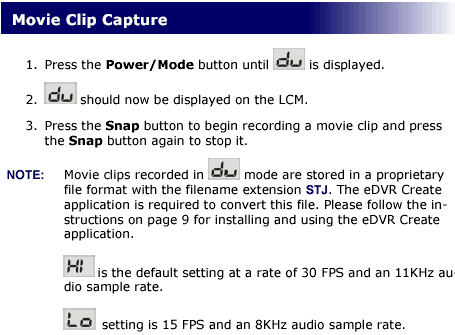
The above screenshot shows more or less how the Movie Clip capture mode works. You can view a sample recorded video here (4.2MB). The recording quality is acceptable, if you consider the device's size and the limited focal length/aperture.

The recorded videos are in STJ format, you have to install the eDVR Create software in order to convert them to a playable (ASF) format.
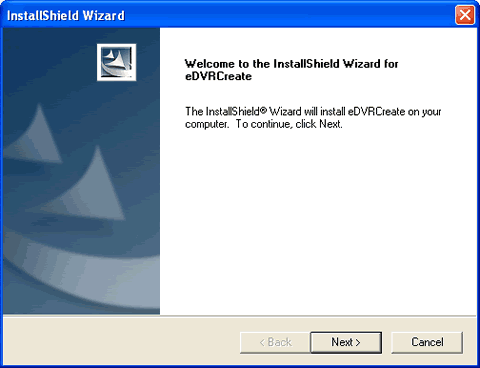
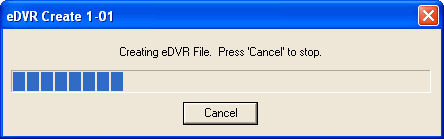
After installing the software, it auto registers the .STJ extension so you only have to double click on the file and the covert wizard loads and prompts you where to store the produced ASF file.

 

Review Pages

1. Introduction
2. Retail package
3. Using the device - Page 1
4. Using the device - Page 2
5. Using the device - Page 3
6. Conclusion

 

Pages

  • « first
  • ‹ previous
  • 1
  • 2
  • 3
  • 4
  • 5
  • 6
  • next ›
  • last »

Octave

Tags: Octave
Previous Post
ArcticCooling - ATI Silencer5
Next Post
Interview with Mr Lawrence Chang of Kingmax

Related Posts

  • Possible Oculus Quest 2 Details Leak

  • Optical Quantum InkJet Printable Media

  • DVD Duplicators by Octave Systems, Incorporated.

  • More about the AVO-Card-Rs

Latest Reviews

Noctua NH-D15 G2 Chromax.Black
Cooling Systems

Noctua NH-D15 G2 Chromax.Black

EnGenius ECW520 AP
Enterprise & IT

EnGenius ECW520 AP

Noctua NP-DM3 desk mat
Gaming

Noctua NP-DM3 desk mat

Crucial P510 2TB NMVE
PC components

Crucial P510 2TB NMVE

The Quiet Technology Behind the Spin
Enterprise & IT

The Quiet Technology Behind the Spin

Popular News

COLORFUL Introduces CVN B850I GAMING FROZEN Motherboard

COLORFUL Introduces CVN B850I GAMING FROZEN Motherboard

COLORFUL Presents CVN X870 ARK FROZEN Motherboard for AMD Ryzen 9000 CPUs

COLORFUL Presents CVN X870 ARK FROZEN Motherboard for AMD Ryzen 9000 CPUs

COLORFUL Presents the B860 Series Motherboards

COLORFUL Presents the B860 Series Motherboards

Intel-AMD new motherboards announced

Intel-AMD new motherboards announced

TEAMGROUP Launches EXPERT P34F Find My External SSD

TEAMGROUP Launches EXPERT P34F Find My External SSD

ASRock AM5 Motherboards Now Fully Support AMD Ryzen 9 9950X3D & 9900X3D Processors

ASRock AM5 Motherboards Now Fully Support AMD Ryzen 9 9950X3D & 9900X3D Processors

Samsung announces Galaxy Tab S11 and Galaxy S25 FE series

Samsung announces Galaxy Tab S11 and Galaxy S25 FE series

Viltrox Showcases Upcoming Lens Lineup and New TTL Flash at IBC 2025

Viltrox Showcases Upcoming Lens Lineup and New TTL Flash at IBC 2025

Main menu

  • Home
  • News
  • Reviews
  • Essays
  • Forum
  • Legacy
  • About
    • Submit News

    • Contact Us
    • Privacy

    • Promotion
    • Advertise

    • RSS Feed
    • Site Map
  • About
  • Privacy
  • Contact Us
  • Promotional Opportunities @ CdrInfo.com
  • Advertise on out site
  • Submit your News to our site
  • RSS Feed


