
Breaking News

Viltrox Launches AF 75mm F1.8 EVO and AF 90mm F2.2 Lenses COLORFUL Unveils New iGame M15 and M16 Origo Gaming Laptops at COMPUTEX 2026 GIGABYTE Showcases Sleek STEALTH and Elegant WOOD PC Builds at COMPUTEX 2026 GIGABYTE Showcases Industry-leading CQDIMM Performance and Ecosystem Expansion at COMPUTEX 2026 G.SKILL Demos Trident Z5 NeoX RGB Series DDR5 with AMD EXPOT Technology

logo

  • Share Us
    • Facebook
    • Twitter
  • Home
  • Home
  • News
  • Reviews
  • Essays
  • Forum
  • Legacy
  • About
    • Submit News

    • Contact Us
    • Privacy

    • Promotion
    • Advertise

    • RSS Feed
    • Site Map

Search form

Yamaha CRW3200E CD-RW

Feb 19,2002 0

11. CD-RW Audio Track Edit mode


Review Pages

1. New Features
2. Installation
3. Data Tests
4. RW reading tests
5. DAE Tests
6. CDR Tests
7. Writing Quality Tests
8. RW Writing Tests
9. CD-MRW (Mt. Rainier Format)
10. Audio Master Quality Recording
11. CD-RW Audio Track Edit mode
12. Conclusion


Yamaha CRW3200E IDE CD-RW - Page 11

CD-RW Audio Track Edit mode

CRW3200 provides a unique new feature that allows users to edit recorded audio track on CD-RW disc without erasing the entire disc. Users can add audio tracks to or erase audio tracks off any audio CD-RW. Nero 5.5.5.7 support the this feature - can be found under AudioCD Project at "RW Edit Disc":
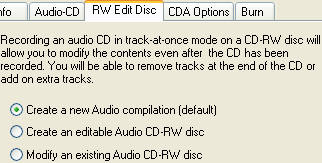
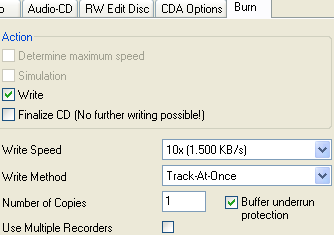
Nero offers 3 options: A) to Create a new Audio compilation, B) to create an editable Audio CD-RW disc and C) to edit an existing Audio CD-RW disc. Lets select "Create a new Audio compilation". After selecting few mp3 files we are ready to burn our project, using TAO mode:
After our burn is finished, lets try to edit our AudioCD. Select "Modify an existing Audio CD-RW disc" and after Nero loads the Audio tracks you can simply delete some of them:
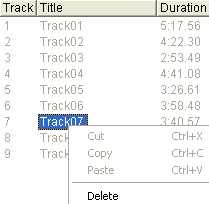
In order to remove a track (in our case Track07) just press right-click and select delete. Correct? Nope. Nero warning message gives the right procedure:

In order to delete Track07 you must also delete Tracks 8 and 9... After deleting Tracks 6 to 9 we add more Mp3 files inside:

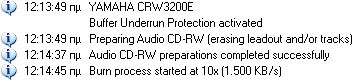
and we are ready to burn the new complilation. Nero will erase the tracks before writing the new one:
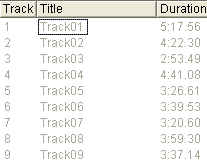
Last lets see our final project:

 

Review Pages

1. New Features
2. Installation
3. Data Tests
4. RW reading tests
5. DAE Tests
6. CDR Tests
7. Writing Quality Tests
8. RW Writing Tests
9. CD-MRW (Mt. Rainier Format)
10. Audio Master Quality Recording
11. CD-RW Audio Track Edit mode
12. Conclusion


Pages

  • « first
  • ‹ previous
  • …
  • 4
  • 5
  • 6
  • 7
  • 8
  • 9
  • 10
  • 11
  • 12
  • next ›
  • last »

Tags:
Previous Post
32x CD-RW Roundup Vol3
Next Post
Roxio Ez CD Creator 5.0 CD-R Software

Related Posts

Latest Reviews

Swit NP-FZ100 Battery
Cameras

Swit NP-FZ100 Battery

The Technology Stack Behind Modern Digital Gaming Platforms
Consumer Electronics

The Technology Stack Behind Modern Digital Gaming Platforms

be quiet! Dark Rock Pro 6
Cooling Systems

be quiet! Dark Rock Pro 6

How Online Casinos Use Encryption, Verification, and Risk Controls to Build User Trust
Enterprise & IT

How Online Casinos Use Encryption, Verification, and Risk Controls to Build User Trust

Why Low-Latency Infrastructure Matters More Than Raw Specs
Enterprise & IT

Why Low-Latency Infrastructure Matters More Than Raw Specs

Popular News

CORSAIR announces Vanguard Pro 96 and Vanguard 96 Gaming Keyboards

CORSAIR announces Vanguard Pro 96 and Vanguard 96 Gaming Keyboards

TEAMGROUP Launches EXPERT P34F Find My External SSD

TEAMGROUP Launches EXPERT P34F Find My External SSD

MSI Launches FORGE GK600 TKL WIRELESS Special Edition Compact Mechanical Keyboard

MSI Launches FORGE GK600 TKL WIRELESS Special Edition Compact Mechanical Keyboard

Samsung announces Galaxy Tab S11 and Galaxy S25 FE series

Samsung announces Galaxy Tab S11 and Galaxy S25 FE series

Viltrox Showcases Upcoming Lens Lineup and New TTL Flash at IBC 2025

Viltrox Showcases Upcoming Lens Lineup and New TTL Flash at IBC 2025

Panasonic Introduces the First Ultra-Telephoto Zoom Lens in the LUMIX S Series

Panasonic Introduces the First Ultra-Telephoto Zoom Lens in the LUMIX S Series

MSI Launches DATAMAG 40Gbps Magnetic Portable SSD

MSI Launches DATAMAG 40Gbps Magnetic Portable SSD

Viltrox Joins the L-Mount Alliance, Expanding Creative Possibilities

Viltrox Joins the L-Mount Alliance, Expanding Creative Possibilities

Main menu

  • Home
  • News
  • Reviews
  • Essays
  • Forum
  • Legacy
  • About
    • Submit News

    • Contact Us
    • Privacy

    • Promotion
    • Advertise

    • RSS Feed
    • Site Map
  • About
  • Privacy
  • Contact Us
  • Promotional Opportunities @ CdrInfo.com
  • Advertise on out site
  • Submit your News to our site
  • RSS Feed

