
Breaking News

Geometric Future Introduces the Eskimo Ultra 42 AIO and Squama Ultimate 3003-14 Fans Arctic announces PX-1 thermal putty pad series Flowtica Verso AI Productivity Companion Launches for Preorder at Special Early-Bird Price DeepCool Launches StationX 622 High-Performance Cooling for Professional Workstations SSSTC Introduces PCIe Gen4 QLC SSDs for AI PCs and Industrial Applications

logo

  • Share Us
    • Facebook
    • Twitter
  • Home
  • Home
  • News
  • Reviews
  • Essays
  • About
    • Submit News

    • Contact Us
    • Privacy

    • Promotion
    • Advertise

    • RSS Feed

Search form

TEAC CD-552E CD-ROM

Nov 22,2002 0

1. Introduction/Installation


Review Pages

1. Introduction/Installation
2. Data Reading Tests
3. CD Error Correction
4. CloneCD Reading Tests
5. DAE Tests
6. Conclusion


Teac CD-552E IDE CD-ROM - Page 1

- Introduction

For all those who still consider a good CD-ROM drive as a "desktop essential", Teac offers a new solution for reading at a high speed of 52X. Although the in our latest hardware reviews we had to do with high-end CD-R/RW and DVD recorders, we could not resist testing the new CD-ROM drive from Teac. The performance of the drive is compared with the already tested CD-ROM solutions from Samsung, MSI and CyberDrive.

- Drive features

The Teac CD-552E is a 52X ATAPI CD-ROM drive. The current firmware revision installed is v1.00 and the supported cache buffer is 128 KB.
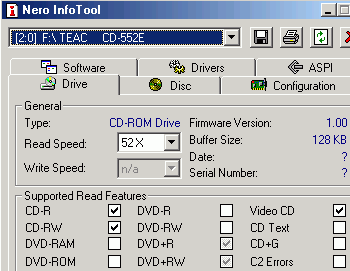
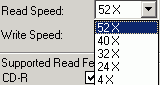
In the following picture you can see the detailed specifications of the drive.

- The package

The retail kit contains the drive itself, a quick installation guide, an IDE cable and mounting screws. A multimedia CD-ROM is also bundled with information and specifications about the Teac products. Teac offers a 2-year warranty for the CD-552E. The retail price of the drive is 30~50 Euro, including tax.

The front panel of the drive looks generic and on the disc loading tray there is the "Compact Disc" logo. The eject/stop button among with the fast/forward button is placed below the tray on the right side of the front panel, as usually. The operation LED indicates the drive's status and is active while reading. Last, the available headphone jack and the volume control knob let you use the drive as an audio playback device.

On the rear panel there are the usual connectors, such as the DC input, the ATAPI interface, the device configuration jumper, and the analog/digital audio outputs.

After removing the screws on the bottom we can see the drive's internal design (click for a high-res).

Click To Enlarge!

- Installation

The Teac drive was identified as "Teac CD-552E" under WinXP. The drive was installed to the secondary IDE channel of our test PC as a "Master" and worked in Ultra DMA Mode 2 transfer mode. The drive was a 2002 model came with firmware version v1.00 installed.

For all the tests we used the latest versions of CloneCD, CDDAE, CDSpeed and EAC. We compare the performance of the Teac drive with three other CD-ROM drives, the Cyberdrive 52X, the MSI MS-8152 and the Samsung SC-152L (52X).


Review Pages

1. Introduction/Installation
2. Data Reading Tests
3. CD Error Correction
4. CloneCD Reading Tests
5. DAE Tests
6. Conclusion


Pages

  • 1
  • 2
  • 3
  • 4
  • 5
  • 6
  • next ›
  • last »

Tags:
Previous Post
ASUS CRW5224 CD-RW
Next Post
AOpen CRW4850 CD-RW

Related Posts

Latest Reviews

NAS Security Is a Matter of Configuration Best Practices for Protecting Systems and Data
Enterprise & IT

NAS Security Is a Matter of Configuration Best Practices for Protecting Systems and Data

GMK TriggerKey
Gadgets

GMK TriggerKey

The Best Online Casino Games to Play on a Browser
Enterprise & IT

The Best Online Casino Games to Play on a Browser

be quiet! Light Wings Pro IO fan
Cooling Systems

be quiet! Light Wings Pro IO fan

Why Intelligent Firmware Matters More Than Peak Throughput in NAS Systems
Enterprise & IT

Why Intelligent Firmware Matters More Than Peak Throughput in NAS Systems

Popular News

MSI’s Latest AMD X870E MAX & EVO Series Motherboards

MSI’s Latest AMD X870E MAX & EVO Series Motherboards

COLORFUL Launches iGame B850M ULTRA Series Micro-ATX Motherboards

COLORFUL Launches iGame B850M ULTRA Series Micro-ATX Motherboards

COLORFUL Launches iGame B850I MINI OC V14 Motherboard

COLORFUL Launches iGame B850I MINI OC V14 Motherboard

COLORFUL Presents Limited Edition Chitu MAG-60 Magnetic Keyboard Inspired by the Year of the Horse

COLORFUL Presents Limited Edition Chitu MAG-60 Magnetic Keyboard Inspired by the Year of the Horse

COLORFUL Launches the iGame X870E VULCAN W OC Motherboard

COLORFUL Launches the iGame X870E VULCAN W OC Motherboard

COLORFUL Presents iGame Z890 ULTRA-S W and iGame Z890M ULTRA Z Motherboards

COLORFUL Presents iGame Z890 ULTRA-S W and iGame Z890M ULTRA Z Motherboards

COLORFUL Launches iGame X870E ULTRA-S V14 Motherboard

COLORFUL Launches iGame X870E ULTRA-S V14 Motherboard

COLORFUL Expands B850 Motherboard Lineup with New CVN, Battle-Ax, and MEOW Models

COLORFUL Expands B850 Motherboard Lineup with New CVN, Battle-Ax, and MEOW Models

Main menu

  • Home
  • News
  • Reviews
  • Essays
  • About
    • Submit News

    • Contact Us
    • Privacy

    • Promotion
    • Advertise

    • RSS Feed
  • About
  • Privacy
  • Contact Us
  • Promotional Opportunities @ CdrInfo.com
  • Advertise on out site
  • Submit your News to our site
  • RSS Feed