
Breaking News

SAMA Introduces the S32 WOOD, a Compact M-ATX Case Bundled with an 80 PLUS Gold PSU Thypoch Completes Simera-C Cine Prime Lineup with New 100mm T1.9 Lens CORSAIR Launches the RM1200e Power Supply with Built-in PinProtect GPU Overcurrent Protection and Platinum-certified Efficiency CORSAIR Changes the Game with PureVector, a Science-Based Personalized Aiming Technology, Launching Exclusively in the SABRE v3 PRO PureVector Mouse Series AMD FSR Upscaling 4.1 Boosts Frames and Image Quality on More Devices

logo

  • Share Us
    • Facebook
    • Twitter
  • Home
  • Home
  • News
  • Reviews
  • Essays
  • About
    • Submit News

    • Contact Us
    • Privacy

    • Promotion
    • Advertise

    • RSS Feed

Search form

AMF CD/DVD Jewel Case and Label Creator 3.8

Jun 4,2004 0

2. Installation/Configuration


Review Pages

1. Introduction
2. Installation/Configuration
3. Making a Label
4. Conclusion


AMF CD/DVD Jewel Case and Label Creator 3.8 - Page 2

Installation/Configuration

Installation is pretty straightforward. The installer will automatically detect the installation folder of Microsoft Word, and place the necessary files there. The installation of the software is done on a per user basis, meaning that only the currently logged on user will be able to use it. This can be fixed though during the installation by changing the installation path. This step though, should be attempted only if you know what you’re doing in order to get a working installation. Another thing that might need attention during installation is Microsoft Word’s security settings regarding macro execution. You might get a security warning, and in that case you should allow the macros to be executed.

After installation, there is no configuration you have to go through in order to get things up and running. You’re ready to start creating your CD/DVD labels! A detailed user’s guide accompanies the software, covering the aspects of installation, and some extra details about each template should you need to customize them further.

Working with the software

To get things under way, all we need to do is open Microsoft Word and create a new document using the File, new menu. We are then presented with the different templates that crdlabel supports. A total of 19 templates are included. Among others, it supports industry standard label layout formats including those from Avery, Neato, Stomper, HP, Kyso, 3-Up and Memorex. So we don’t have to measure things in order to align our text with the preprinted labels. Most of the templates are characterized as CD labels, but they can also be used to create DVD labels, as someone would expect.
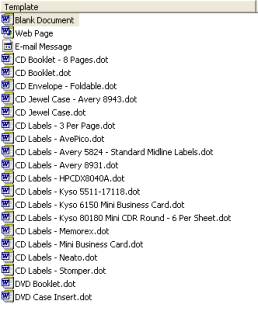
After we choose the type of label we wish to create, a new document is opened. A thing we notice is that there is an extra toolbar added, which controls some of the features we can add to our labels. Most of the icons will be already familiar to an experienced Microsoft Word user, like insert a textbox, a picture, clipart, a drawing. If we want to create a label for an audio CD, there is a pretty handy feature that can search and download from the Internet the CD’s title and the list of tracks that you can afterwards paste into the label. 

The advantage of the labels being embedded as a Microsoft Word template is that we have absolute freedom with what we can create for our labels. We can use all the tools already available in Microsoft Word’s arsenal. The only limit is each one’s imagination.

In the next section, we take the software out for a spin, and we create some of our own labels. Read on…..


Review Pages

1. Introduction
2. Installation/Configuration
3. Making a Label
4. Conclusion


Pages

  • « first
  • ‹ previous
  • 1
  • 2
  • 3
  • 4
  • next ›
  • last »

Tags:
Previous Post
Samsung SH-W08A
Next Post
VGA Roundup

Related Posts

Latest Reviews

be quiet! Light Wings Pro IO fan
Cooling Systems

be quiet! Light Wings Pro IO fan

Why Intelligent Firmware Matters More Than Peak Throughput in NAS Systems
Enterprise & IT

Why Intelligent Firmware Matters More Than Peak Throughput in NAS Systems

Fanxiang MP83 M.2 NVMe SSD Enclosure
Enterprise & IT

Fanxiang MP83 M.2 NVMe SSD Enclosure

Ugreen CM642 USB4.0 Enclosure
PC components

Ugreen CM642 USB4.0 Enclosure

be quiet! Dark Power 14 IO
PC components

be quiet! Dark Power 14 IO

Popular News

MSI’s Latest AMD X870E MAX & EVO Series Motherboards

MSI’s Latest AMD X870E MAX & EVO Series Motherboards

COLORFUL Launches iGame B850M ULTRA Series Micro-ATX Motherboards

COLORFUL Launches iGame B850M ULTRA Series Micro-ATX Motherboards

COLORFUL Presents Limited Edition Chitu MAG-60 Magnetic Keyboard Inspired by the Year of the Horse

COLORFUL Presents Limited Edition Chitu MAG-60 Magnetic Keyboard Inspired by the Year of the Horse

COLORFUL Launches iGame B850I MINI OC V14 Motherboard

COLORFUL Launches iGame B850I MINI OC V14 Motherboard

COLORFUL Launches the iGame X870E VULCAN W OC Motherboard

COLORFUL Launches the iGame X870E VULCAN W OC Motherboard

COLORFUL Presents iGame Z890 ULTRA-S W and iGame Z890M ULTRA Z Motherboards

COLORFUL Presents iGame Z890 ULTRA-S W and iGame Z890M ULTRA Z Motherboards

COLORFUL Expands B850 Motherboard Lineup with New CVN, Battle-Ax, and MEOW Models

COLORFUL Expands B850 Motherboard Lineup with New CVN, Battle-Ax, and MEOW Models

ASRock Adds Support for One Sub-Channel DRAM Module on Intel DDR5 Motherboards

ASRock Adds Support for One Sub-Channel DRAM Module on Intel DDR5 Motherboards

Main menu

  • Home
  • News
  • Reviews
  • Essays
  • About
    • Submit News

    • Contact Us
    • Privacy

    • Promotion
    • Advertise

    • RSS Feed
  • About
  • Privacy
  • Contact Us
  • Promotional Opportunities @ CdrInfo.com
  • Advertise on out site
  • Submit your News to our site
  • RSS Feed