Breaking News

SAMA Introduces the S32 WOOD, a Compact M-ATX Case Bundled with an 80 PLUS Gold PSU Thypoch Completes Simera-C Cine Prime Lineup with New 100mm T1.9 Lens CORSAIR Launches the RM1200e Power Supply with Built-in PinProtect GPU Overcurrent Protection and Platinum-certified Efficiency CORSAIR Changes the Game with PureVector, a Science-Based Personalized Aiming Technology, Launching Exclusively in the SABRE v3 PRO PureVector Mouse Series AMD FSR Upscaling 4.1 Boosts Frames and Image Quality on More Devices

logo

  • Share Us
    • Facebook
    • Twitter
  • Home
  • Home
  • News
  • Reviews
  • Essays
  • About
    • Submit News

    • Contact Us
    • Privacy

    • Promotion
    • Advertise

    • RSS Feed

Search form

Asus N6600GT AGP

Apr 13,2005 0

15. Overclocking


Review Pages

1. Introduction
2. Features-TurboCache
3. A closer look
4. Test System
5. 3DMark05
6. 3DMark 2003
7. Codecreatures
8. Aquamark3 / 3DMark 2001
9. Half life 2
10. Doom 3
11. Far Cry
12. Thief 3
13. Colin McRae 05
14. Ground Control II
15. Overclocking
16. Conclusion


No matter your graphics card, there comes a time in your computer's life when it can no longer cope with the latest technology the ever so popular games use. This is one of the main reasons for overclocking your graphics card. Gamers are always looking forward for a little extra boost in terms of framerate. Even though most of the times the boost is far from noticeable, overclocking remains the last resort when you can't afford to buy a brand new VGA card.
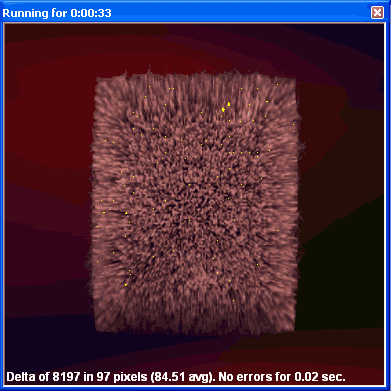
Increasing the memory clock too much,
produces the so-called "artifacts".

As we explained earlier, the Asus N6600GT comes stock clocked higher than other vendor implementations of the 6600GT. It's core runs at 520MHz and the memory at 550MHz.

Unlike other 6600GTs, the memory chosen by Asus is the 1.6ns K4J55323QF-GC16 by Samsung. This means that the theoretical maximum for the memory parts is 625MHz.

Encouraged by that fact, we immediately set the memory clock to 600MHz. That would create an effective memory fetch frequency of 1.2GHz which would boost memory bandwidth even more. The card could run 3DMark05 and games without producing artifacts so we set the clock to 605MHz. Once more, we got no artifacts, but that was the highest frequency where this was possible.

It was time to play around with the GPU clock speeds. Being used to other 6600GT versions we were hoping to push the clock from 520MHz to 550MHz. Unfortunately this wasn't possible and any option above 530MHz would at some point create artifacts or other screen anomalies and finally the system would freeze.

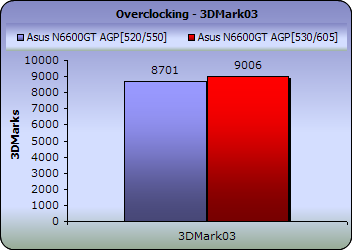
Here are some benchmark results, with the maximum stable overclocking settings on the Asus N6600GT :
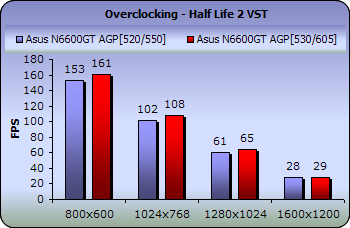
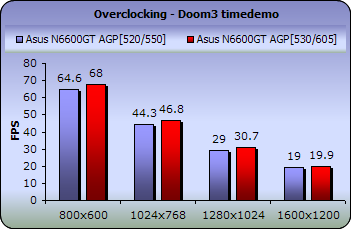
The boost in performance is much less than we originally expected as the GPU clock could not be overclocked as high as we had hoped or seen on similar graphics cards. As a result, we got a boost of 300 3DMarks in 3DMark03 and an average of 2 to 3 fps in the rest of the games.


Review Pages

1. Introduction
2. Features-TurboCache
3. A closer look
4. Test System
5. 3DMark05
6. 3DMark 2003
7. Codecreatures
8. Aquamark3 / 3DMark 2001
9. Half life 2
10. Doom 3
11. Far Cry
12. Thief 3
13. Colin McRae 05
14. Ground Control II
15. Overclocking
16. Conclusion


Pages

  • « first
  • ‹ previous
  • …
  • 8
  • 9
  • 10
  • 11
  • 12
  • 13
  • 14
  • 15
  • 16
  • next ›
  • last »

ASUS

Tags: ASUS
Previous Post
VSO latest results April 17th 2005
Next Post
Toshiba SD-R5372

Related Posts

  • ASUS Announces ExpertBook A7 (AMD)

  • ASUS ProArt RTX Spark Windows PCs Available for Immediate Pre-Order

  • ASUS Announces New 64GB Configuration of ASUS Ascent GX10

  • Announcing the New ASUS Googlebook 14

  • ASUS Announces Ascent QN10 Mini PC

  • ASUS Announces WiFi 8 Router

  • Asus announces ExpertBook B3 G2 and ExpertBook P3 G2

  • ASUS Announces Prime AP304 PC Case

Latest Reviews

be quiet! Light Wings Pro IO fan
Cooling Systems

be quiet! Light Wings Pro IO fan

Why Intelligent Firmware Matters More Than Peak Throughput in NAS Systems
Enterprise & IT

Why Intelligent Firmware Matters More Than Peak Throughput in NAS Systems

Fanxiang MP83 M.2 NVMe SSD Enclosure
Enterprise & IT

Fanxiang MP83 M.2 NVMe SSD Enclosure

Ugreen CM642 USB4.0 Enclosure
PC components

Ugreen CM642 USB4.0 Enclosure

be quiet! Dark Power 14 IO
PC components

be quiet! Dark Power 14 IO

Popular News

MSI’s Latest AMD X870E MAX & EVO Series Motherboards

MSI’s Latest AMD X870E MAX & EVO Series Motherboards

COLORFUL Launches iGame B850M ULTRA Series Micro-ATX Motherboards

COLORFUL Launches iGame B850M ULTRA Series Micro-ATX Motherboards

COLORFUL Presents Limited Edition Chitu MAG-60 Magnetic Keyboard Inspired by the Year of the Horse

COLORFUL Presents Limited Edition Chitu MAG-60 Magnetic Keyboard Inspired by the Year of the Horse

COLORFUL Launches iGame B850I MINI OC V14 Motherboard

COLORFUL Launches iGame B850I MINI OC V14 Motherboard

COLORFUL Launches the iGame X870E VULCAN W OC Motherboard

COLORFUL Launches the iGame X870E VULCAN W OC Motherboard

COLORFUL Presents iGame Z890 ULTRA-S W and iGame Z890M ULTRA Z Motherboards

COLORFUL Presents iGame Z890 ULTRA-S W and iGame Z890M ULTRA Z Motherboards

COLORFUL Expands B850 Motherboard Lineup with New CVN, Battle-Ax, and MEOW Models

COLORFUL Expands B850 Motherboard Lineup with New CVN, Battle-Ax, and MEOW Models

ASRock Adds Support for One Sub-Channel DRAM Module on Intel DDR5 Motherboards

ASRock Adds Support for One Sub-Channel DRAM Module on Intel DDR5 Motherboards

Main menu

  • Home
  • News
  • Reviews
  • Essays
  • About
    • Submit News

    • Contact Us
    • Privacy

    • Promotion
    • Advertise

    • RSS Feed
  • About
  • Privacy
  • Contact Us
  • Promotional Opportunities @ CdrInfo.com
  • Advertise on out site
  • Submit your News to our site
  • RSS Feed