
Breaking News

Lexar Introduces JumpDrive A50V and C50V Dashcam USB Drives Lexar ARES RGB 2nd Gen DDR5 Passes AMD EXPO Ultra Low Latency Certification Tests Thypoch Introduces New Sculptor AF Lens Series with 23mm f1.4 Prime for Fujifilm X-Mount ASUS Announces Availability of ProArt GR1X Xiaomi and Leica Present the Xiaomi 18 Pro Series

logo

  • Share Us
    • Facebook
    • Twitter
  • Home
  • Home
  • News
  • Reviews
  • Essays
  • About
    • Submit News

    • Contact Us
    • Privacy

    • Promotion
    • Advertise

    • RSS Feed

Search form

Bad Copy Pro

Mar 10,2004 0

4. CD-RW Recovery Test


Review Pages

1. Introduction
2. CD-R Recovery Test - page 1
3. CD-R Recovery Test - page 2
4. CD-RW Recovery Test
5. Hard Disk Recovery Test
6. Floppy Recovery Test - page 1
7. Floppy Recovery Test - page 2
8. Floppy Recovery Test - page 3
9. Conlusion


Bad Copy Pro - Page 4

CDRW TEST

Starting the second test with our CDRW, we select from recovery source board on the left,

CD-ROM/CD-R/CD-RW source, for CD-ROM, CD-R, CD-RW discs.


Notice that the CDRW, quick erased with Nero burning rom program.

The Test

Starting, we select "Rescue Lost Files - Mode #1" as we can`t see our files under Windows.

The window below appears and we click on Scan Disk button.

No more than one second a pop - up window appears to report that the scan process finish.

Following the advice from pop - up window, we select the track, but unfortunately no files found to recover. Hence, we decided to give a final try with Rescue Lost Files - Mode #2.

Starting again from the begin and selecting "Rescue Lost Files - Mode #2, we give our second try to recover our files from the erased CDRW.

A note appears, giving us information about what will happen.
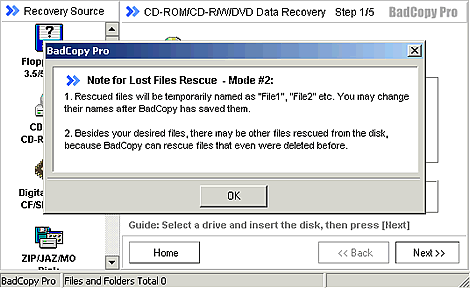
Here all we had to do, was to press the start.
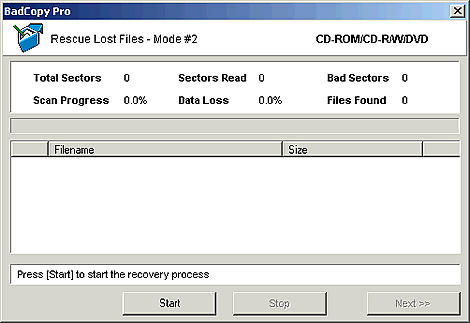
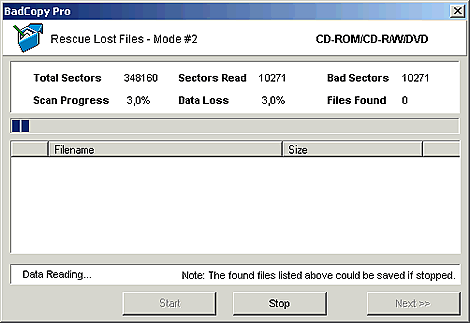
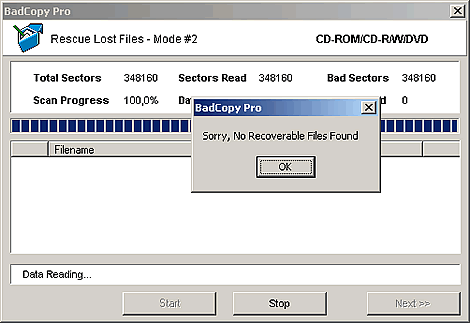
After pressing start, a window pop-ups to select scan options. We choose full scan and retrieve all supported file types. During the data reading process we notice that all sectors which had been read was bad sectors for the recovery program and data loss was 100% at the end. Thus, we did not get any file back, as you can see from the two pictures below.
 

Review Pages

1. Introduction
2. CD-R Recovery Test - page 1
3. CD-R Recovery Test - page 2
4. CD-RW Recovery Test
5. Hard Disk Recovery Test
6. Floppy Recovery Test - page 1
7. Floppy Recovery Test - page 2
8. Floppy Recovery Test - page 3
9. Conlusion


Pages

  • « first
  • ‹ previous
  • 1
  • 2
  • 3
  • 4
  • 5
  • 6
  • 7
  • 8
  • 9
  • next ›
  • last »

Tags:
Previous Post
Memorex True-8x
Next Post
LiteOn SOHC-5232K combo

Related Posts

Latest Reviews

NAS Security Is a Matter of Configuration Best Practices for Protecting Systems and Data
Enterprise & IT

NAS Security Is a Matter of Configuration Best Practices for Protecting Systems and Data

GMK TriggerKey
Gadgets

GMK TriggerKey

The Best Online Casino Games to Play on a Browser
Enterprise & IT

The Best Online Casino Games to Play on a Browser

be quiet! Light Wings Pro IO fan
Cooling Systems

be quiet! Light Wings Pro IO fan

Why Intelligent Firmware Matters More Than Peak Throughput in NAS Systems
Enterprise & IT

Why Intelligent Firmware Matters More Than Peak Throughput in NAS Systems

Popular News

MSI’s Latest AMD X870E MAX & EVO Series Motherboards

MSI’s Latest AMD X870E MAX & EVO Series Motherboards

COLORFUL Launches iGame B850M ULTRA Series Micro-ATX Motherboards

COLORFUL Launches iGame B850M ULTRA Series Micro-ATX Motherboards

COLORFUL Launches iGame B850I MINI OC V14 Motherboard

COLORFUL Launches iGame B850I MINI OC V14 Motherboard

COLORFUL Presents Limited Edition Chitu MAG-60 Magnetic Keyboard Inspired by the Year of the Horse

COLORFUL Presents Limited Edition Chitu MAG-60 Magnetic Keyboard Inspired by the Year of the Horse

COLORFUL Launches the iGame X870E VULCAN W OC Motherboard

COLORFUL Launches the iGame X870E VULCAN W OC Motherboard

COLORFUL Presents iGame Z890 ULTRA-S W and iGame Z890M ULTRA Z Motherboards

COLORFUL Presents iGame Z890 ULTRA-S W and iGame Z890M ULTRA Z Motherboards

COLORFUL Launches iGame X870E ULTRA-S V14 Motherboard

COLORFUL Launches iGame X870E ULTRA-S V14 Motherboard

COLORFUL Expands B850 Motherboard Lineup with New CVN, Battle-Ax, and MEOW Models

COLORFUL Expands B850 Motherboard Lineup with New CVN, Battle-Ax, and MEOW Models

Main menu

  • Home
  • News
  • Reviews
  • Essays
  • About
    • Submit News

    • Contact Us
    • Privacy

    • Promotion
    • Advertise

    • RSS Feed
  • About
  • Privacy
  • Contact Us
  • Promotional Opportunities @ CdrInfo.com
  • Advertise on out site
  • Submit your News to our site
  • RSS Feed