
Breaking News

Lexar Introduces JumpDrive A50V and C50V Dashcam USB Drives Lexar ARES RGB 2nd Gen DDR5 Passes AMD EXPO Ultra Low Latency Certification Tests Thypoch Introduces New Sculptor AF Lens Series with 23mm f1.4 Prime for Fujifilm X-Mount ASUS Announces Availability of ProArt GR1X Xiaomi and Leica Present the Xiaomi 18 Pro Series

logo

  • Share Us
    • Facebook
    • Twitter
  • Home
  • Home
  • News
  • Reviews
  • Essays
  • About
    • Submit News

    • Contact Us
    • Privacy

    • Promotion
    • Advertise

    • RSS Feed

Search form

Bad Copy Pro

Mar 10,2004 0

6. Floppy Recovery Test - page 1


Review Pages

1. Introduction
2. CD-R Recovery Test - page 1
3. CD-R Recovery Test - page 2
4. CD-RW Recovery Test
5. Hard Disk Recovery Test
6. Floppy Recovery Test - page 1
7. Floppy Recovery Test - page 2
8. Floppy Recovery Test - page 3
9. Conlusion


Bad Copy Pro - Page 6

FLOPPY TEST

Starting the first test with our Floppy, we choose from recovery source board on the left,

Floppy Disk 3.5/5" Disk source.


Notice that under Windows we can not open Floppy disk from My Computer, because a message asking to format drive A appears any time we double click the floppy icon.

Bad Copy Pro features for Floppy disks.

1. Corrupt and unopenable files on floppy disk

2. Disk is inaccessible and Windows prompt you to format

3. FAT (File Allocation Table) or BOOT area of the disk were damaged

4. ROOT area of the disk was damaged and files can not be listed

5. Floppy disk contains bad sectors or clusters

6. Accidentally deleted files on floppy disk (floppy disk undelete)

7. Virus attack or other lost files on diskette

Note: The "File Allocation Table" itself is actually one of the structures inside the FAT file system as seen on-disk. The purpose of this table is to keep track of which areas of the disk are available and which areas are in use.

The Test

Starting first step, the only thing we have to do, is to select the recovery mode where we select "Rescue Lost Files - Mode #1", as we can`t see our files under Windows.

After that we press the scan disk button, starting the process.

The window below appears, advice us to wait for data read.

When data read finish, we could see our files real time using the preview button, as you can see from the two pictures below.

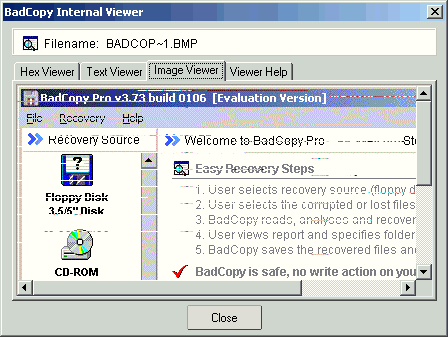
Selecting all of the files and pressing the recover button, we saved our files back to our hard disk.


Review Pages

1. Introduction
2. CD-R Recovery Test - page 1
3. CD-R Recovery Test - page 2
4. CD-RW Recovery Test
5. Hard Disk Recovery Test
6. Floppy Recovery Test - page 1
7. Floppy Recovery Test - page 2
8. Floppy Recovery Test - page 3
9. Conlusion


Pages

  • « first
  • ‹ previous
  • 1
  • 2
  • 3
  • 4
  • 5
  • 6
  • 7
  • 8
  • 9
  • next ›
  • last »

Tags:
Previous Post
Memorex True-8x
Next Post
LiteOn SOHC-5232K combo

Related Posts

Latest Reviews

NAS Security Is a Matter of Configuration Best Practices for Protecting Systems and Data
Enterprise & IT

NAS Security Is a Matter of Configuration Best Practices for Protecting Systems and Data

GMK TriggerKey
Gadgets

GMK TriggerKey

The Best Online Casino Games to Play on a Browser
Enterprise & IT

The Best Online Casino Games to Play on a Browser

be quiet! Light Wings Pro IO fan
Cooling Systems

be quiet! Light Wings Pro IO fan

Why Intelligent Firmware Matters More Than Peak Throughput in NAS Systems
Enterprise & IT

Why Intelligent Firmware Matters More Than Peak Throughput in NAS Systems

Popular News

MSI’s Latest AMD X870E MAX & EVO Series Motherboards

MSI’s Latest AMD X870E MAX & EVO Series Motherboards

COLORFUL Launches iGame B850M ULTRA Series Micro-ATX Motherboards

COLORFUL Launches iGame B850M ULTRA Series Micro-ATX Motherboards

COLORFUL Launches iGame B850I MINI OC V14 Motherboard

COLORFUL Launches iGame B850I MINI OC V14 Motherboard

COLORFUL Presents Limited Edition Chitu MAG-60 Magnetic Keyboard Inspired by the Year of the Horse

COLORFUL Presents Limited Edition Chitu MAG-60 Magnetic Keyboard Inspired by the Year of the Horse

COLORFUL Launches the iGame X870E VULCAN W OC Motherboard

COLORFUL Launches the iGame X870E VULCAN W OC Motherboard

COLORFUL Presents iGame Z890 ULTRA-S W and iGame Z890M ULTRA Z Motherboards

COLORFUL Presents iGame Z890 ULTRA-S W and iGame Z890M ULTRA Z Motherboards

COLORFUL Launches iGame X870E ULTRA-S V14 Motherboard

COLORFUL Launches iGame X870E ULTRA-S V14 Motherboard

COLORFUL Expands B850 Motherboard Lineup with New CVN, Battle-Ax, and MEOW Models

COLORFUL Expands B850 Motherboard Lineup with New CVN, Battle-Ax, and MEOW Models

Main menu

  • Home
  • News
  • Reviews
  • Essays
  • About
    • Submit News

    • Contact Us
    • Privacy

    • Promotion
    • Advertise

    • RSS Feed
  • About
  • Privacy
  • Contact Us
  • Promotional Opportunities @ CdrInfo.com
  • Advertise on out site
  • Submit your News to our site
  • RSS Feed