
Breaking News

Noctua introduces NT-CP1 Carbice carbon nanotube thermal pad for AM5 CORSAIR Launches the HX1000i SHIFT CRYSTAL Power Supply GIGABYTE Expands Its Local AI Portfolio with the Launch of AI TOP AERO Powered by NVIDIA RTX SPARK Viltrox Announces Exclusive Deals and Shopping Rewards for Black Friday 2026 ASUS Showcases ProArt GR1X, ProArt P16 & P14 Laptops, ProArt OLED Monitors, and AI-Powered Solutions for Creatives at Adobe MAX 2026

logo

  • Share Us
    • Facebook
    • Twitter
  • Home
  • Home
  • News
  • Reviews
  • Essays
  • About
    • Submit News

    • Contact Us
    • Privacy

    • Promotion
    • Advertise

    • RSS Feed

Search form

Nero Recode 2

Dec 5,2003 0

4. Remake a DVD


Review Pages

1. Introduction
2. DVD9 to DVD5
3. DVD5 to MPEG4
4. Remake a DVD


Nero Recode 2 software - Page 04

Remake a DVD

This time choose "Remake a DVD". This is the screen you will see after your selection:
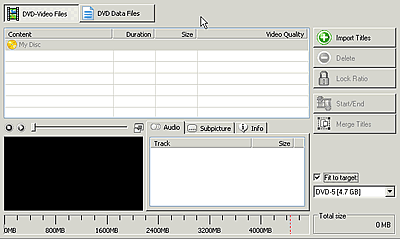
Once again you import the titles you want, even if they are from different movies. You can create your own DVD using parts from different DVD sources, remove subtitles or audio tracks, trim the movie and fit it in a blank 4.7GB DVD disc. The settings are familiar with those in the previous pages. If you read carefully the two other projects we have described, you will easy manage to continue with this one.

This time of course you can burn the compilation you have chosen in a 4.7 GB media or to your hard drive. The output format is either DVD-Video or DVD ISO/UDF (data). No MPEG-4 encoding is available in this task.

In case of DVD-Video, user should import DVD files from a Video TS folder on his hard disk. Note that Nero Recode 2 will only work with VOB, IFO and BUP files. You cannot import MPEG, AVI, WMV, ASF, MP4 or DV files directly.

Of course there are many other setting that will probably make your work easier. We hope you have get a basic idea of the software. More information will be available very soon. Stay tuned!


Review Pages

1. Introduction
2. DVD9 to DVD5
3. DVD5 to MPEG4
4. Remake a DVD


Pages

  • « first
  • ‹ previous
  • 1
  • 2
  • 3
  • 4

Tags:
Previous Post
Optorite DD0401 Dual DVD Recorder
Next Post
Cyberdrive DX082D DVD+RW

Related Posts

Latest Reviews

GMK TriggerKey
Gadgets

GMK TriggerKey

The Best Online Casino Games to Play on a Browser
Enterprise & IT

The Best Online Casino Games to Play on a Browser

be quiet! Light Wings Pro IO fan
Cooling Systems

be quiet! Light Wings Pro IO fan

Why Intelligent Firmware Matters More Than Peak Throughput in NAS Systems
Enterprise & IT

Why Intelligent Firmware Matters More Than Peak Throughput in NAS Systems

Fanxiang MP83 M.2 NVMe SSD Enclosure
Enterprise & IT

Fanxiang MP83 M.2 NVMe SSD Enclosure

Popular News

MSI’s Latest AMD X870E MAX & EVO Series Motherboards

MSI’s Latest AMD X870E MAX & EVO Series Motherboards

COLORFUL Launches iGame B850M ULTRA Series Micro-ATX Motherboards

COLORFUL Launches iGame B850M ULTRA Series Micro-ATX Motherboards

COLORFUL Launches iGame B850I MINI OC V14 Motherboard

COLORFUL Launches iGame B850I MINI OC V14 Motherboard

COLORFUL Presents Limited Edition Chitu MAG-60 Magnetic Keyboard Inspired by the Year of the Horse

COLORFUL Presents Limited Edition Chitu MAG-60 Magnetic Keyboard Inspired by the Year of the Horse

COLORFUL Launches the iGame X870E VULCAN W OC Motherboard

COLORFUL Launches the iGame X870E VULCAN W OC Motherboard

COLORFUL Presents iGame Z890 ULTRA-S W and iGame Z890M ULTRA Z Motherboards

COLORFUL Presents iGame Z890 ULTRA-S W and iGame Z890M ULTRA Z Motherboards

COLORFUL Launches iGame X870E ULTRA-S V14 Motherboard

COLORFUL Launches iGame X870E ULTRA-S V14 Motherboard

COLORFUL Expands B850 Motherboard Lineup with New CVN, Battle-Ax, and MEOW Models

COLORFUL Expands B850 Motherboard Lineup with New CVN, Battle-Ax, and MEOW Models

Main menu

  • Home
  • News
  • Reviews
  • Essays
  • About
    • Submit News

    • Contact Us
    • Privacy

    • Promotion
    • Advertise

    • RSS Feed
  • About
  • Privacy
  • Contact Us
  • Promotional Opportunities @ CdrInfo.com
  • Advertise on out site
  • Submit your News to our site
  • RSS Feed