Breaking News

KIOXIA and NVIDIA collaborate to expand effective high-bandwidth memory capacity with SSDs ASRock Takes All-In-One Liquid Cooling Beyond the Closed Loop with the Taichi AQUA 360 LCD KIOXIA GP2 series SSD delivers new levels of performance for GPU memory expansion CyberPowerPC Expands AI Workstation Line with Compact AMD Ryzen AI Max 395-Powered Desktop PlayStation Plus Monthly Games for December 2026

logo

  • Share Us
    • Facebook
    • Twitter
  • Home
  • Home
  • News
  • Reviews
  • Essays
  • About
    • Submit News

    • Contact Us
    • Privacy

    • Promotion
    • Advertise

    • RSS Feed

Search form

Padus DJ .NET

Feb 7,2002 0

4. How DJ .NET works? - Page 1


Review Pages

1. Introduction
2. Main Features - Page 1
3. Main Features - Page 2
4. How DJ .NET works? - Page 1
5. How DJ .NET works? - Page 2
6. How DJ .NET works? - Page 3
7. How DJ .NET works? - Page 4
8. How DJ .NET works? - Page 5


Padus DJ .NET - Page 4

How DJ .NET works? - Page 1

Padus supplied a beta version of Padus DJ .NET for our tests. The build of Padus DJ .NET was 4.01.495 and the software is still under developement. The interface of the .NET version is still the same as found at the previous 3.5x series since the networking develeopment features are now more important for Padus. The new version takes a little more time to load in order to config networking features:

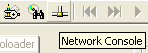
The only addition from the previous 3.5xx series is a a new button that enables the "Network Console". The Padus Network Console includes all options that user needs to setup in order to use DJ .NET features. The Network Console includes 3 main submenus "File", "View", "Action". At the bottom of the console, there are 2 PC icons, which are ligheted up when we have login in the local server. The Padus icon is also being placed at the bottom right of screen, from where the console can be easily accessed
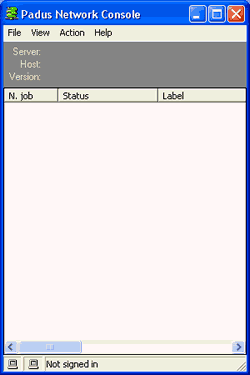
At the "View" menu we can rotate between the "Jobs", "Writers" and/or "Log messages":

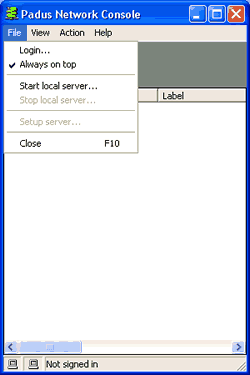
Under the File menu we find the "Login", "Start local server", "Stop local server" and "Setup server":
 

Review Pages

1. Introduction
2. Main Features - Page 1
3. Main Features - Page 2
4. How DJ .NET works? - Page 1
5. How DJ .NET works? - Page 2
6. How DJ .NET works? - Page 3
7. How DJ .NET works? - Page 4
8. How DJ .NET works? - Page 5


Pages

  • « first
  • ‹ previous
  • 1
  • 2
  • 3
  • 4
  • 5
  • 6
  • 7
  • 8
  • next ›
  • last »

Tags:
Previous Post
PleXWriter PX-W4012A CD-RW
Next Post
TEAC CD-W28PU

Related Posts

Latest Reviews

NAS Security Is a Matter of Configuration Best Practices for Protecting Systems and Data
Enterprise & IT

NAS Security Is a Matter of Configuration Best Practices for Protecting Systems and Data

GMK TriggerKey
Gadgets

GMK TriggerKey

The Best Online Casino Games to Play on a Browser
Enterprise & IT

The Best Online Casino Games to Play on a Browser

be quiet! Light Wings Pro IO fan
Cooling Systems

be quiet! Light Wings Pro IO fan

Why Intelligent Firmware Matters More Than Peak Throughput in NAS Systems
Enterprise & IT

Why Intelligent Firmware Matters More Than Peak Throughput in NAS Systems

Popular News

MSI’s Latest AMD X870E MAX & EVO Series Motherboards

MSI’s Latest AMD X870E MAX & EVO Series Motherboards

COLORFUL Launches iGame B850M ULTRA Series Micro-ATX Motherboards

COLORFUL Launches iGame B850M ULTRA Series Micro-ATX Motherboards

COLORFUL Launches iGame B850I MINI OC V14 Motherboard

COLORFUL Launches iGame B850I MINI OC V14 Motherboard

COLORFUL Presents Limited Edition Chitu MAG-60 Magnetic Keyboard Inspired by the Year of the Horse

COLORFUL Presents Limited Edition Chitu MAG-60 Magnetic Keyboard Inspired by the Year of the Horse

COLORFUL Launches the iGame X870E VULCAN W OC Motherboard

COLORFUL Launches the iGame X870E VULCAN W OC Motherboard

COLORFUL Launches iGame X870E ULTRA-S V14 Motherboard

COLORFUL Launches iGame X870E ULTRA-S V14 Motherboard

COLORFUL Presents iGame Z890 ULTRA-S W and iGame Z890M ULTRA Z Motherboards

COLORFUL Presents iGame Z890 ULTRA-S W and iGame Z890M ULTRA Z Motherboards

ASRock Adds Support for One Sub-Channel DRAM Module on Intel DDR5 Motherboards

ASRock Adds Support for One Sub-Channel DRAM Module on Intel DDR5 Motherboards

Main menu

  • Home
  • News
  • Reviews
  • Essays
  • About
    • Submit News

    • Contact Us
    • Privacy

    • Promotion
    • Advertise

    • RSS Feed
  • About
  • Privacy
  • Contact Us
  • Promotional Opportunities @ CdrInfo.com
  • Advertise on out site
  • Submit your News to our site
  • RSS Feed