
Breaking News

Greenliant heads to electronica 2026 with its full industrial SSD lineup CORSAIR Brings Comfort in Full Bloom with Dark Cherry Blossom TC500 and TC100 RELAXED Gaming Chairs ASUS Republic of Gamers Announces Availability of ROG Swift OLED PG259QWS Ace and Strix OLED XG259QWPG Ace ASUS Announces TUF Gaming Radeon RX 9070 XT Onimusha Special Edition ASUS Republic of Gamers Announces ROG XG Station 3

logo

  • Share Us
    • Facebook
    • Twitter
  • Home
  • Home
  • News
  • Reviews
  • Essays
  • About
    • Submit News

    • Contact Us
    • Privacy

    • Promotion
    • Advertise

    • RSS Feed

Search form

Sansun Arctic Power Supply

Feb 28,2006 0

2. A Closer Look


Review Pages

1. Introduction
2. A Closer Look
3. Installation
4. Conclusion


The Arctic power supply unit is of normal size, ready to fit in any standard PC case available on the market. About the only difference to a standard PSU is the blue light that will add a little extra to the special fx at the back of the PC case.
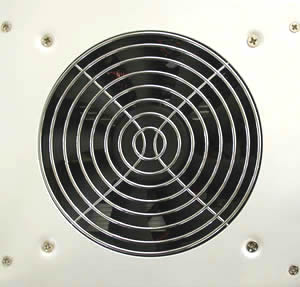
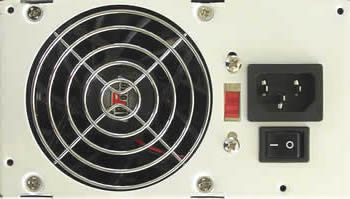
The side of the PSU that faces the CPU, has a 12cm fan which draws air from the case and helps with the cooling. The back of the PSU has a standard 8cm fan that blows out hot air from the PSU and the case. Also on the back are the power connector and power on/off button, as well as a voltage switch to adjust between 115/230 V.
The front side, which faces the drive bay, has all the outputs for the various power cables. Cables to HDD, optical drives, etc are attached afterwards when the PSU has been installed in the PC case. This is a nice feature.

Not much else to add here, since no expert features or panels are included in the box. Now let's move on to the installation and performance of this powerful PSU solution.


Review Pages

1. Introduction
2. A Closer Look
3. Installation
4. Conclusion


Pages

  • « first
  • ‹ previous
  • 1
  • 2
  • 3
  • 4
  • next ›
  • last »

Sansun

Tags: Sansun
Previous Post
XFX 7800GTX
Next Post
ASUS EAX1300PRO

Related Posts

  • Sansun SN-C001 the BAT

Latest Reviews

The Best Online Casino Games to Play on a Browser
Enterprise & IT

The Best Online Casino Games to Play on a Browser

be quiet! Light Wings Pro IO fan
Cooling Systems

be quiet! Light Wings Pro IO fan

Why Intelligent Firmware Matters More Than Peak Throughput in NAS Systems
Enterprise & IT

Why Intelligent Firmware Matters More Than Peak Throughput in NAS Systems

Fanxiang MP83 M.2 NVMe SSD Enclosure
Enterprise & IT

Fanxiang MP83 M.2 NVMe SSD Enclosure

Ugreen CM642 USB4.0 Enclosure
PC components

Ugreen CM642 USB4.0 Enclosure

Popular News

MSI’s Latest AMD X870E MAX & EVO Series Motherboards

MSI’s Latest AMD X870E MAX & EVO Series Motherboards

COLORFUL Launches iGame B850M ULTRA Series Micro-ATX Motherboards

COLORFUL Launches iGame B850M ULTRA Series Micro-ATX Motherboards

COLORFUL Launches iGame B850I MINI OC V14 Motherboard

COLORFUL Launches iGame B850I MINI OC V14 Motherboard

COLORFUL Presents Limited Edition Chitu MAG-60 Magnetic Keyboard Inspired by the Year of the Horse

COLORFUL Presents Limited Edition Chitu MAG-60 Magnetic Keyboard Inspired by the Year of the Horse

COLORFUL Launches the iGame X870E VULCAN W OC Motherboard

COLORFUL Launches the iGame X870E VULCAN W OC Motherboard

COLORFUL Presents iGame Z890 ULTRA-S W and iGame Z890M ULTRA Z Motherboards

COLORFUL Presents iGame Z890 ULTRA-S W and iGame Z890M ULTRA Z Motherboards

COLORFUL Expands B850 Motherboard Lineup with New CVN, Battle-Ax, and MEOW Models

COLORFUL Expands B850 Motherboard Lineup with New CVN, Battle-Ax, and MEOW Models

ASRock Adds Support for One Sub-Channel DRAM Module on Intel DDR5 Motherboards

ASRock Adds Support for One Sub-Channel DRAM Module on Intel DDR5 Motherboards

Main menu

  • Home
  • News
  • Reviews
  • Essays
  • About
    • Submit News

    • Contact Us
    • Privacy

    • Promotion
    • Advertise

    • RSS Feed
  • About
  • Privacy
  • Contact Us
  • Promotional Opportunities @ CdrInfo.com
  • Advertise on out site
  • Submit your News to our site
  • RSS Feed