Breaking News

ASUS Announces WiFi 8 Router DJI Launches Osmo 360 II Razer introduces Clio X Wireless Speaker Head Cushion That Delivers THX Spatial Audio LiberNovo Showcases Ergonomic Innovation at IFA 2026 with Maxis Series for Big And Tall Users TIMEKETTLE UNVEILS NEW W4 PLUS AI INTERPRETER EARBUDS EXPANDING REAL-TIME TRANSLATION ACROSS CALLS, MEETINGS AND MULTIMEDIA CONTENT

logo

  • Share Us
    • Facebook
    • Twitter
  • Home
  • Home
  • News
  • Reviews
  • Essays
  • About
    • Submit News

    • Contact Us
    • Privacy

    • Promotion
    • Advertise

    • RSS Feed

Search form

ACRyan Veolo review

Jan 30,2012 0

2. Opening the box


Review Pages

1. Features, specs
2. Opening the box
3. Main functions, settings
4. App support, file management
5. Benchmarks, Video/audio/gaming performance
6. Final thoughts


The ACRyan Veolo retails for about €200 (including VAT 23%) and it is backed by a 2-year carry-in warranty, valid from the date of purchase. Considering that many full HD media players can be purchased for about €100 or even for less, the Veolo is pricey, although Android fans will appreciate the player's extra features and apps.

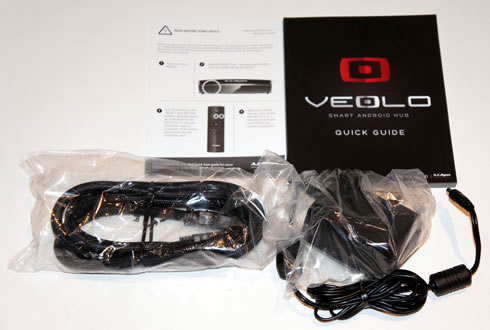
Veolo is described as a "Smart Android Hub" onto its small retail package:

The box includes:

  • an HDMI 1.3 Cable
  • the VEOLO 3-in-1 Remote Control
  • 2x AAA Batteries
  • a DC-In 5V Power Adapter
  • a Quick Start Guide


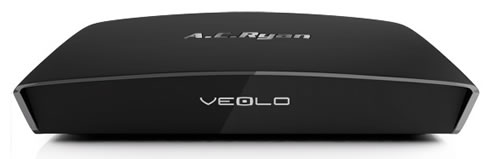
The player has a curvy design and is covered by a black plastic outshell, which easily attracts fingerprints. An operation LED is found on the front, (white under operation, red in standby mode) along with the " A.C. Ryan" and "VEOLO" labels. The device is compact enough at just 150 x 114 x 36 mm and its weight is 375 g.

A USB2.0 host, an SD/SDHC slot-in card port (up to 32GB) and the power button are located at the right side of the device:

The rear panel includes the power input, an RCA audio output, an HDMI 1.3 output, the 1GBit LAN input, a USB2.0 host and an S/PDIF optical Audio output:


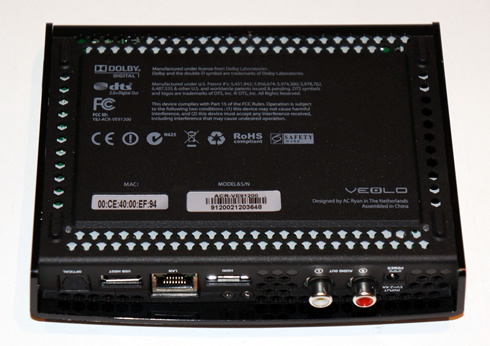
Certifications and information about the model number, MAC address etc related to the player are located underneath the player:
The player's remote control has a streamlined, minimal design. The red button on the top is the Power/Standby button. Three more buttons (Pointer On/Off , Select/Swipe and Return) are located right below the power button. A 4-way keypad offers navigation across the player's menus. Other basic operations such as going directly to the main Menu, returning to the Home page as well as volume controls are provided by the rest four buttons found on the remote control:

The other side of the remote includes a very handy full QWERTY keyboard, which offers easy data input while using the player:

To conserve battery life, the remote's pointer automatically powers off when the VEOLO is left to idle for more than 30secs. Pressing the Pointer ON/OFF button on the remote activates the pointer again. This feature may take you some time to become comfortable with. Pressing the Pointer button once displays the on-screen pointer. Press it twice and the function goes off. Lastly, the built-in sensor cancels out accidental presses on the remote's side front side while typing on the QWERTY keyboard. Comfortable distance between the player and the VEOLO 3-in-1 Remote Control is 2m - 3m.


Review Pages

1. Features, specs
2. Opening the box
3. Main functions, settings
4. App support, file management
5. Benchmarks, Video/audio/gaming performance
6. Final thoughts


Pages

  • « first
  • ‹ previous
  • 1
  • 2
  • 3
  • 4
  • 5
  • 6
  • next ›
  • last »

Tags:
Previous Post
Kingston HyperX 120GB SSD review
Next Post
OCZ Synapse Cache 64GB SSD review

Related Posts

  • ACRyan PlayOnHD Mini review

Latest Reviews

be quiet! Dark Power 14 IO
PC components

be quiet! Dark Power 14 IO

SanDisk High Endurance 512GB microSDXC
Cameras

SanDisk High Endurance 512GB microSDXC

Samsung PRO Ultimate 512GB microSDXC
Cameras

Samsung PRO Ultimate 512GB microSDXC

be quiet! Light Mount TKL
Consumer Electronics

be quiet! Light Mount TKL

be quiet! Light Loop IO LCD
Cooling Systems

be quiet! Light Loop IO LCD

Popular News

CORSAIR announces Vanguard Pro 96 and Vanguard 96 Gaming Keyboards

CORSAIR announces Vanguard Pro 96 and Vanguard 96 Gaming Keyboards

MSI Launches FORGE GK600 TKL WIRELESS Special Edition Compact Mechanical Keyboard

MSI Launches FORGE GK600 TKL WIRELESS Special Edition Compact Mechanical Keyboard

Viltrox Showcases Upcoming Lens Lineup and New TTL Flash at IBC 2025

Viltrox Showcases Upcoming Lens Lineup and New TTL Flash at IBC 2025

Panasonic Introduces the First Ultra-Telephoto Zoom Lens in the LUMIX S Series

Panasonic Introduces the First Ultra-Telephoto Zoom Lens in the LUMIX S Series

MSI Launches DATAMAG 40Gbps Magnetic Portable SSD

MSI Launches DATAMAG 40Gbps Magnetic Portable SSD

MSI’s Latest AMD X870E MAX & EVO Series Motherboards

MSI’s Latest AMD X870E MAX & EVO Series Motherboards

COLORFUL Launches iGame B850M ULTRA Series Micro-ATX Motherboards

COLORFUL Launches iGame B850M ULTRA Series Micro-ATX Motherboards

COLORFUL Presents Limited Edition Chitu MAG-60 Magnetic Keyboard Inspired by the Year of the Horse

COLORFUL Presents Limited Edition Chitu MAG-60 Magnetic Keyboard Inspired by the Year of the Horse

Main menu

  • Home
  • News
  • Reviews
  • Essays
  • About
    • Submit News

    • Contact Us
    • Privacy

    • Promotion
    • Advertise

    • RSS Feed
  • About
  • Privacy
  • Contact Us
  • Promotional Opportunities @ CdrInfo.com
  • Advertise on out site
  • Submit your News to our site
  • RSS Feed