
Breaking News

ASUS Announces WiFi 8 Router DJI Launches Osmo 360 II Razer introduces Clio X Wireless Speaker Head Cushion That Delivers THX Spatial Audio LiberNovo Showcases Ergonomic Innovation at IFA 2026 with Maxis Series for Big And Tall Users TIMEKETTLE UNVEILS NEW W4 PLUS AI INTERPRETER EARBUDS EXPANDING REAL-TIME TRANSLATION ACROSS CALLS, MEETINGS AND MULTIMEDIA CONTENT

logo

  • Share Us
    • Facebook
    • Twitter
  • Home
  • Home
  • News
  • Reviews
  • Essays
  • About
    • Submit News

    • Contact Us
    • Privacy

    • Promotion
    • Advertise

    • RSS Feed

Search form

AMF CD/DVD Jewel Case and Label Creator 3.8

Jun 4,2004 0

2. Installation/Configuration


Review Pages

1. Introduction
2. Installation/Configuration
3. Making a Label
4. Conclusion


AMF CD/DVD Jewel Case and Label Creator 3.8 - Page 2

Installation/Configuration

Installation is pretty straightforward. The installer will automatically detect the installation folder of Microsoft Word, and place the necessary files there. The installation of the software is done on a per user basis, meaning that only the currently logged on user will be able to use it. This can be fixed though during the installation by changing the installation path. This step though, should be attempted only if you know what you’re doing in order to get a working installation. Another thing that might need attention during installation is Microsoft Word’s security settings regarding macro execution. You might get a security warning, and in that case you should allow the macros to be executed.

After installation, there is no configuration you have to go through in order to get things up and running. You’re ready to start creating your CD/DVD labels! A detailed user’s guide accompanies the software, covering the aspects of installation, and some extra details about each template should you need to customize them further.

Working with the software

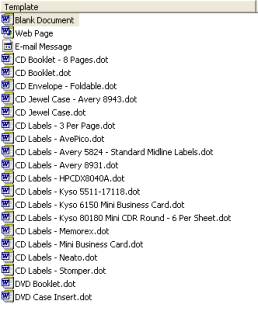
To get things under way, all we need to do is open Microsoft Word and create a new document using the File, new menu. We are then presented with the different templates that crdlabel supports. A total of 19 templates are included. Among others, it supports industry standard label layout formats including those from Avery, Neato, Stomper, HP, Kyso, 3-Up and Memorex. So we don’t have to measure things in order to align our text with the preprinted labels. Most of the templates are characterized as CD labels, but they can also be used to create DVD labels, as someone would expect.
After we choose the type of label we wish to create, a new document is opened. A thing we notice is that there is an extra toolbar added, which controls some of the features we can add to our labels. Most of the icons will be already familiar to an experienced Microsoft Word user, like insert a textbox, a picture, clipart, a drawing. If we want to create a label for an audio CD, there is a pretty handy feature that can search and download from the Internet the CD’s title and the list of tracks that you can afterwards paste into the label. 

The advantage of the labels being embedded as a Microsoft Word template is that we have absolute freedom with what we can create for our labels. We can use all the tools already available in Microsoft Word’s arsenal. The only limit is each one’s imagination.

In the next section, we take the software out for a spin, and we create some of our own labels. Read on…..


Review Pages

1. Introduction
2. Installation/Configuration
3. Making a Label
4. Conclusion


Pages

  • « first
  • ‹ previous
  • 1
  • 2
  • 3
  • 4
  • next ›
  • last »

Tags:
Previous Post
Samsung SH-W08A
Next Post
VGA Roundup

Related Posts

Latest Reviews

be quiet! Dark Power 14 IO
PC components

be quiet! Dark Power 14 IO

SanDisk High Endurance 512GB microSDXC
Cameras

SanDisk High Endurance 512GB microSDXC

Samsung PRO Ultimate 512GB microSDXC
Cameras

Samsung PRO Ultimate 512GB microSDXC

be quiet! Light Mount TKL
Consumer Electronics

be quiet! Light Mount TKL

be quiet! Light Loop IO LCD
Cooling Systems

be quiet! Light Loop IO LCD

Popular News

CORSAIR announces Vanguard Pro 96 and Vanguard 96 Gaming Keyboards

CORSAIR announces Vanguard Pro 96 and Vanguard 96 Gaming Keyboards

MSI Launches FORGE GK600 TKL WIRELESS Special Edition Compact Mechanical Keyboard

MSI Launches FORGE GK600 TKL WIRELESS Special Edition Compact Mechanical Keyboard

Viltrox Showcases Upcoming Lens Lineup and New TTL Flash at IBC 2025

Viltrox Showcases Upcoming Lens Lineup and New TTL Flash at IBC 2025

Panasonic Introduces the First Ultra-Telephoto Zoom Lens in the LUMIX S Series

Panasonic Introduces the First Ultra-Telephoto Zoom Lens in the LUMIX S Series

MSI Launches DATAMAG 40Gbps Magnetic Portable SSD

MSI Launches DATAMAG 40Gbps Magnetic Portable SSD

MSI’s Latest AMD X870E MAX & EVO Series Motherboards

MSI’s Latest AMD X870E MAX & EVO Series Motherboards

COLORFUL Launches iGame B850M ULTRA Series Micro-ATX Motherboards

COLORFUL Launches iGame B850M ULTRA Series Micro-ATX Motherboards

COLORFUL Presents Limited Edition Chitu MAG-60 Magnetic Keyboard Inspired by the Year of the Horse

COLORFUL Presents Limited Edition Chitu MAG-60 Magnetic Keyboard Inspired by the Year of the Horse

Main menu

  • Home
  • News
  • Reviews
  • Essays
  • About
    • Submit News

    • Contact Us
    • Privacy

    • Promotion
    • Advertise

    • RSS Feed
  • About
  • Privacy
  • Contact Us
  • Promotional Opportunities @ CdrInfo.com
  • Advertise on out site
  • Submit your News to our site
  • RSS Feed


