Breaking News

ASUS Announces WiFi 8 Router DJI Launches Osmo 360 II Razer introduces Clio X Wireless Speaker Head Cushion That Delivers THX Spatial Audio LiberNovo Showcases Ergonomic Innovation at IFA 2026 with Maxis Series for Big And Tall Users TIMEKETTLE UNVEILS NEW W4 PLUS AI INTERPRETER EARBUDS EXPANDING REAL-TIME TRANSLATION ACROSS CALLS, MEETINGS AND MULTIMEDIA CONTENT

logo

  • Share Us
    • Facebook
    • Twitter
  • Home
  • Home
  • News
  • Reviews
  • Essays
  • About
    • Submit News

    • Contact Us
    • Privacy

    • Promotion
    • Advertise

    • RSS Feed

Search form

AOpen Aeolus FX 5900 XT

Jun 17,2004 0

10. Anti-Aliasing Quality


Review Pages

1. Introduction
2. Test Specifications
3. 3DMark 2003
4. Aquamark 3
5. Codecreatures
6. GLExcess
7. Farcry & Painkiller
8. Unreal Tournament 2004 & 2003
9. Halo & Tomb Raider:AOD
10. Anti-Aliasing Quality
11. Anisotropic Filtering Quality
12. Overclocking Capabilities
13. Conclusion


Anti-Aliasing Quality Test

There are 2 features that can make the gameplay more qualitative. The first feature is the Anti-Aliasing (AA). Anti-Aliasing is a technique used on a grayscale or color bitmap display to make diagonal edges appear smoother by setting pixels near the edge to intermediate smoothing to where the edge crosses them.

No Anti-Aliased
Anti-Aliased

The most common example is black characters on a white background. Without anti-aliasing, diagonal edges appear jagged, like staircases, which may be noticeable on a low resolution display. If the display can show intermediate grays then anti-aliasing can be applied. A pixel will be black if it is completely within the black area, or white if it is completely outside the black area, or an intermediate shade of gray according to the proportions of it which overlap the black and white areas. The technique works similarly with other foreground and background colors.

A technical explanation of the "Aliasing" process refers to the fact that many points (which would differ in the real image) are mapped or "aliased" to the same pixel (with a single value) in the digital representation.


These are the Aeolus 5900 XT Anti-Aliasing levels

- AA Quality Test

To test AOpen's Aeolus FX 5900 XT graphics quality we used Painkiller and Unreal Tournament 2004. We grabbed screenshots from specific scenes with different values of AA and AF.

First let's see Painkiller. To test Aeolus' Anti-Aliasing technique, we found a scene that include many edged textures. This scene was found on the DM_Cursed multiplayer stage. On the following picture you can see the area we used for the AA test. You can enlarge the image by clicking on it.

Click to enlarge

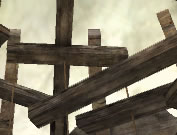
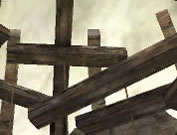
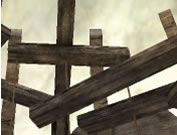
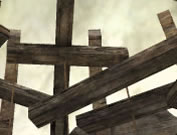
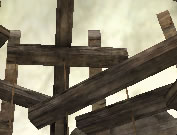
Aeolus FX 5900 XT support the following AA settings: 2x, 2xQ, 4x, 6xS and 8x. Now let's see the quality difference on this scene at the 1024 x768 resolution.
AA OFF
AA 2x
AA 2xQ
AA 4x
AA 6xS
AA 8x

Until 4x the scale effect is still visible. Later on the 6xS and 8x settings, which seem to be identical, we face have fine quality without scaling or other irritating effects.

We also picked a scene from Unreal Tournament 2004 to check the card's Anti-Aliasing rendering. The scene can be found on the ONS_Antalus map on the powercore's base.
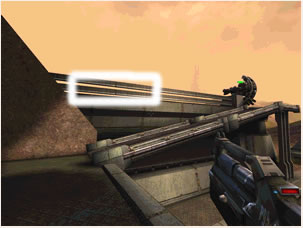
Again we grabbed screenshots using all AA settings Aeolus supports at the 1024x768 resolution.

AA OFF
AA 2x
AA 2xQ
AA 4x
AA 6xQ
AA 8x

Even with the 2x setting the quality looks a lot better since the scale effect has tremendously reduced. Again the flawless quality is visible from the 6xQ setting.

Now let's see the Anisotropic Filtering rendering quality of Aeolus 5900 XT.


Review Pages

1. Introduction
2. Test Specifications
3. 3DMark 2003
4. Aquamark 3
5. Codecreatures
6. GLExcess
7. Farcry & Painkiller
8. Unreal Tournament 2004 & 2003
9. Halo & Tomb Raider:AOD
10. Anti-Aliasing Quality
11. Anisotropic Filtering Quality
12. Overclocking Capabilities
13. Conclusion


Pages

  • « first
  • ‹ previous
  • …
  • 5
  • 6
  • 7
  • 8
  • 9
  • 10
  • 11
  • 12
  • 13
  • next ›
  • last »

Tags:
Previous Post
AOpen COM5232 / AAH
Next Post
Plasmon UDO30I external SCSI Drive

Related Posts

Latest Reviews

be quiet! Dark Power 14 IO
PC components

be quiet! Dark Power 14 IO

SanDisk High Endurance 512GB microSDXC
Cameras

SanDisk High Endurance 512GB microSDXC

Samsung PRO Ultimate 512GB microSDXC
Cameras

Samsung PRO Ultimate 512GB microSDXC

be quiet! Light Mount TKL
Consumer Electronics

be quiet! Light Mount TKL

be quiet! Light Loop IO LCD
Cooling Systems

be quiet! Light Loop IO LCD

Popular News

CORSAIR announces Vanguard Pro 96 and Vanguard 96 Gaming Keyboards

CORSAIR announces Vanguard Pro 96 and Vanguard 96 Gaming Keyboards

MSI Launches FORGE GK600 TKL WIRELESS Special Edition Compact Mechanical Keyboard

MSI Launches FORGE GK600 TKL WIRELESS Special Edition Compact Mechanical Keyboard

Viltrox Showcases Upcoming Lens Lineup and New TTL Flash at IBC 2025

Viltrox Showcases Upcoming Lens Lineup and New TTL Flash at IBC 2025

Panasonic Introduces the First Ultra-Telephoto Zoom Lens in the LUMIX S Series

Panasonic Introduces the First Ultra-Telephoto Zoom Lens in the LUMIX S Series

MSI Launches DATAMAG 40Gbps Magnetic Portable SSD

MSI Launches DATAMAG 40Gbps Magnetic Portable SSD

MSI’s Latest AMD X870E MAX & EVO Series Motherboards

MSI’s Latest AMD X870E MAX & EVO Series Motherboards

COLORFUL Launches iGame B850M ULTRA Series Micro-ATX Motherboards

COLORFUL Launches iGame B850M ULTRA Series Micro-ATX Motherboards

COLORFUL Presents Limited Edition Chitu MAG-60 Magnetic Keyboard Inspired by the Year of the Horse

COLORFUL Presents Limited Edition Chitu MAG-60 Magnetic Keyboard Inspired by the Year of the Horse

Main menu

  • Home
  • News
  • Reviews
  • Essays
  • About
    • Submit News

    • Contact Us
    • Privacy

    • Promotion
    • Advertise

    • RSS Feed
  • About
  • Privacy
  • Contact Us
  • Promotional Opportunities @ CdrInfo.com
  • Advertise on out site
  • Submit your News to our site
  • RSS Feed