
Aopen XRecorder
4. Software Features
Review Pages
AOpen XRecorder VX2000 - Page 4
Software
So, enough with the technical talk and on to the XRecorder itself. Using the software, the user can select the source device on the Xrecorder, arrange TV channels as well as choose the recording quality.
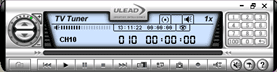
The XRecorder comes bundled with Ulead's Video@Home software.Software installation is a breeze, all you need to do is install the necessary drivers from the included CD, and the bundled software that controls the unit’s functions. The software used is Ulead’s Video@Home vR2.0 which proved to be quite easy to use.
An infrared remote control is included as well, allowing you to control the unit’s functions, like changing channels, adjusting volume etc. The infrared receiver is located in the front of the box. However, while simple to use, Video@Home does not offer advanced features, lacking a channel browse function, picture-in-picture or downloadable programme schedules. On the other hand, key PVR features like scheduled recording and time shift are provided.
More features
The X-recorder also has a built-in TV tuner that allows the user to receive a signal from an Antenna or Cable TV input, with the ability to record in real time any desired TV channel. The antenna input is located on the rear panel of the XRecorder, next to the 5V DC input. Furthermore, the XRecorder can operate as a standard TV receiver. Simply set the source device to TV in Video@Home.

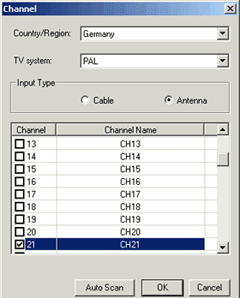 When
operating as a TV receiver, the
only settings that must be configured are the Country/Region, TV
system and Input Type.
You will need to know the transmission standard supported in your
country (e.g. PAL, NTSC).
If
your
country is not listed, then choose one that supports the same standard as yours.
For our tests, we
selected Germany and Pal with input from an Antenna.
When
operating as a TV receiver, the
only settings that must be configured are the Country/Region, TV
system and Input Type.
You will need to know the transmission standard supported in your
country (e.g. PAL, NTSC).
If
your
country is not listed, then choose one that supports the same standard as yours.
For our tests, we
selected Germany and Pal with input from an Antenna.
Next, by selecting the Auto Scan button, the system will scan through all the channels automatically, and marking with a tick any channels that produce a signal (see the screen-shot at left).
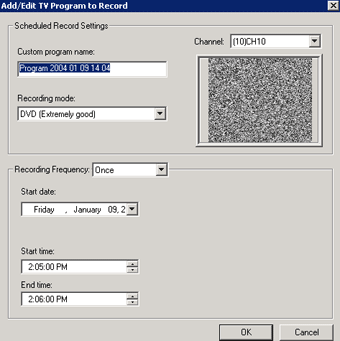
Ulead's Video@Home also includes a scheduled writing feature. By using this feature, you can record a TV program at a scheduled time, so you will never have to lose your favorite show again. Simply specify the channel, date, the start and the end times, the recording frequency (i.e. whether this is a once off job, every day, etc), and the recording mode (quality). One handy feature that is missing here is an auto shutdown option so that the system will shutdown when recording has finished.
 The retail package
also includes an IR remote control (see photo at left). The dimensions
of the control were a little bigger than we expected
but it does allow you to fully control the X-Recorder with
the remote control. The response time is fast and it includes Power On/Off
, Channel Up/Down, Volume Up/Down, Mute, Source selection, Record, Snap and
navigation buttons. One snag is that there is no explanation
in the manual for what each button does, so you'll have to experiment. While
most buttons are similar to those found on most common remote controls, on
button that may not be so well known is SAP (Second Audio Program). Most
television sets can receive two separate audio
channels,
Main (stereo/mono)
and a Second Audio Program (SAP) channel.
The retail package
also includes an IR remote control (see photo at left). The dimensions
of the control were a little bigger than we expected
but it does allow you to fully control the X-Recorder with
the remote control. The response time is fast and it includes Power On/Off
, Channel Up/Down, Volume Up/Down, Mute, Source selection, Record, Snap and
navigation buttons. One snag is that there is no explanation
in the manual for what each button does, so you'll have to experiment. While
most buttons are similar to those found on most common remote controls, on
button that may not be so well known is SAP (Second Audio Program). Most
television sets can receive two separate audio
channels,
Main (stereo/mono)
and a Second Audio Program (SAP) channel.
Review Pages










